
Understanding Object-specific vs global actions in the real world
If you have ever felt a bit lost trying to decide between Object-specific vs global actions, you are definitely not alone. I have spent years in the Salesforce ecosystem, and I still see seasoned admins grab the wrong tool for the job. It is one of those things that seems simple on paper but gets messy once you start building out a complex Lightning page.
Look, the short answer is context. If you want a button that knows where it is and who it is talking to, you go object-specific. If you want a button that is just "there" regardless of the page, you go global. But as we all know, the devil is in the details of how these things actually behave in the wild.
One thing that trips people up is the setup. I have seen teams waste hours building a global action only to realize they can't easily pull data from the record they are looking at. That is because global actions are basically "homeless" - they don't have a parent record to lean on unless you force one through some clever automation.
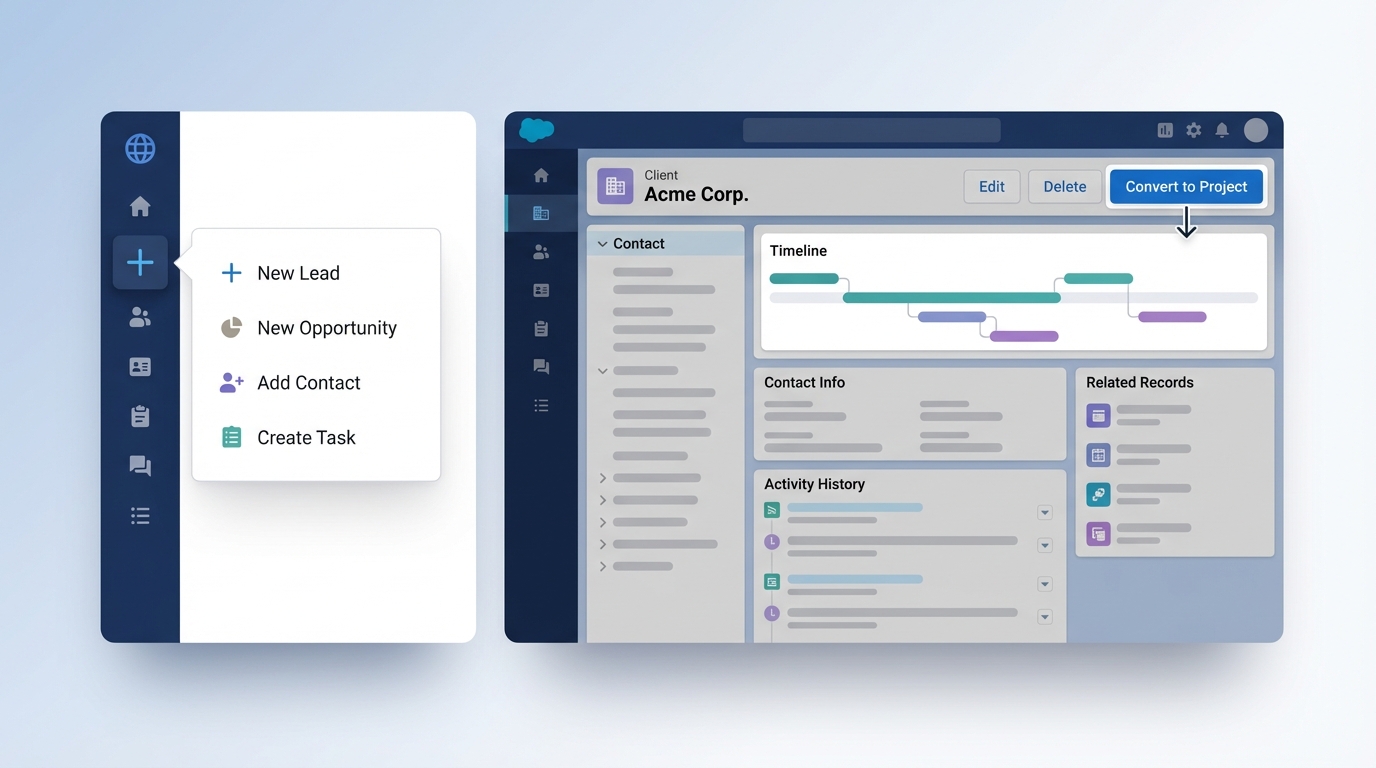
A side-by-side comparison showing a global action menu versus a context-specific action button integrated into a record page header.
Where do they actually show up?
Placement is usually the first thing you'll notice. Object-specific actions are tied to a particular object, so they live on that object's record page. Think of a "New Opportunity" button that only shows up when you are looking at an Account. It is tidy and keeps the UI clean for your users.
Global actions are different. These live in the global publisher - that little plus sign in the top header - or in the utility bar. They are great for those "quick hit" tasks, like logging a call or creating a lead while you are halfway through a report. Since clarity is an admin's most valuable contribution, you really want to be intentional about what you put in that global menu so it doesn't become a junk drawer.
The power of record association
Here is where it gets interesting. Object-specific actions are smart. If you create a Case from a Contact record using an object-specific action, Salesforce automatically links the two. You don't have to lift a finger. It just works because the action knows its parent.
But with global actions, that link isn't automatic. If you're using a global action to create a record and you want it tied to the page you're on, you're going to have a bad time. You'll end up needing to use predefined field values or even a flow to bridge that gap. Speaking of flows, if you're launching one from an action, make sure you're following Salesforce Flow best practices to keep your data clean.
When to choose Object-specific vs global actions
So how do you decide? In my experience, it comes down to the workflow. Honestly, most teams get this wrong by overcomplicating the global menu. You don't need every possible action available from the header. It just confuses people.
Use object-specific actions when the data needs to be related to the record on the screen. This is your bread and butter for things like "Add Note to Case" or "New Quote from Opportunity." It keeps the user focused on the task at hand without making them hunt for lookup fields.
Go with global actions for the universal stuff. If your sales reps are constantly getting cold calls, a "New Lead" global action is a lifesaver. They can trigger it from anywhere in the app without losing their place. It is all about reducing the number of clicks it takes to get data into the system.
Quick Tip: If you're building a global action to create a record, remember that Salesforce won't automatically link it to anything. You'll need to use predefined values or a flow to handle the heavy lifting if you want that record to have a parent.
Layouts and Field Selection
Both types let you pick which fields show up in the popup. This is huge for adoption. Nobody wants to see 50 fields when they are just trying to log a quick call. You can strip it down to the bare essentials. Just remember that object-specific actions are added to the Page Layout (under Mobile & Lightning Actions), while global actions are managed in the Global Publisher Layout.
Key Takeaways
- Context is king: Object-specific actions know which record you're on; global actions don't.
- Automatic linking: Object-specific actions handle the parent-child relationship for you.
- Placement: Global actions live in the header; object-specific ones live on the record page.
- UX matters: Use Object-specific vs global actions to reduce clicks, not just to add more buttons.
- Security: Users still need the right "Create" or "Edit" permissions for the object, no matter which action type you use.
The choice between Object-specific vs global actions really boils down to where your users are and what they need to do. Don't overthink it. Start with the record page and only move to the global menu if the action is truly universal. Your users will thank you for keeping their workspace clean and relevant. Now, go take a look at your current page layouts and see if there is a global action that really should have been object-specific all along - you might be surprised what you find.




Leave a Comment