
Picking the Right Path: Enterprise vs Partner WSDL
If you're building a SOAP integration, you're going to face the classic debate of Enterprise vs Partner WSDL. It's one of those decisions that seems small at first, but it'll either make your life easy or give you a massive headache six months down the line. I've spent years connecting external systems to Salesforce, and I've learned the hard way that picking the wrong one usually leads to unnecessary code rewrites.
Now, before you get too deep into the weeds, you should probably check out our breakdown of SOAP vs REST to make sure SOAP is even the right tool for the job. But if you're committed to the WSDL route, let's look at how these two options actually play out in the real world.
The Main Difference: Typed vs Untyped
The Enterprise WSDL is what we call "strongly typed." When you download it, Salesforce looks at your specific org and writes a file that includes every custom object and field you've got. If you have a field called "Region_Code__c" on your Account, that field is literally written into the WSDL. Your IDE will see it, and you'll get nice autocomplete and compile-time checks. It feels very comfortable for Java or C# developers.
But the Partner WSDL is a different beast. It's "loosely typed" or untyped. It doesn't know about your custom fields. Instead, it uses a generic sObject structure. You're basically passing name-value pairs back and forth. It's more work to write the code initially because you don't get that sweet autocomplete, but it's far more flexible. If you're still fuzzy on the basics of the file itself, here's a quick refresher on what a WSDL actually is.
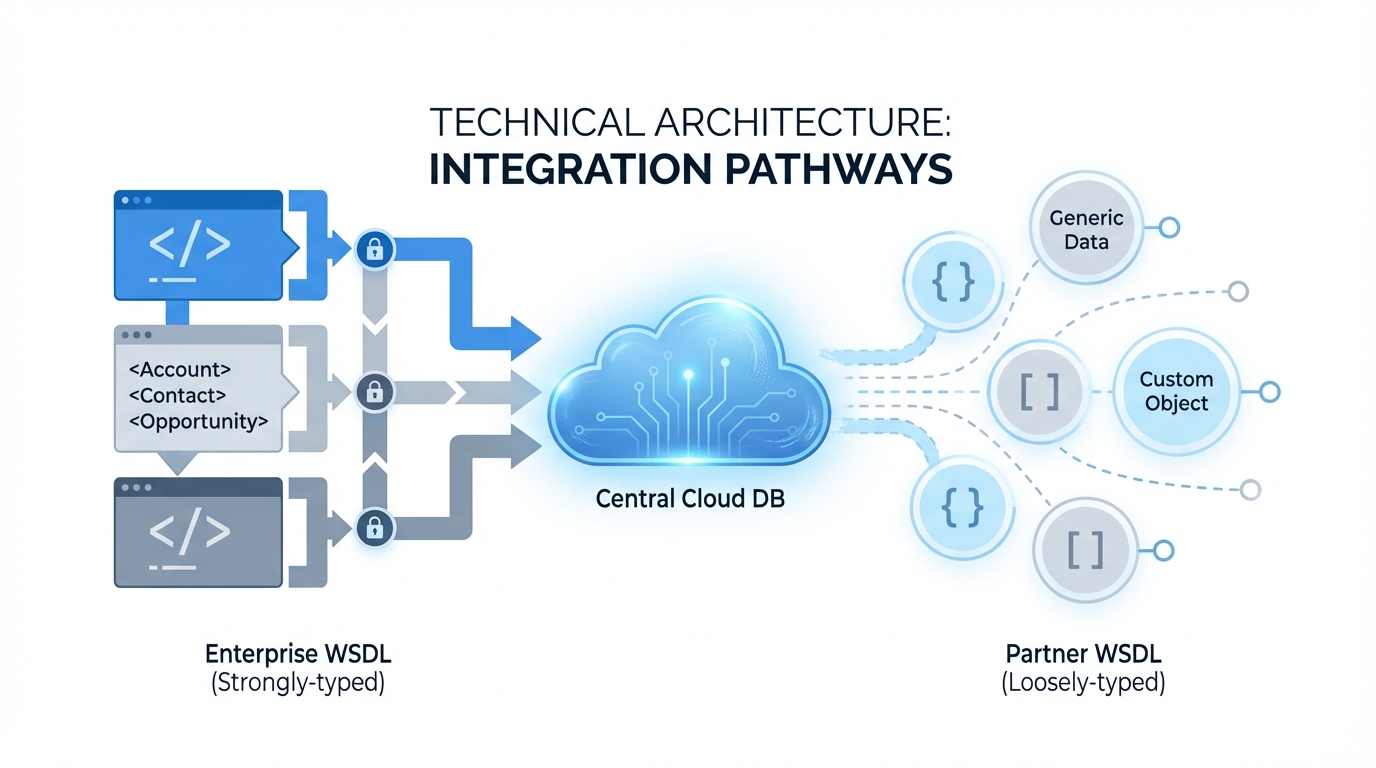
A professional architecture diagram illustrating the structural differences between a strongly-typed Enterprise WSDL and a flexible, loosely-typed Partner WSDL.
When to use Enterprise vs Partner WSDL
I usually tell my clients that the choice comes down to who "owns" the target org. If you're an internal developer building an integration for your own company's Salesforce instance, the Enterprise WSDL is usually the way to go. You know the schema, you control the changes, and you want the safety of strong typing.
But here's where it gets interesting. If you're an ISV building a tool that needs to work for hundreds of different customers, you can't use the Enterprise version. Why? Because every customer has different custom fields. You'd have to generate a new client for every single person who buys your app. That's a nightmare. In that scenario, you use the Partner WSDL so your code can handle any org it touches.
Pro Tip: I've seen teams try to use the Enterprise WSDL for multi-tenant apps because they liked the IDE support. They ended up spending half their week re-generating code every time a client added a new picklist value. Don't be those guys.
Maintenance and Stability with Enterprise vs Partner WSDL
This is the part that trips people up. The Enterprise WSDL is brittle. If an admin deletes a field or changes a data type in Salesforce, your integration code will likely break the next time it tries to run. You'll have to download the WSDL again, re-generate your client stubs, and re-deploy your app. It's a lot of overhead for a simple schema change.
The Partner WSDL is much more resilient. Since it's generic, it doesn't care if a field was added or removed from the org - it just processes whatever you tell it to. You handle the logic at runtime. It's a bit more "manual" to code, but it keeps running even when the Salesforce org is evolving. So, when you're looking at architecting for scale, consider how much maintenance you're willing to do.
Developer Experience and Performance
Let's talk about the actual code. With the Enterprise WSDL, your code looks very clean. You're just setting properties on an object. Here's a quick look at what that looks like in a Java-style setup:
Account a = new Account();
a.setName("Acme Corp");
a.setIndustry("Technology");
binding.create(new SObject[] {a});
With the Partner WSDL, you're working with maps and generic objects. It's a bit wordier and you're more likely to make a typo that won't be caught until you actually run the code. But the upside is that the same code can create an Account, a Contact, or a Custom_Object__c without you having to change a single class definition.
SObject a = new SObject();
a.setType("Account");
a.setField("Name", "Acme Corp");
a.setField("Industry", "Technology");
binding.create(new SObject[] {a});
Key Takeaways
- Enterprise WSDL is for single-org, internal projects where the schema is stable.
- Partner WSDL is for ISVs and tools that need to work across many different Salesforce environments.
- The Enterprise version gives you better IDE support but breaks easily when fields change.
- The Partner version requires more "manual" coding but won't break just because an admin renamed a field.
- Both use the same login logic and session headers, so security isn't the deciding factor here.
Final Thoughts
So, what's the verdict? Look, if you're building something quick for your boss and you want it done by Friday, grab the Enterprise WSDL. The strong typing will save you time today. But if you're building a product or a long-term integration that needs to survive a changing environment, do yourself a favor and put in the extra effort to use the Partner WSDL. You'll thank yourself the next time someone decides to delete a "legacy" field without telling you.



Leave a Comment