

Picking the right path: Enterprise vs Partner WSDL
If you're building a SOAP integration, you're going to face the classic Enterprise vs Partner WSDL debate. It seems like a small decision at first, but it'll either make your life easy or give you a massive headache six months down the line. I've spent years connecting external systems to Salesforce, and I learned the hard way that picking the wrong one usually leads to unnecessary code rewrites.
Before you get too deep into the weeds, check our breakdown of SOAP vs REST to make sure SOAP is even the right tool for the job. If you're committed to the WSDL route, the two options play out very differently once real orgs get involved.
The main difference: typed vs untyped
The Enterprise WSDL is what we call "strongly typed." When you download it, Salesforce looks at your specific org and writes a file that includes every custom object and field you've got. If you have a field called "Region_Code__c" on your Account, that field is literally written into the WSDL. Your IDE will see it, and you'll get nice autocomplete and compile-time checks. It feels very comfortable for Java or C# developers.
The Partner WSDL is a different beast. It's "loosely typed," or untyped, and it knows nothing about your custom fields. It uses a generic sObject structure, so you're basically passing name-value pairs back and forth. Writing the code takes more work up front because you don't get that sweet autocomplete, but it's far more flexible. If the file itself is still fuzzy, this refresher covers what a WSDL actually is.
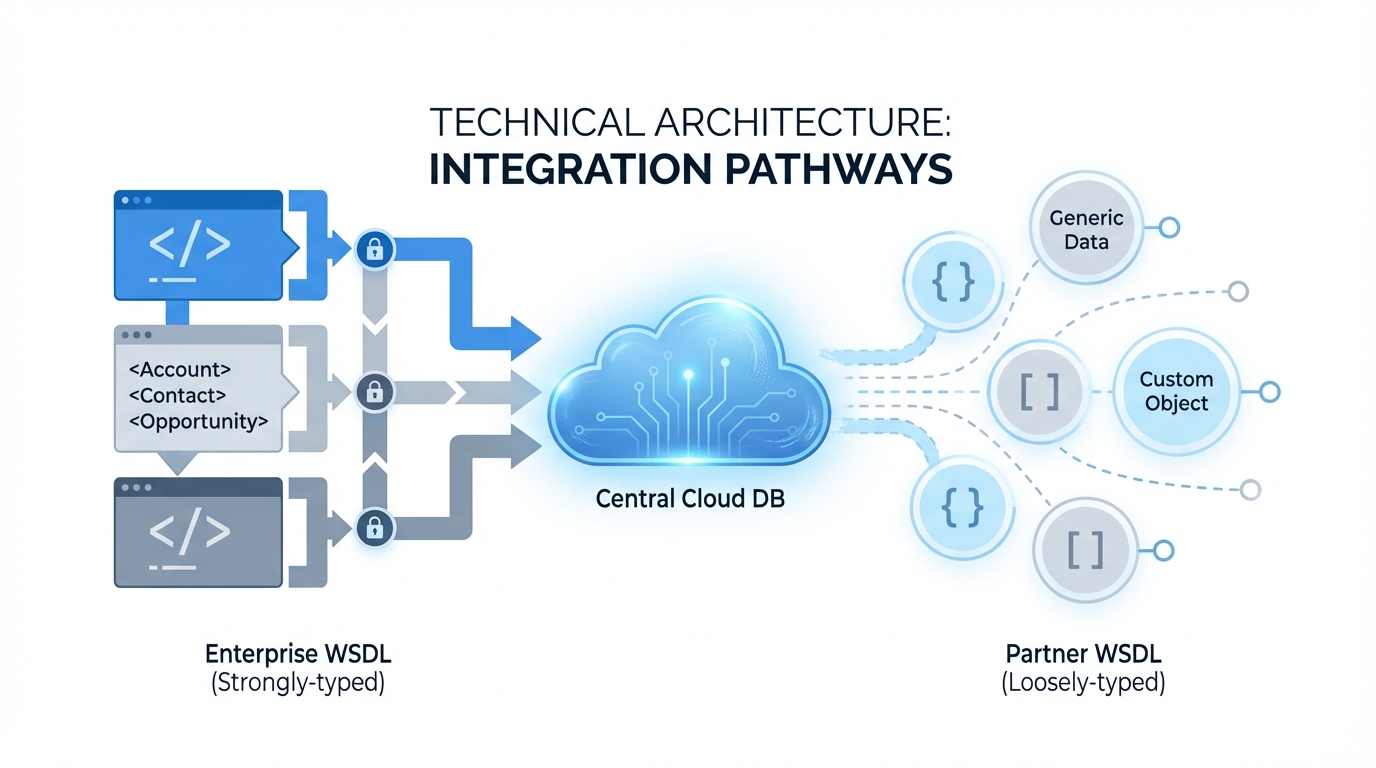
An architecture diagram showing the structural differences between a strongly-typed Enterprise WSDL and a loosely-typed Partner WSDL.
When to use Enterprise vs Partner WSDL
I usually tell my clients that the choice comes down to who "owns" the target org. If you're an internal developer building an integration for your own company's Salesforce instance, the Enterprise WSDL is usually the way to go. You know the schema, you control the changes, and you want the safety of strong typing.
ISVs are the other case. If you're building a tool that needs to work for hundreds of different customers, the Enterprise version is out, because every customer has different custom fields. You'd have to generate a new client for every single person who buys your app. That's a nightmare. In that scenario you use the Partner WSDL so your code can handle any org it touches.
I've seen teams try to use the Enterprise WSDL for multi-tenant apps because they liked the IDE support. They ended up spending half their week re-generating code every time a client added a new picklist value. Don't be those guys.
Maintenance and stability with Enterprise vs Partner WSDL
The Enterprise WSDL is brittle, and that's what trips people up. If an admin deletes a field or changes a data type in Salesforce, your integration code will likely break the next time it tries to run. You'll have to download the WSDL again, re-generate your client stubs, and re-deploy your app. It's a lot of overhead for a simple schema change.
The Partner WSDL is much more resilient. Since it's generic, it doesn't care if a field was added or removed from the org, and it just processes whatever you tell it to. You handle the logic at runtime. It's a bit more "manual" to code, but it keeps running even when the Salesforce org is evolving. So when you're looking at architecting for scale, consider how much maintenance you're willing to do.
Developer experience and performance
With the Enterprise WSDL, your code looks very clean. You're just setting properties on an object, Java-style:
Account a = new Account();
a.setName("Acme Corp");
a.setIndustry("Technology");
binding.create(new SObject[] {a});
With the Partner WSDL, you're working with maps and generic objects. It's a bit wordier and you're more likely to make a typo that won't be caught until you actually run the code. The upside is that the same code can create an Account, a Contact, or a Custom_Object__c without you having to change a single class definition.
SObject a = new SObject();
a.setType("Account");
a.setField("Name", "Acme Corp");
a.setField("Industry", "Technology");
binding.create(new SObject[] {a});
Key takeaways
- Enterprise WSDL suits single-org, internal projects where the schema is stable.
- Partner WSDL suits ISVs and tools that need to work across many different Salesforce environments.
- The Enterprise version gives you better IDE support but breaks easily when fields change.
- The Partner version requires more "manual" coding but won't break just because an admin renamed a field.
- Both use the same login logic and session headers, so security isn't the deciding factor here.
Final thoughts
If you're building something quick for your boss and you want it done by Friday, grab the Enterprise WSDL. The strong typing will save you time today. But if you're building a product or a long-term integration that needs to survive a changing environment, do yourself a favor and put in the extra effort to use the Partner WSDL. You'll thank yourself the next time someone decides to delete a "legacy" field without telling you.

Leave a Comment