

Why Lightning Message Service is a total lifesaver
If you have ever struggled to get different parts of a page to talk to each other, you need to know about Lightning Message Service. It is the standard way to handle communication across the Lightning Platform without pulling your hair out. Before this came along, we had to rely on messy custom pub-sub implementations or complex event bubbling that usually broke the moment someone touched the code.
Lightning Message Service lets your components talk to each other even if they aren't related. We are talking about Lightning Web Components (LWC), Aura, and even old-school Visualforce pages all playing nicely together in one sandbox. It is designed for those times when a user clicks a button in one sidebar and you need a totally separate chart component to refresh instantly.
I've seen teams spend weeks trying to sync up data across a complex console app. Honestly, most teams get this wrong by over-complicating their LWC component communication. If you find yourself passing events through five levels of parent-child components, stop. That is exactly when you should reach for a message channel instead.
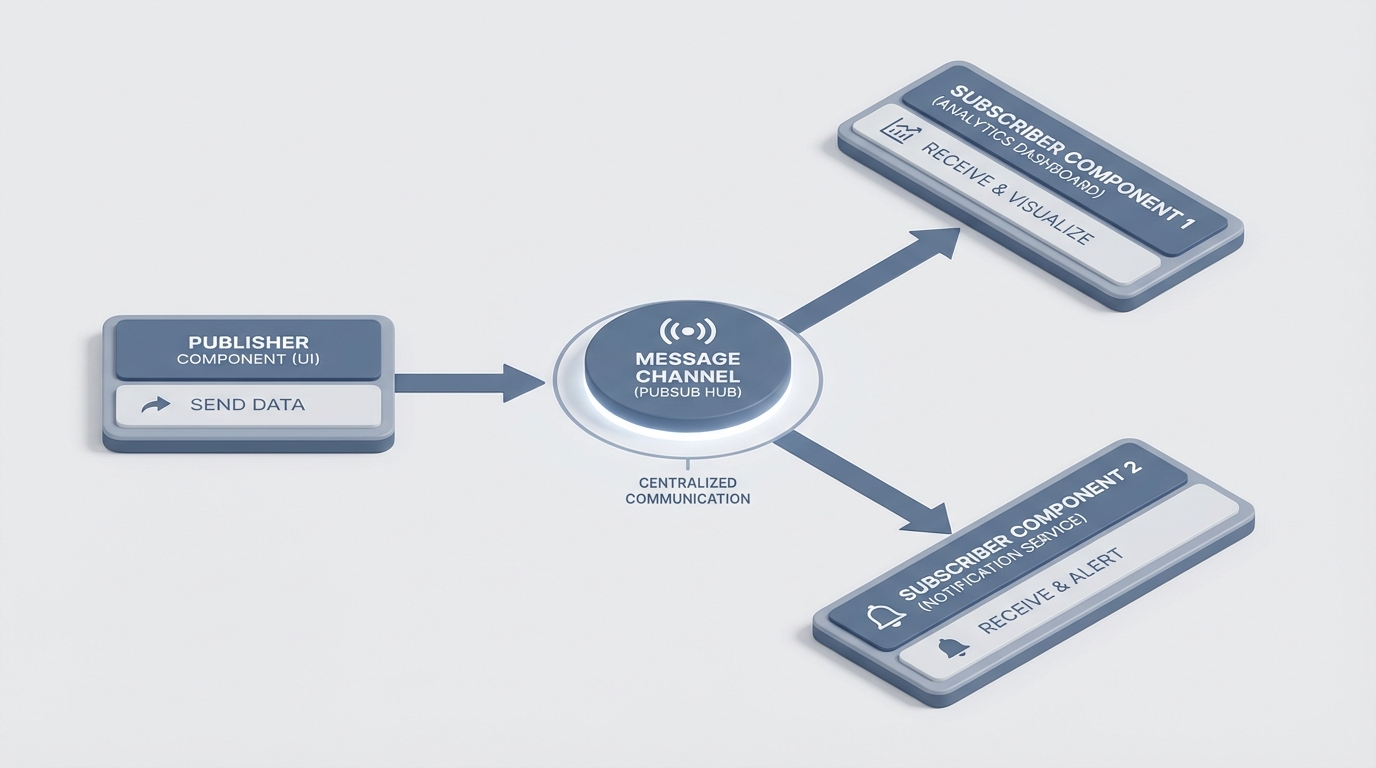
An architectural diagram showing multiple software components connected to a central communication channel.
How to use Lightning Message Service in your project
The whole thing works on a simple idea: a central channel. Think of it like a radio station. One component broadcasts a signal, and anyone tuned into that specific frequency hears it and decides what to do. Here is the basic workflow you'll follow every time.
1. Create the Message Channel
Everything starts with a metadata file. You need to create an XML file in your messageChannels folder. This defines what your "radio station" is called and what kind of data it carries. Here is a quick look at how that XML should look:
<LightningMessageChannel xmlns="http://soap.sforce.com/2006/04/metadata">
    <masterLabel>RecordSelected</masterLabel>
    <isExposed>true</isExposed>
    <description>This channel sends record IDs across the page.</description>
    <lightningMessageFields>
        <fieldName>recordId</fieldName>
        <description>The ID of the record that was clicked.</description>
    </lightningMessageFields>
</LightningMessageChannel>
2. Publishing a message
Now, let's say you have a list of records. When a user clicks one, you want to tell the rest of the page about it. In your LWC, you'll import the publish function and your channel. It's pretty straightforward once you see the code.
import { LightningElement, wire } from 'lwc';
import { publish, MessageContext } from 'lightning/messageService';
import RECORD_SELECTED_CHANNEL from '@salesforce/messageChannel/RecordSelected__c';

export default class MyPublisher extends LightningElement {
    @wire(MessageContext)
    messageContext;

    handleSelect(event) {
        const payload = { recordId: event.target.dataset.id };
        publish(this.messageContext, RECORD_SELECTED_CHANNEL, payload);
    }
}
3. Subscribing to the channel
On the other side, you have your listener. This component is just waiting for that specific channel to send something. One thing that trips people up is forgetting to clean up their subscriptions. If you don't manage the lifecycle, you can end up with memory leaks or weird duplicate behavior.
import { LightningElement, wire } from 'lwc';
import { subscribe, MessageContext } from 'lightning/messageService';
import RECORD_SELECTED_CHANNEL from '@salesforce/messageChannel/RecordSelected__c';

export default class MySubscriber extends LightningElement {
    subscription = null;

    @wire(MessageContext)
    messageContext;

    connectedCallback() {
        this.subscribeToMessageChannel();
    }

    subscribeToMessageChannel() {
        if (!this.subscription) {
            this.subscription = subscribe(
                this.messageContext,
                RECORD_SELECTED_CHANNEL,
                (message) => this.handleMessage(message)
            );
        }
    }

    handleMessage(message) {
        console.log('Got the ID:', message.recordId);
    }
}
When to avoid Lightning Message Service
Look, just because you have a hammer doesn't mean everything is a nail. I've seen developers use Lightning Message Service for every single interaction on a page, and it becomes a nightmare to debug. You lose that clear data flow that makes LWC so good in the first place.
The short answer? If you are just sending data from a parent to its direct child, use @api properties. If a child needs to talk to its direct parent, use custom events. Only use LMS when components are truly "strangers" on the page. Also, don't try to send massive data blobs or entire lists of records. Keep your payloads light - usually just an ID or a simple status string is enough.
Pro tip: Always use the default page scope unless you really need a message to persist when a user switches between different apps in the Navigation Bar. Application scope can cause unexpected side effects if you aren't careful.
If you're preparing for a senior Salesforce developer interview, expect to get asked about these trade-offs. Knowing when NOT to use a tool is often more important than knowing how to use it.
Key Takeaways
- Use LMS for cross-framework communication (LWC to Aura or Visualforce).
- Keep your message payloads small and focused on IDs or simple flags.
- Always import
MessageContextto keep your components testable. - Remember to unsubscribe if you are manually handling the subscription lifecycle.
- Stick to page scope by default to keep your messages isolated and predictable.
Lightning Message Service is one of those tools that makes your life as a developer much easier once you get the hang of it. It cleans up your architecture and makes your components way more modular. If you haven't tried it yet, go create a simple message channel in your scratch org and see how much cleaner your code feels. It beats the old pub-sub hacks every single time.



Leave a Comment