

I have spent years watching teams nail their metadata deployments only to have everything break because they forgot to load a few Price Book entries. That is why Salesforce Data DevOps is finally getting the attention it deserves. It is the practice of treating your configuration data with the same respect as your code, and it is the only way to stop that sinking feeling you get when a release fails in UAT because of a missing record.
Why we need to talk about Salesforce Data DevOps
Most of us have been there. You spend all week getting your Flow logic and Apex classes perfect. You deploy them to your staging org, and then everything crashes because the reference data isn't there. Manual CSV imports are slow, they are error-prone, and honestly, they are a waste of your time. When your UAT environment drifts from Production, testing becomes a joke. Choosing the right Salesforce sandbox types helps, but it won't fix data drift on its own.
An event-driven approach changes the game. Instead of you pushing buttons and running Data Loader, the system reacts to what you are doing in Jira. When you move a ticket to "Ready for Deploy," the pipeline just handles it. It keeps your metadata and your configuration data in lockstep. This is the core of a solid Salesforce Data DevOps strategy.
Building a Salesforce Data DevOps architecture
You don't need a massive budget to set this up, but you do need three specific pieces to talk to each other. Here's how I usually see this built out in the real world:
- The Trigger (Jira): This is your source of truth for status. When a story is approved, that is the "event" that starts the engine.
- The Brain (Integration Layer): You need something to catch the Jira webhook and tell your CI/CD tool what to do. If you are planning a Salesforce API Integration for this, keep it simple with MuleSoft or a lightweight custom API.
- The Muscle (CI/CD Platform): Tools like Copado, Gearset, or even custom SFDX scripts. This is what actually moves the bits and bytes.
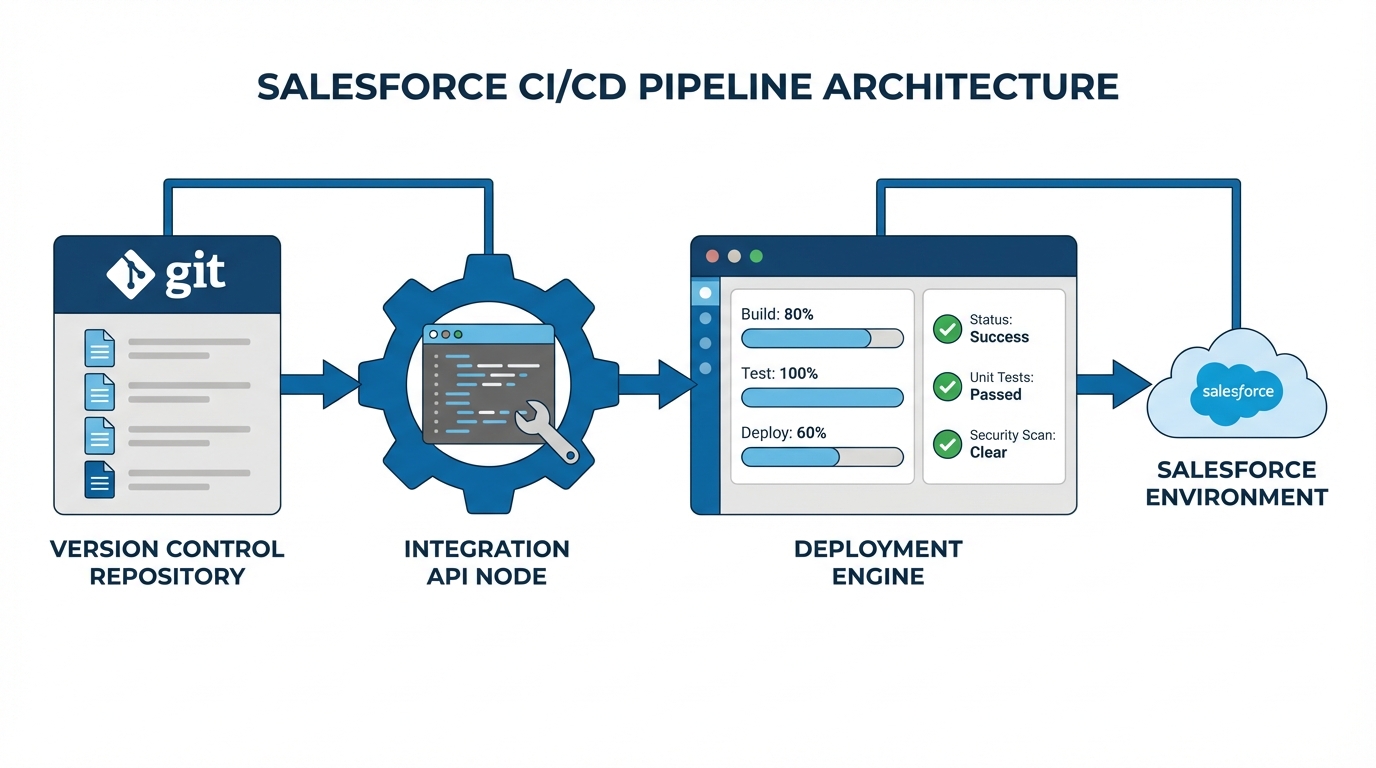
A professional architecture diagram showing the automated flow of data and metadata through a Salesforce CI/CD deployment pipeline.
How the flow actually works
So, what does this look like in practice? A dev finishes a feature and moves the Jira story to "Deploy Ready." Jira sends a webhook to your integration layer. That layer calls your CI/CD tool, which pulls the metadata from GitHub and the data from your templates. It pushes everything to the target org at the same time. Then, it runs your validations. If a test fails, the deployment stops. If it passes, it moves forward. No manual intervention required.
Practical use case: Price Books and CPQ
Price Books are probably the biggest headache for release managers. Sales ops changes a price, and suddenly you have to migrate hundreds of records across four different environments. If you do this manually, you'll eventually miss a record or create a duplicate. It is just a matter of time.
With Salesforce Data DevOps, you capture those Price Book entries as part of the user story. You use data templates that upsert based on an External ID. This ensures that the record in UAT is the exact same record in Production. It makes your testing reliable because you are finally testing against the real data configuration.
If you aren't using External IDs for your reference data, you're basically asking for duplicates. Trust me, I've cleaned up enough Production orgs to know that "Name" is not a unique identifier.
Best practices for a cleaner pipeline
Look, setting this up takes some effort upfront, but it pays off within the first two release cycles. Here is what I've learned from doing this the hard way:
- Keep metadata and data together: Never deploy one without the checking the other. They are two halves of the same whole.
- Automate your gates: Don't let a deployment move to Production without passing Apex tests and basic SOQL checks.
- Use idempotent loads: This is just a fancy way of saying "use upserts." You want to be able to run the same job twice without breaking anything. This is a huge part of maintaining Salesforce Flow data integrity as well.
- Stay tool-agnostic: The pattern matters more than the tool. Whether you use Flosum or a home-grown SFDX script, the logic remains the same.
Key Takeaways for Salesforce Data DevOps
- Automation is the goal: Use Jira status changes to trigger your deployments and remove the human error factor.
- External IDs are mandatory: You cannot have a reliable data pipeline without a unique key that persists across environments.
- Validation matters: Automated gates ensure that you aren't just deploying "faster," but also "safer."
- Start small: Pick one pain point, like CPQ configs or Price Books, and automate that first before trying to move every object in your org.
Moving to an event-driven Salesforce Data DevOps model makes release days boring. And in our world, boring is good. It means no late-night hotfixes, no "oops I forgot the CSV" emails, and a lot more confidence when you hit that deploy button. Start by mapping out your most painful manual data moves and see how a simple webhook can start doing the heavy lifting for you.




Leave a Comment