

OpenID vs OAuth: The Real-World Difference
If you've spent any time in the Salesforce setup menu, you've likely hit a wall trying to figure out OpenID vs OAuth. It's one of those topics where the more documentation you read, the more confused you might get. I've been there, and honestly, most teams I work with get the two mixed up at the start of a project.
Look, the confusion is understandable because they're built on the same foundation. But they solve two very different problems. One is about who you are, and the other is about what you're allowed to touch. Let's break this down without the academic fluff.
OAuth 2.0 is for Authorization
Think of OAuth 2.0 as a valet key for your car. When you give your key to a valet, you're giving them permission to drive your car and park it. You aren't giving them your driver's license or proving your identity to them; you're just granting them a specific, limited set of permissions.
In the tech world, OAuth answers one question: "Can this app access this specific data on behalf of the user?" It uses an access_token to make that happen. But here's the kicker - OAuth doesn't actually care about the user's name or email. It just cares that the user said "yes" to the request.
OpenID Connect (OIDC) is for Authentication
Now, OpenID Connect is the identity layer that sits right on top of OAuth. If OAuth is the valet key, OIDC is the ID badge. It's what allows an application to say, "I know exactly who this user is."
When you use OIDC, you get an id_token. This is usually a JWT (JSON Web Token) that contains the user's profile info - things like their username, email, and unique ID. If you're building a Salesforce API integration where the user needs to actually "log in," OIDC is what you're looking for.
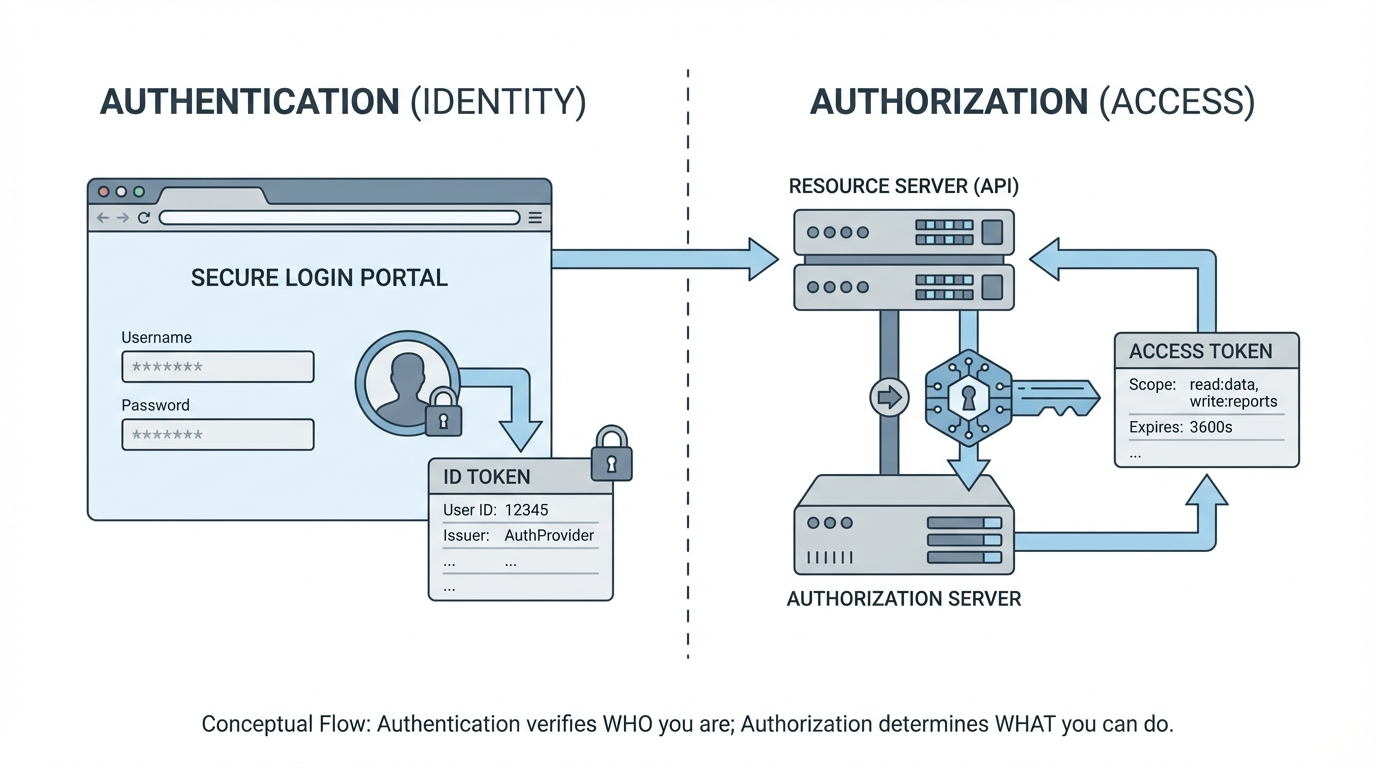
A technical diagram comparing the authentication flow of a user identity token with the authorization flow of a resource access token.
Breaking down the tokens in OpenID vs OAuth
One thing that trips people up is the tokens. I've seen teams try to use an OAuth access token to identify a user, and it's a mess. Access tokens are often "opaque," meaning the client app can't even read what's inside them. They're just a string of characters meant for the resource server.
OIDC introduces the id_token, which is designed to be read by the client. It's signed, so you know it hasn't been messed with. I've written before about the Salesforce JWT flow, and that's a perfect example of how specific token types handle secure server-to-server communication.
Pro Tip: If you see the
openidscope in an authorization request, you're using OIDC. If you don't see it, you're likely just doing standard OAuth. That one little string changes the entire behavior of the identity provider.
When to choose OpenID vs OAuth for your integrations
So what does this actually mean for your day-to-day work? It comes down to your use case. You don't always need both, but in modern web apps, they usually travel together. Here is how I usually decide which way to go:
- Use OAuth when: You need to let a third-party app post to a user's Slack channel or read their Google Calendar. The app doesn't need to know the user's life story; it just needs permission to hit an API.
- Use OIDC when: You want a "Sign in with Salesforce" button on a custom website. You need to know who the user is so you can create a session for them and show their specific data.
Common Scenarios
Most of the time, we use them together. You'll run a flow that authenticates the user (OIDC) and, in the same breath, gets an access token to call their data (OAuth). It's efficient and keeps the security tight.
| Feature | OAuth 2.0 | OpenID Connect (OIDC) |
|---|---|---|
| Main Goal | Authorization (Access) | Authentication (Identity) |
| Key Token | Access Token | ID Token (JWT) |
| Question it answers | "What can I do?" | "Who are you?" |
| Relationship | The Foundation | The Layer on Top |
Security things to keep in mind
I've seen plenty of integrations go sideways because of poor security choices. For starters, stop using the "Implicit Flow" for your single-page apps. It's outdated and risky. Use the Authorization Code flow with PKCE instead. It's a bit more work to set up, but it's the standard for a reason.
Also, always validate that id_token. Don't just take it at face value. Check the issuer, the expiration, and the signature. If you don't, you're leaving a massive back door open for someone to spoof a user's identity.
Key Takeaways
- OAuth is about granting permission to resources; OpenID is about verifying identity.
- OIDC is built on top of OAuth 2.0 - it's not a replacement.
- The
id_tokenis a JWT used by the client to get user details. - The
access_tokenis used by the API to check permissions. - Always use the
openidscope if you need user profile information.
The short answer? If you're building a login system, you're doing OIDC. If you're just connecting two systems to swap data, you're likely just using OAuth. Use the right tool for the job and your future self (and your security auditors) will thank you.




Leave a Comment