

Getting your Salesforce object relationships right is the bread and butter of any solid implementation. If you mess up the data model early on, you'll be fighting against your own architecture for months to come. I've spent years cleaning up orgs where a simple mistake in choosing a relationship type led to a complete mess in the security model. So, let's talk about how these connections actually work in the real world.
The Core Salesforce object relationships: Lookup vs. Master-Detail
1. The Lookup Relationship
Think of a lookup as a casual link between two records. They're basically just acquaintances. If you delete the parent record, the child record stays right where it is. It's flexible and doesn't force any strict ownership rules on you. I've seen teams use these for almost everything because they're afraid of the "strictness" of other types, but that can lead to its own set of problems.
I usually stick with lookups when the relationship is optional. For example, maybe a Case doesn't always need to be linked to a specific Asset. One thing to keep in mind is that there's a Salesforce lookup limit on how many of these you can have per object. If you find yourself hitting that limit, it's probably time to rethink your data model.
2. Master-Detail Relationship
This is the "til death do us part" of Salesforce object relationships. The child record is totally dependent on the master. If you delete the master, the child record gets wiped out too. It also inherits the security settings of the master, which is a huge deal for your sharing rules and overall visibility.
So why would you use this instead of a lookup? Usually, it's because you need roll-up summary fields to calculate things like the total value of all line items on an invoice. Just watch out for performance. If you have thousands of children under one master, you'll run into locking issues and slow saves. I've seen this happen a lot with "Data Skew" where one parent record becomes a bottleneck for the whole system.
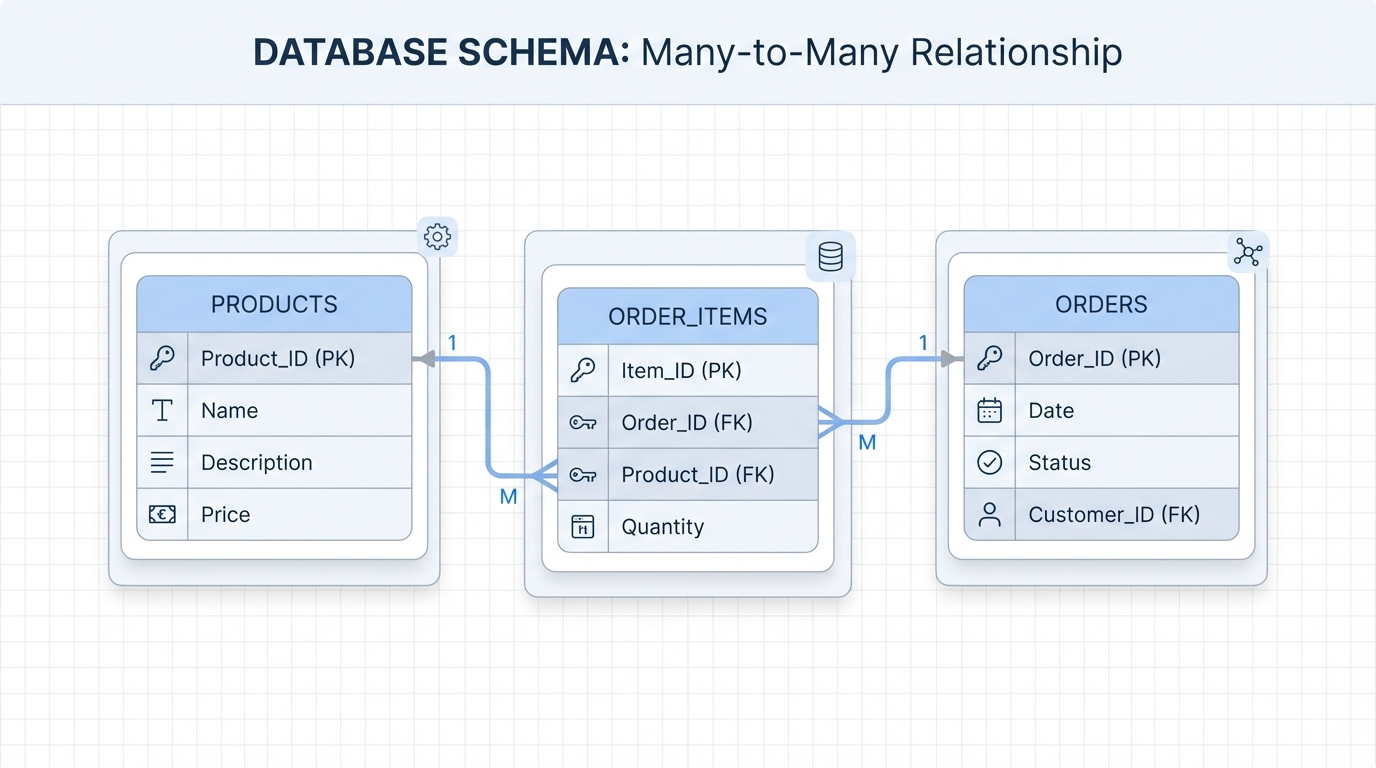
A professional database schema diagram showing a junction object connecting two parent objects in a Many-to-Many relationship.
3. Many-to-Many (The Junction Object)
Here's the thing: Salesforce doesn't have a specific "Many-to-Many" field type you can just click and create. Instead, we use a junction object. This is just a custom object with two Master-Detail relationships pointing to different parents. It's the standard way to link things like Students to multiple Classes or Products to multiple Campaigns. It sounds a bit clunky at first, but it's actually really powerful once you start reporting on it.
Specialized Salesforce object relationships You Should Know
Beyond the basics, there are a few niche types that solve specific problems. You won't use these every day, but they're lifesavers when you're dealing with complex architectures or external data.
4. Hierarchical and Polymorphic Lookups
The Hierarchical relationship is a special one only found on the User object. It's how we build manager-subordinate chains. Then there's the Polymorphic lookup. You've seen this on Tasks with the "Related To" (WhatId) field. It lets one field point to an Account, an Opportunity, or a custom object. Now, here's the catch - we can't build our own custom polymorphic fields. We're stuck with the ones Salesforce provides out of the box.
5. External and Indirect Lookups
If you're using Salesforce Connect to pull in data from an outside database, you'll use these. They link your internal records to data that doesn't actually live in your org. It's a great way to show order history from an ERP without using up all your storage space. It's much lighter than trying to sync millions of records manually.
Pro tip: Always start with a Lookup if you're unsure. It's much easier to convert a Lookup to a Master-Detail later than it is to go the other way around. To convert, just make sure every child record has a value in that lookup field before you try to change the field type.
Key Takeaways for Salesforce object relationships
- Master-Detail controls security and deletion; Lookups are independent.
- Roll-up summaries only work on Master-Detail relationships.
- Be mindful of data skew when linking thousands of records to a single parent.
- Junction objects are the only way to handle many-to-many scenarios.
- Always check your sharing requirements before committing to a Master-Detail.
At the end of the day, your choice of Salesforce object relationships defines how your users interact with data. Take a second to think about who needs to see the records and whether they should disappear when a parent is deleted. If you get those two things right, the rest of your build will be much smoother and easier to maintain long-term.



Leave a Comment