
How the Salesforce Streaming API Saves Your Integration Limits
Ever had a client ask for a dashboard that updates the second a deal closes? You could set up a REST API that polls Salesforce every five seconds, but your API limits will scream at you. That's where the Salesforce Streaming API comes in. It's a way for Salesforce to push data to you the moment something happens, instead of you constantly asking if there's an update.
I've seen too many teams burn through their daily limits because they didn't want to deal with the learning curve of event-driven architecture. But honestly, once you get the hang of it, you'll never go back to basic polling for real-time needs. It's about building a Salesforce API integration that actually scales without breaking the bank.
The Four Flavors of the Salesforce Streaming API
Not all streaming is created equal. Salesforce gives us four different ways to get these notifications, and picking the wrong one is a classic rookie mistake. Let's break down how they actually work in the wild.
1. PushTopic Streaming
This is the "old school" way of doing things, but it still has its place. You basically write a SOQL query and tell Salesforce, "Hey, if any record that matches this query changes, let me know." It's great because it's declarative and you can filter exactly which fields you care about.
But here's the thing: it's not the most reliable for heavy enterprise workloads. I usually only recommend PushTopics for simple UI updates where it isn't the end of the world if a message gets dropped once in a blue moon. It's easy to set up, but it doesn't have the same "oomph" as the newer tools.
2. Platform Events
If you're building anything serious, you'll probably end up here. Platform Events are the gold standard for modern Salesforce development. They're much more flexible because they aren't strictly tied to a single record update. You can fire a Platform Event from a Flow, Apex, or even an external system.
Pro Tip: If you're debating between this and older tech, check out this guide on Platform Events vs Outbound Messages. It'll save you a lot of architectural headaches later on.
One thing that trips people up is that Platform Events are "fire and forget." Once you send it, Salesforce handles the delivery. It's much more reliable than PushTopics because it supports replay IDs, meaning your subscriber can "catch up" if it goes offline for a minute.
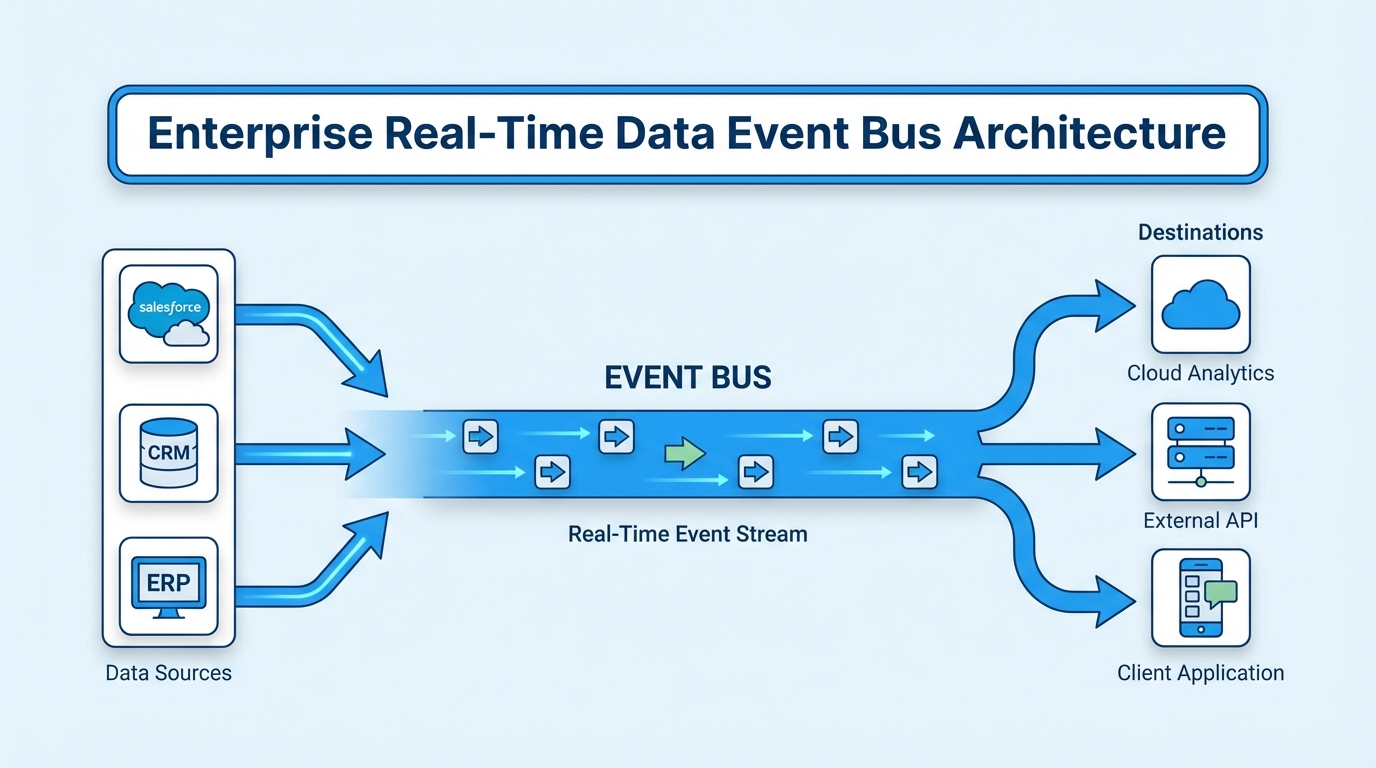
A professional architecture diagram showing Salesforce data objects flowing into a central event bus and streaming out to external applications.
3. Change Data Capture (CDC)
CDC is like PushTopic's cooler, more organized younger brother. Instead of you writing queries, you just flip a switch for an object (like Account or Opportunity). Salesforce then automatically streams every single create, update, delete, or undelete event.
I love using CDC for data replication. If you need to keep an external SQL database in sync with Salesforce, this is your best friend. It's especially useful when managing large data volumes because it only sends the changes, not the whole record every time. It keeps the noise down and the speed up.
4. Generic Streaming
You won't use this one often. Generic streaming lets you send custom text strings that aren't tied to Salesforce records at all. Think of it like a simple chat window or a status notification. It's lightweight, but since Platform Events came out, most of the reasons to use Generic Streaming have kind of disappeared.
How the Connection Actually Stays Alive
So how does the Salesforce Streaming API keep that connection open without timing out? It uses something called the Bayeux protocol and CometD. Think of it like a "long-lived" request. The client asks for data, and Salesforce just holds onto that request until it actually has something to say.
Now, don't forget about authentication. You're still using OAuth tokens here. If your session expires, your stream dies. I've spent hours debugging a "broken" integration only to realize the integration user's password expired or the token wasn't refreshed. Don't be that person.
Key Takeaways for Developers
- Use CDC for syncing data to external databases or keeping caches fresh.
- Use Platform Events for custom business logic and complex workflows between systems.
- Always implement ReplayID logic. Connections drop. It happens. If you don't use the ReplayID, you'll lose data.
- Watch your limits. Even though streaming is efficient, Salesforce still caps the number of events you can send in a 24-hour window.
- Stay Idempotent. That's a fancy way of saying: make sure your system can handle receiving the same message twice without breaking things.
A Quick Code Reality Check
Most people use a library like CometD in JavaScript to listen to these streams. Here's a tiny snippet of what a PushTopic subscription looks like in practice. It's not as scary as it looks, but you've got to get the handshake right first.
// This is the basic handshake and subscription flow
cometd.configure({
  url: 'https://your-instance.salesforce.com/cometd/60.0',
  requestHeaders: { Authorization: 'Bearer ' + sessionID }
});

cometd.handshake(function(reply) {
  if (reply.successful) {
    // We are in! Now listen to the channel
    cometd.subscribe('/topic/NewLeads', function(message) {
      console.log('Got a new lead: ', message.data.sobject.Name);
    });
  }
});
At the end of the day, the Salesforce Streaming API is all about making your apps feel fast and responsive. No user wants to hit a refresh button in 2026. Whether you go with Platform Events or CDC, just make sure you're thinking about how the system recovers when the internet inevitably hiccups. Get that right, and your users will think you're a magician.


Leave a Comment