

New tool CRON Expression Builder — preview next run times before you schedule Apex. Open the builder →
Diagram showing Salesforce API callout limits increasing for developers with unlimited API callouts
Integration

Unlimited API Callouts

Salesforce has made some updated on API callouts limit. Maximum daily cap of 1,000,000 API requests has been removed. Default daily API request allocation raised from 15,000 to 100,000.

The short answer

Salesforce increased the default daily API request allocation to 100,000 and removed the 1,000,000 daily request cap for supported editions. The article outlines how total API allocations are calculated and how administrators can monitor daily API usage.

Key takeaways Plan integration volume around the default 100,000 daily API request allocation available to Enterprise, Unlimited, Performance, and API-enabled Professional Editions. Calculate your total daily API limit using the formula: 100,000 + (number of licenses x calls per license type) + purchased API Call Add-Ons. Check current 24-hour API consumption by viewing the API Requests, Last 24 Hours field in Company Information under Setup. Track daily consumption trends by running the API Calls Made Within Last 7 Days report under Administrative Reports.

To ensure quality of service, Salesforce has put governor limits on resource usage. API callouts are also part of it. In Spring 20 release, Salesforce come up with following updates on API Callouts:

  • Default daily API request allocation raised from 15,000 to 100,000.
    • Applicable to the Enterprise Edition, Professional Edition with API access enabled, Unlimited Edition, and Performance Edition.
    • This provides paid Salesforce ORGs with additional API calls by default to support integrations with Salesforce.
  • Maximum daily cap of 1,000,000 API requests has been removed.
    • This will allow to make more API calls without exceeding allocation.
    • Applicable to Enterprise Edition and to the Professional Edition with API access enabled.

How these API callouts are distributed?

The org wide API callout limit is calculated by 100,000 + (number of licenses x calls per license type) + purchased API Call Add-Ons. More information over here.

How to check API calls consumption in Salesforce

There are two ways you can check API callout consumption:

  • Setup -> Company Profile -> Company Information : Check the field "API Requests, Last 24 Hours"
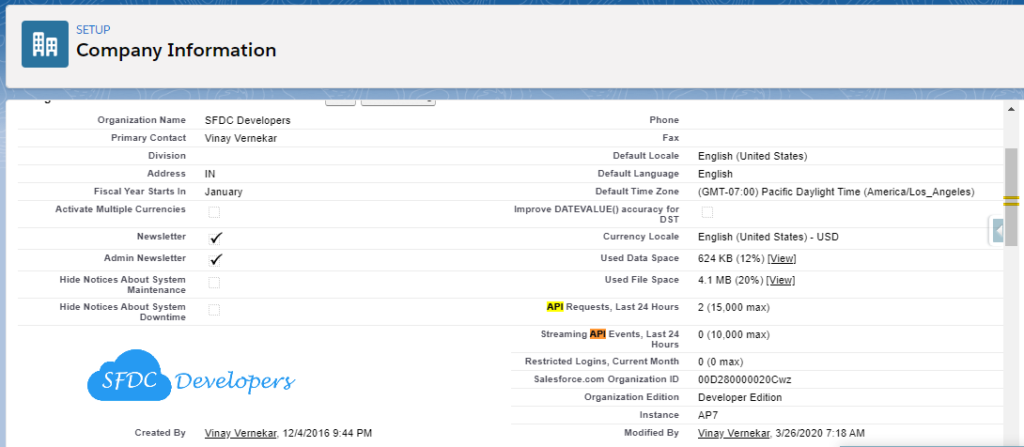
Unlimited API Callouts

API Requests

  • Reports -> Administrative Reports -> API Calls Made Within Last 7 Days - This report displays based on the day the individual call is consumed.
Frequently asked questions

How is the Salesforce daily API request limit calculated?

The org-wide API limit is calculated by adding 100,000 to the product of your total licenses and calls allowed per license type, plus any purchased API Call Add-Ons.

How do you check API call consumption in Salesforce?

You can view usage by checking the API Requests, Last 24 Hours field under Setup > Company Profile > Company Information, or by running the API Calls Made Within Last 7 Days report in Administrative Reports.

Which Salesforce editions have the 100,000 default daily API request limit?

The 100,000 default daily request allocation applies to Enterprise Edition, Unlimited Edition, Performance Edition, and Professional Edition with API access enabled.

Newsletter

One email every Tuesday

New guides, tool updates, and the release-note changes that break things.

No spam. Unsubscribe in one click.

Comments

Loading comments...

Leave a Comment