

If you're staring at a blank design doc for a new project, the Salesforce SOAP vs REST debate is likely one of the first things you'll hit. I've spent years building these connections, and honestly, picking the wrong one can make your life miserable six months down the road when you're trying to debug a weird timeout or a massive data sync.
Look, both have their place in the ecosystem. But the way we build today is a lot different than how we did it ten years ago. When you're planning a Salesforce API integration, you've got to think about who's consuming the data and what kind of "contract" you need between systems.
The core differences in Salesforce SOAP vs REST
When we compare Salesforce SOAP vs REST, the biggest thing to remember is that one is a strict protocol and the other is a flexible architectural style. SOAP (Simple Object Access Protocol) is like a certified mail delivery. It has very specific rules about how the envelope looks, who can open it, and what's inside. It uses XML for everything, which makes it a bit "wordy" and heavy on the wire.
REST (Representational State Transfer) is more like sending a postcard. It's lightweight and uses standard HTTP methods like GET, POST, and PATCH. While it can handle XML, almost everyone in the Salesforce world uses JSON. It's much easier to read and way faster to parse for mobile apps or modern web frameworks.
Message format and overhead
SOAP is strictly XML. This means every single request is wrapped in a "SOAP Envelope" with headers and a body. It's predictable, sure, but it adds a lot of extra characters to your data. REST is much more chill. You'll usually see JSON payloads because they're smaller and don't require a specialized library just to read a single field.
Contracts and WSDLs
This is where SOAP usually wins in big enterprise environments. It uses a WSDL (Web Services Description Language) file. Think of this as a legally binding contract. If you go the SOAP route, you'll need to decide between the Enterprise vs Partner WSDL depending on how much flexibility you need. REST doesn't have this by default, though many teams use OpenAPI or Swagger to document things manually.
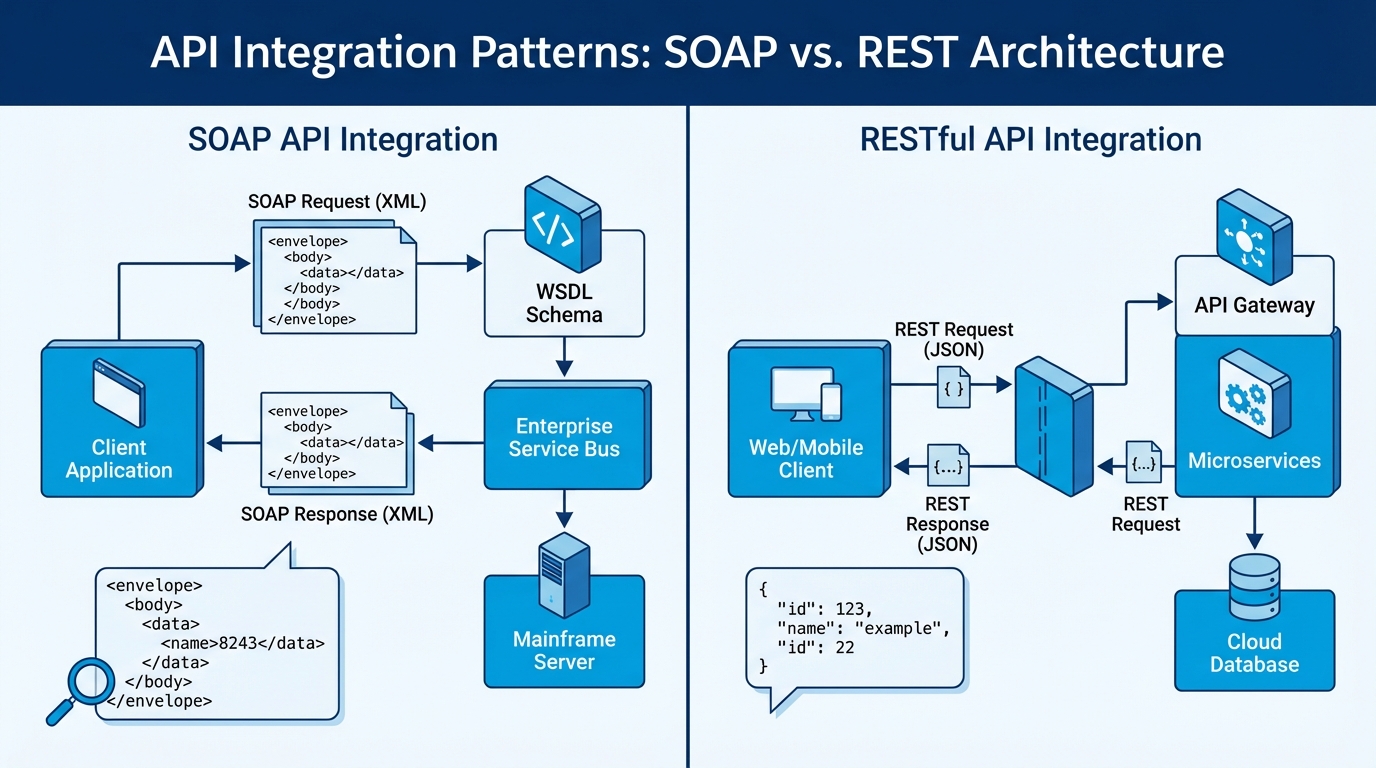
A technical architecture diagram comparing the structured XML-based SOAP protocol with the lightweight JSON-based REST API integration pattern.
Technical deep dive into Salesforce SOAP vs REST
One thing that trips people up is security. SOAP has this thing called WS-Security. It's heavy-duty and allows for message-level encryption. If you're working with a bank or a government agency that needs to ensure the data is encrypted even while it's sitting in a server's memory, SOAP might be your only choice. But for 95% of us, REST over HTTPS with OAuth 2.0 is more than enough.
Pro tip: Most modern REST setups use OAuth, and I've found the Salesforce JWT flow is the way to go for secure server-to-server connections where you don't want a human clicking a "Grant Access" button every time a token expires.
Statefulness vs. Statelessness
REST is stateless. Every request is a fresh start; the server doesn't remember what you did five seconds ago. This makes scaling much easier. SOAP can be stateful, which sounds nice in theory but usually just adds complexity that you don't want to manage in a cloud environment like Salesforce.
Error Handling
In SOAP, if something goes wrong, you get a "SOAP Fault." It's a specific XML structure that tells you what happened. In REST, we rely on HTTP status codes. If you get a 404, the record is gone. If you get a 500, the server is having a bad day. It's simple, and most developers already know how to handle these codes without reading a manual.
// Example: A simple REST GET request
GET /services/data/v60.0/sobjects/Account/001XXXXXXXXXXXXXXX
Host: yourInstance.salesforce.com
Authorization: Bearer YOUR_ACCESS_TOKEN
<! - Example: A SOAP login request snippet - >
<soapenv:Envelope xmlns:soapenv="http://schemas.xmlsoap.org/soap/envelope/">
  <soapenv:Body>
    <login xmlns="urn:partner.soap.sforce.com">
      <username>[email protected]</username>
      <password>Password123Token</password>
    </login>
  </soapenv:Body>
</soapenv:Envelope>
When to choose Salesforce SOAP vs REST for your project
So, which one do you actually use? Here's the thing: Salesforce is clearly pushing REST as the future. Most of the cool new features like Composite Resources or the Bulk API 2.0 are REST-based. But don't write off SOAP just yet. If you're integrating with a legacy system built in the early 2000s, it probably only speaks SOAP. In that case, don't fight it - just use the WSDL and move on.
Go with REST if:
- You're building a mobile app or a modern web UI.
- You want to keep your payloads small and fast.
- You're comfortable with OAuth 2.0 and JSON.
- You're using Salesforce's latest APIs for things like UI API or Einstein.
Stick with SOAP if:
- Your middleware or legacy system requires a formal WSDL contract.
- You need strict, built-in validation of every field before the message even hits the server.
- You're doing complex metadata operations that are better supported in the Metadata SOAP API.
Key Takeaways
- The Salesforce SOAP vs REST decision usually comes down to the system you're connecting to, not just Salesforce itself.
- REST is faster and easier for most web developers, while SOAP is more rigid and formal.
- JSON is the standard for REST in Salesforce, making it much lighter than SOAP's XML.
- Security in REST is typically handled by OAuth, while SOAP offers WS-Security for specialized needs.
- Salesforce is prioritizing REST for almost all new API developments.
I've seen teams get stuck overanalyzing Salesforce SOAP vs REST for weeks. Don't fall into that trap. If you have the choice, start with REST. It's easier to debug, the community support is massive, and it's where the platform is heading. Only go the SOAP route if you have a specific requirement that forces your hand. Your future self will thank you when you don't have to spend your weekend debugging nested XML tags.




Leave a Comment