


If you're staring at a blank design doc for a new project, the Salesforce SOAP vs REST debate is likely one of the first things you'll hit. I've spent years building these connections, and honestly, picking the wrong one can make your life miserable six months down the road when you're trying to debug a weird timeout or a massive data sync.
Both still have a place, but the way we build today is a lot different than how we did it ten years ago. When you're planning a Salesforce API integration, you've got to think about who's consuming the data and what kind of "contract" you need between systems.
The core differences in Salesforce SOAP vs REST
When you compare Salesforce SOAP vs REST, the thing to hold onto is that one is a strict protocol and the other is a flexible architectural style. SOAP (Simple Object Access Protocol) is like certified mail. It has very specific rules about how the envelope looks, who can open it, and what's inside. It uses XML for everything, which makes it a bit "wordy" and heavy on the wire.
REST (Representational State Transfer) is more like sending a postcard. It's lightweight and uses standard HTTP methods like GET, POST, and PATCH. It can handle XML, but almost everyone building on Salesforce uses JSON. It's easier to read and way faster to parse for mobile apps or modern web frameworks.
Message format and overhead
SOAP is strictly XML, so every single request is wrapped in a "SOAP Envelope" with headers and a body. That's predictable, sure, but it adds a lot of extra characters to your data. REST is much more chill. You'll usually see JSON payloads because they're smaller and don't require a specialized library just to read a single field.
Contracts and WSDLs
This is where SOAP usually wins in big enterprise environments. It uses a WSDL (Web Services Description Language) file, which works like a legally binding contract. If you go the SOAP route, you'll need to decide between the Enterprise vs Partner WSDL depending on how much flexibility you need. REST has nothing like it by default, though plenty of teams document things manually with OpenAPI or Swagger.
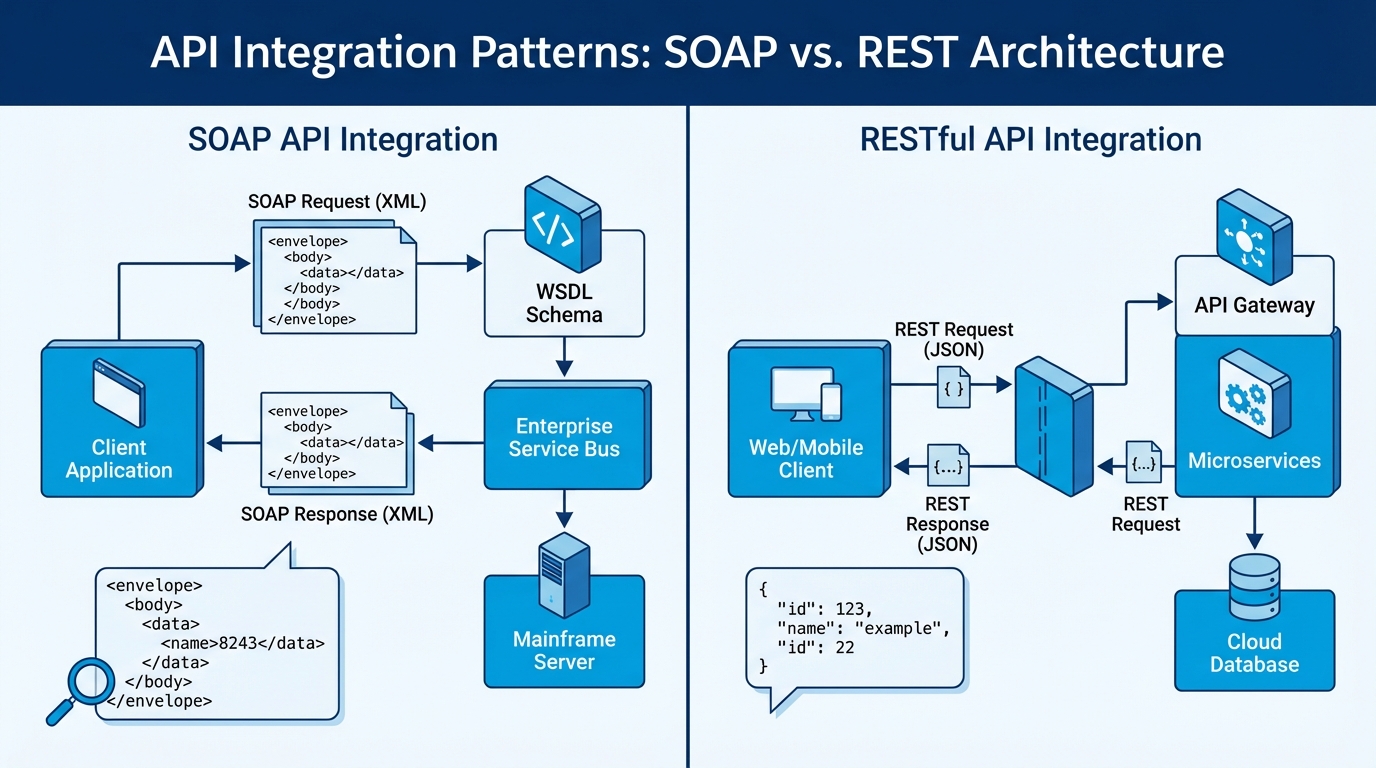
The structured XML of SOAP next to the lightweight JSON of a REST call.
Technical deep dive into Salesforce SOAP vs REST
One thing that trips people up is security. SOAP has WS-Security, which is heavy duty and allows message-level encryption. If you're working with a bank or a government agency that needs the data encrypted even while it's sitting in a server's memory, SOAP might be your only choice. But for 95% of us, REST over HTTPS with OAuth 2.0 is more than enough.
Pro tip: Most modern REST setups use OAuth, and I've found the Salesforce JWT flow is the way to go for secure server-to-server connections where you don't want a human clicking a "Grant Access" button every time a token expires.
Statefulness vs. statelessness
REST is stateless. Every request is a fresh start, and the server doesn't remember what you did five seconds ago. That makes scaling much easier. SOAP can be stateful, which sounds nice in theory but usually just adds complexity you don't want to manage in a cloud environment like Salesforce.
Error handling
In SOAP, when something goes wrong you get a "SOAP Fault," a specific XML structure that tells you what happened. In REST, we rely on HTTP status codes. If you get a 404, the record is gone. If you get a 500, the server is having a bad day. Most developers already know how to handle these codes without reading a manual.
// Example: A simple REST GET request
GET /services/data/v60.0/sobjects/Account/001XXXXXXXXXXXXXXX
Host: yourInstance.salesforce.com
Authorization: Bearer YOUR_ACCESS_TOKEN
<! - Example: A SOAP login request snippet - >
<soapenv:Envelope xmlns:soapenv="http://schemas.xmlsoap.org/soap/envelope/">
  <soapenv:Body>
    <login xmlns="urn:partner.soap.sforce.com">
      <username>[email protected]</username>
      <password>Password123Token</password>
    </login>
  </soapenv:Body>
</soapenv:Envelope>
When to choose Salesforce SOAP vs REST for your project
So which one do you actually use? Salesforce is clearly pushing REST as the future, and most of the newer features like Composite Resources or the Bulk API 2.0 are REST-based. Don't write off SOAP yet, though. If you're integrating with a legacy system built in the early 2000s, it probably only speaks SOAP. In that case, don't fight it. Use the WSDL and move on.
Go with REST if:
- You're building a mobile app or a modern web UI.
- You want to keep your payloads small and fast.
- You're comfortable with OAuth 2.0 and JSON.
- You're using Salesforce's latest APIs for things like UI API or Einstein.
Stick with SOAP if:
- Your middleware or legacy system requires a formal WSDL contract.
- You need strict, built-in validation of every field before the message even hits the server.
- You're doing complex metadata operations that are better supported in the Metadata SOAP API.
Key takeaways
- The Salesforce SOAP vs REST decision usually comes down to the system you're connecting to, not Salesforce itself.
- REST is faster and easier for most web developers, while SOAP is more rigid and formal.
- JSON is the standard for REST in Salesforce, which makes it much lighter than SOAP's XML.
- Security in REST is typically handled by OAuth, while SOAP offers WS-Security for specialized needs.
- Salesforce is prioritizing REST for almost all new API development.
I've seen teams get stuck overanalyzing Salesforce SOAP vs REST for weeks. Don't fall into that trap. If you have the choice, start with REST. It's easier to debug, the community support is massive, and it's where the platform is heading. Only go the SOAP route if a specific requirement forces your hand, and you'll save yourself a weekend of debugging nested XML tags.


Leave a Comment