


Two SOAP login() changes land in back-to-back releases, and many teams are tracking them as a single ticket. Winter '27 adds a permission check to login() that locks out integration users on the day your instance upgrades, and some instances have already upgraded. Summer '27 then removes login() entirely in API versions 31.0 through 64.0. The first change needs a permission set this week; the second needs a migration to OAuth through an External Client App, and that work should start now.
Two changes, two deadlines
Both changes touch only the authentication call. Your SOAP query(), create(), update(), delete() and upsert() calls keep working, and so do the partner and enterprise WSDLs behind them. The client has to send an OAuth 2.0 access token in the session header where it used to send a session ID from login().
| Winter '27 | Summer '27 | |
|---|---|---|
| Release update | Assign Use Any API Auth Permission for SOAP login() | SOAP API login() Call in SOAP API Versions 31.0 Through 64.0 Is Being Retired |
| What changes | login() requires the calling user to hold Use Any API Auth | login() is removed from 31.0 to 64.0 (already unavailable in 65.0 and later) |
| When | Your instance's Winter '27 upgrade: 29 Aug, 5 Sep, 3 Oct, 9 Oct or 10 Oct 2026 | Summer '27 (one secondary source cites 1 June 2027) |
| Failure mode | Server-to-server auth error at login time, with nothing shown in the UI | Error saying the login() endpoint has been deactivated |
| Fix | Grant the permission to integration users | Move the client to OAuth through an External Client App |
This is the third round of the same retirement. Versions 7.0 to 20.0 lost login() in Summer '22, and 21.0 to 30.0 lost it in Summer '25. New orgs already have login() turned off by default. A client still calling it has survived two earlier rounds, so assume nobody is watching it closely and its original owner may have left.
If your instance is in the 3 October wave, the first deadline is tomorrow. Do the audit and the permission set today and plan the migration afterwards.
Find every login() caller
LoginHistory is where to look, and it has a trap. Application, Status and ApiType can be grouped but not filtered, so WHERE Application = 'SOAP Api' fails to parse. The filterable fields are LoginTime, UserId, LoginType, SourceIp and LoginUrl. Group broadly, then pick the SOAP rows out of the results.
Look back 90 days. A finance export or archive job that runs once a quarter won't appear in a 30-day window.
SELECT UserId, Application, ApiType, LoginType, Status,
       COUNT(Id) attempts, MAX(LoginTime) lastSeen
FROM LoginHistory
WHERE LoginTime = LAST_N_DAYS:90
GROUP BY UserId, Application, ApiType, LoginType, Status
ORDER BY UserId
Run it against production from the CLI so the output is a file you can hand to the integration owners:
sf data query \
  --query "SELECT UserId, Application, ApiType, LoginType, Status, COUNT(Id) attempts, MAX(LoginTime) lastSeen FROM LoginHistory WHERE LoginTime = LAST_N_DAYS:90 GROUP BY UserId, Application, ApiType, LoginType, Status" \
  --target-org prod \
  --result-format csv > login-audit-90d.csv

grep -i soap login-audit-90d.csv > soap-callers.csv
For each SOAP row, write down the username, the system behind it, the API version in that client's endpoint URL and the team that can change its code. To identify the system, rerun the query filtered on that UserId and group by SourceIp. Say [email protected] shows two thousand successful attempts: that is a nightly ERP job with an obvious owner. A handful of rows from a named person usually means an old Data Loader install or a desktop tool, and those need an owner too.
Run the audit in every production org you operate. A sandbox doesn't see production traffic, so a clean sandbox result tells you nothing.
Winter '27: grant Use Any API Auth as a stopgap
Who already holds it
Check existing holders before granting anything. The permission is PermissionsUseAnyApiAuth (label Use Any API Auth), and it exists on both PermissionSet and Profile. Use Any API Client is a different permission: it belongs to API Access Control and covers connected app self-authorization. There is no PermissionsUseAnyApiClient field, so a script that references it fails with an invalid field error and checks nothing.
SELECT Name, Label FROM PermissionSet
WHERE PermissionsUseAnyApiAuth = true AND IsOwnedByProfile = false

SELECT Name FROM Profile WHERE PermissionsUseAnyApiAuth = true

SELECT Assignee.Username, PermissionSet.Name, PermissionSet.IsOwnedByProfile
FROM PermissionSetAssignment
WHERE PermissionSet.PermissionsUseAnyApiAuth = true
ORDER BY Assignee.Username
The third query decides whether you are covered, because a permission set with the permission enabled protects nobody until it is assigned. Compare the assigned usernames against soap-callers.csv. Any SOAP caller missing from the assignments will fail on upgrade day.
The stopgap permission set
Create one permission set called Integration_SOAP_Login. In its description, name the release update and the Summer '27 retirement. Enable Use Any API Auth under System Permissions and assign it only to the users in the gap. Leave profiles alone: a profile change applies to everyone on that profile, including the next user someone clones onto it.
sf org assign permset --name Integration_SOAP_Login \
  --on-behalf-of [email protected] \
  --on-behalf-of [email protected] \
  --target-org prod
The grant keeps those clients running until Summer '27. They still send a stored password to login(), so they stop working the day it retires. I file the grant as a ticket with an owner, a date and a final step to delete the permission set once the last caller has moved. I have seen stopgap permission sets like this outlive everyone who knew why they existed, and then nobody dares remove them. After your upgrade date, check the Status column in LoginHistory for those users and confirm their logins still succeed.
Summer '27: move clients to an External Client App
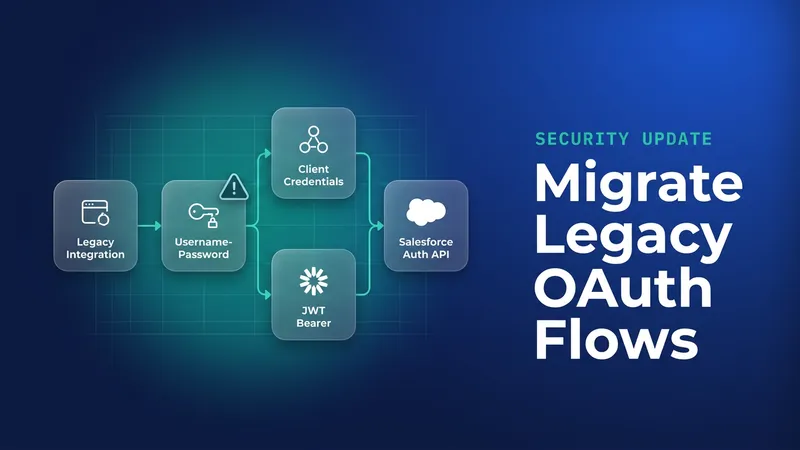
Salesforce's guidance is to move apps to External Client Apps for authentication before Summer '27. Two flows suit server-to-server integrations. Client credentials is the simplest for scheduled jobs and middleware: the client exchanges a key and secret for a token, and the token runs as an execution user you choose. JWT bearer avoids a shared secret, because the client signs an assertion with a private key and Salesforce checks it against an uploaded certificate. I would choose JWT bearer for anything running outside your own network and client credentials for middleware you already trust with secrets. The JWT setup is covered step by step in the JWT bearer webhook guide. If you are also cleaning up connected apps after the device flow change, handle both in the same review.
Skip the OAuth username-password flow. Its retirement moved from Winter '27 to 20 February 2027, which falls before Summer '27, so a client moved there would have to move again.
Here is the client credentials token request, sent to your My Domain host:
curl -s https://acme.my.salesforce.com/services/oauth2/token \
  -d grant_type=client_credentials \
  -d client_id="$ECA_CONSUMER_KEY" \
  -d client_secret="$ECA_CONSUMER_SECRET"
The response includes access_token and instance_url. The client puts the token where it used to put the login() session ID and posts to {instance_url}/services/Soap/u/64.0 as before:
<soapenv:Envelope xmlns:soapenv="http://schemas.xmlsoap.org/soap/envelope/"
                  xmlns:urn="urn:partner.soap.sforce.com">
  <soapenv:Header>
    <urn:SessionHeader>
      <urn:sessionId>ACCESS_TOKEN_FROM_TOKEN_RESPONSE</urn:sessionId>
    </urn:SessionHeader>
  </soapenv:Header>
  <soapenv:Body>
    <urn:query>
      <urn:queryString>SELECT Id, Name, StockKeepingUnit FROM Product2 WHERE LastModifiedDate = TODAY</urn:queryString>
    </urn:query>
  </soapenv:Body>
</soapenv:Envelope>
If the caller is another Salesforce org, keep the External Client App credentials in a Named Credential instead of a custom setting or a hard-coded string.
Roll out in this order. Build the External Client App in a full sandbox and switch the client over. Then open Setup > Release Updates and start the test run for the Summer '27 retirement update, which disables login() in that sandbox ahead of time. Let a full cycle run, quarterly jobs included, and only then go to production. I would start this month. A migration that begins in May 2027 has no slack for a vendor that needs three sprints to ship an auth change.
Profile Filtering: the other Winter '27 change that hits integrations
Winter '27 also enforces Enable Profile Filtering. A user without View All Profiles, or a bypass permission such as Customize Application or Manage Users, sees only their own profile name. Code, flows and reports that read Profile.Name for other users can get a blank value back with no error. Integration users with minimal permissions are the likeliest to hit this. Admins hold bypass permissions, so a test run as an admin passes when it shouldn't; test as a standard user.
public with sharing class DiscountGate {
    // Before: compares another user's profile label. Under Profile Filtering,
    // a user without View All Profiles may read this as blank, so it returns false.
    public static Boolean ownerCanOverrideLegacy(Id ownerId) {
        User owner = [SELECT Profile.Name FROM User WHERE Id = :ownerId];
        return owner.Profile.Name == 'Regional Sales Manager';
    }

    // After: ask whether the running user holds a capability you control.
    public static Boolean canOverride() {
        return FeatureManagement.checkPermission('Override_Discount_Limit');
    }
}
Create the Override_Discount_Limit custom permission, add it to the permission set your managers already have, and call canOverride() in the running user's context. If the logic really depends on a different user, base the check on a permission set assignment you own instead of a profile label, and test it as a standard user.
What to watch for
WHERE Application = 'SOAP Api'fails to parse on LoginHistory. Filter on LoginTime and pick out SOAP rows after grouping.- Raising a client's endpoint to API 65.0 or later doesn't help, because login() is already unavailable from 65.0 onward.
- A permission set with Use Any API Auth enabled does nothing until it is assigned, so always check PermissionSetAssignment.
- Profile Filtering failures show up as blank values with no exception. Add assertions on Profile.Name lookups in your tests and run them as a standard user.
- The 1 June 2027 date comes from a secondary source and is not yet confirmed by Salesforce. Plan against the Summer '27 release date for your instance and finish well before it.
Leave a Comment