
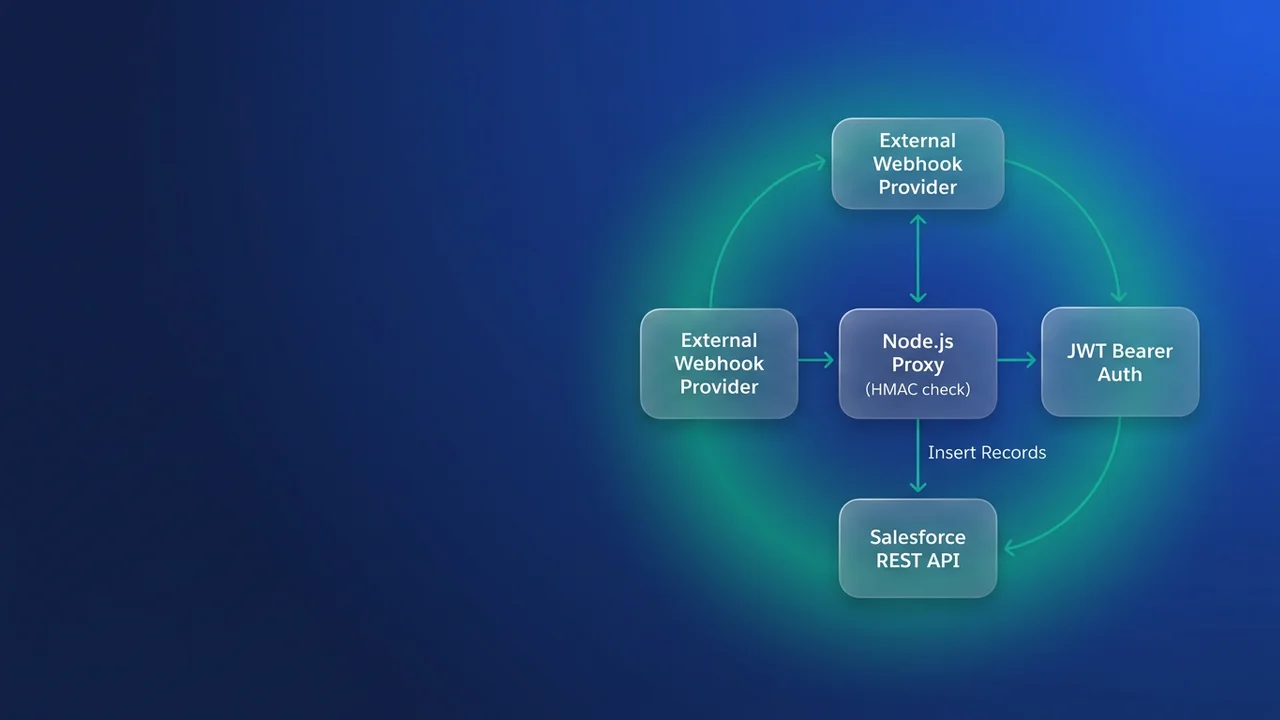

A carrier wants to POST a shipment milestone to you every time a trailer is scanned. There is no URL inside a Salesforce org you can hand them: the platform has no inbound webhook listener, and the only native way to accept an anonymous POST is an Experience Cloud site with a guest user, which turns a stranger on the internet into an identity with object access. So you put a small service in front of the org. Receiving the callback is the easy half; the hard half is how that service authenticates itself into Salesforce every few seconds for the next three years without anybody logging in.
This walks through that build in Node.js. It is based on the reference project Walid Sarkis published on Salesforce Ben on 11 September 2026, with the source on GitHub. That project is a clean skeleton, and I will say where I would change it before it takes real traffic.
Which way the calls actually go
The word webhook makes people picture Salesforce receiving something, but in this architecture Salesforce receives nothing from the outside. Two separate authentication problems sit back to back:
- The carrier calls your service. Your service has to prove the caller is the carrier and not someone who found the URL.
- Your service calls Salesforce. It has to prove it is entitled to write, using a credential no human types in.
The second half is what JWT Bearer Flow is for. You hold an RSA private key, sign a short-lived assertion, and exchange it for an access token. Nothing you store depends on a user session.
| Approach | What the caller presents | What your side stores | Pulling access back | When I pick it |
|---|---|---|---|---|
| Guest-user Apex REST on an Experience Cloud site | Nothing, or a header secret | A public site and a guest profile with object permissions | Deactivate the site or strip the profile | Almost never for machine callbacks |
| Hosted service, web server flow | Provider signature | A refresh token per integration | Revoke the token in Connected App Usage, one click | When a human must consent, or you need per-user context |
| Hosted service, JWT bearer | Provider signature | An RSA private key and a certificate in the org | Rotate the key, re-upload the certificate, redeploy | Default for unattended server-to-server |
JWT bearer is my default for this shape of work because there is no refresh token sitting in the deployment environment to leak or rotate, and a container can be rebuilt from scratch with only an environment variable. The trade-off: the private key is a bearer credential, the certificate in the reference setup lasts ten years, and there is no per-session revoke, so pulling access means shipping a new build. I have had to do exactly that at 11pm after a laptop holding a copy of the key went missing, and the gap between deciding to revoke and the new certificate being live was forty minutes. If you are still choosing between flows, the comparison of Salesforce OAuth flows covers the alternatives.
Keys, the external client app, and the step people miss
Generate the pair locally. The certificate is only a carrier for the public key, so the subject fields are there for your own recognition:
openssl genrsa -out carrier-bridge.key 2048
openssl req -new -x509 -key carrier-bridge.key -out carrier-bridge.crt -days 730 \
  -subj "/C=GB/ST=Greater Manchester/L=Manchester/O=Northwind Freight/CN=carrier-bridge"
The reference project uses -days 3650. I use 730. A ten-year certificate means the rotation runbook gets written by whoever is on call in 2036, which is to say never. Two years puts it in a calendar you still look at.
In Setup, create an external client app. On the Settings tab, add the OAuth scopes the integration needs (api and refresh_token is the usual pair, and yes, you still tick refresh_token even though you never use one). In Flow Enablement, switch on the JWT bearer flow and upload carrier-bridge.crt. The step that produces most of the support tickets comes next: the sub user must be pre-authorised. Set Permitted Users to admin approved users are pre-authorized, and add the integration user's profile or permission set to the App Policies allowlist. Skip it and the token request fails with invalid_grant while every value in your JWT is correct. The external client app scopes and setup walkthrough covers that configuration in more depth.
Give the integration user only what the payload needs. In my case that is create on one platform event and nothing else.
Signing the assertion and keeping the session
The claim set is four required values plus one I add by choice:
// orgAssertion.js
import { randomUUID } from 'node:crypto';
import jwt from 'jsonwebtoken';

const ASSERTION_TTL_SECONDS = 180;

export function signOrgAssertion() {
  const privateKey = process.env.SF_PRIVATE_KEY.replace(/\\n/g, '\n');

  const claims = {
    iss: process.env.SF_CONSUMER_KEY,      // external client app consumer key
    sub: process.env.SF_INTEGRATION_USER,  // pre-authorised username
    aud: process.env.SF_AUDIENCE,          // https://login.salesforce.com or https://test.salesforce.com
    exp: Math.floor(Date.now() / 1000) + ASSERTION_TTL_SECONDS,
    jti: randomUUID()
  };

  return jwt.sign(claims, privateKey, { algorithm: 'RS256' });
}
The reference project uses 180 seconds for exp; Salesforce's own documentation example uses 300. I keep 180, because the assertion is created and spent inside the same function call and three minutes is already generous. What that window hides is host clock drift. When the clock on the box runs slow, exp is already in the past by the time Salesforce parses it, and the failure looks like a credential problem: every request returns invalid_grant, nothing in your code changed, the key still matches the certificate. So log the local unix timestamp next to the exp you signed whenever a token request fails. That one line turns an afternoon of re-uploading certificates into a two minute NTP check.
jti is optional. If you send it, Salesforce checks the value has not been seen before, which kills replay of a captured assertion. A UUID per call costs nothing.
The token exchange returns both the access token and the instance URL, and the second one matters:
// orgSession.js
import { signOrgAssertion } from './orgAssertion.js';

const GRANT_TYPE = 'urn:ietf:params:oauth:grant-type:jwt-bearer';
let cached = null;

export async function getOrgSession({ force = false } = {}) {
  if (!force && cached && cached.leaseUntil > Date.now()) return cached;

  const res = await fetch(process.env.SF_TOKEN_URL, {
    method: 'POST',
    headers: { 'Content-Type': 'application/x-www-form-urlencoded' },
    body: new URLSearchParams({ grant_type: GRANT_TYPE, assertion: signOrgAssertion() })
  });

  const payload = await res.json();
  if (!res.ok) {
    // never log payload.access_token, and never log the assertion
    throw new Error(`token request failed: ${payload.error} (${payload.error_description})`);
  }

  cached = {
    accessToken: payload.access_token,
    instanceUrl: payload.instance_url,
    leaseUntil: Date.now() + 20 * 60 * 1000  // local guess, a 401 is the real authority
  };
  return cached;
}

export async function publishShipmentEvent(event) {
  let session = await getOrgSession();
  let res = await sendEvent(session, event);

  if (res.status === 401) {
    session = await getOrgSession({ force: true });
    res = await sendEvent(session, event);
  }

  if (!res.ok) throw new Error(`publish failed: ${res.status} ${await res.text()}`);
}

function sendEvent(session, event) {
  return fetch(`${session.instanceUrl}/services/data/v67.0/sobjects/Carrier_Milestone__e/`, {
    method: 'POST',
    headers: {
      Authorization: `Bearer ${session.accessToken}`,
      'Content-Type': 'application/json'
    },
    body: JSON.stringify({
      Tracking_Number__c: event.tracking_number,
      Milestone_Code__c: event.code,
      Scanned_At__c: event.scanned_at
    })
  });
}
The session lease is a local guess. How long the token actually lives is decided by the org's session timeout setting, and the token response does not tell you what that is. Treat the 401 as the source of truth and force one refresh when you see it. Publishing to a platform event instead of an sObject also hands backpressure to Salesforce: the subscriber trigger runs on the platform's schedule, and a burst of scans does not become a burst of synchronous DML.
The reference project names its equivalents getAssertionToken() and getSalesforceToken(). Its placeholder API function hardcodes var sfInstanceUrl = 'your salesforce URL'; while referring to token and messagePayload, neither of which is in its scope, so as written it throws a ReferenceError. Fix it by reading instance_url off the token response, which is already sitting there. Hardcoding a My Domain URL is extra config, and it breaks the day someone migrates the org.
Authenticating the webhook itself
The reference implementation checks a pre-shared VERIFY_TOKEN during the GET handshake, which is the pattern Meta's Graph API uses with hub.mode, hub.challenge and hub.verify_token. That handshake happens once, at subscription time. The POST handler that runs thereafter checks nothing. Anyone who learns the URL can post arbitrary JSON and cause an authenticated write into your org.
Most serious providers sign their payloads. Verify over the raw bytes, before any JSON parsing:
import crypto from 'node:crypto';
import express from 'express';

const app = express();
app.use('/hooks/carrier/', express.raw({ type: 'application/json', limit: '512kb' }));

function verifyCarrierSignature(req, res, next) {
  const timestamp = req.get('x-carrier-timestamp');
  const signature = req.get('x-carrier-signature') || '';
  const skew = Math.abs(Math.floor(Date.now() / 1000) - Number(timestamp));

  if (!timestamp || Number.isNaN(skew) || skew > 300) return res.status(401).end();

  const expected = crypto
    .createHmac('sha256', process.env.CARRIER_SIGNING_SECRET)
    .update(`${timestamp}.`)
    .update(req.body)
    .digest();

  const provided = Buffer.from(signature, 'hex');
  if (provided.length !== expected.length || !crypto.timingSafeEqual(provided, expected)) {
    return res.status(401).end();
  }

  req.event = JSON.parse(req.body.toString('utf8'));
  next();
}

app.post('/hooks/carrier/', verifyCarrierSignature, async (req, res) => {
  res.status(202).end();          // acknowledge fast so the carrier stops retrying
  await enqueue(req.event);       // durable store, drained by a worker
});
Three details do the work here. express.raw preserves byte fidelity, because express.json reserialises and your HMAC will never match. The timestamp inside the signed string, plus a five minute window, stops a captured request being replayed tomorrow. timingSafeEqual after a length check avoids leaking the comparison through response timing.
The reference code acknowledges with a 200 before awaiting the token call, which is the right instinct, since providers retry anything that is not a 2xx and you do not want Salesforce latency driving their retry logic. What it does next is drop failures on the floor. I have watched an integration user lose a permission set during a profile cleanup, after which the service kept returning 200 to a carrier that counted every delivery as a success, and nobody noticed for four days until someone compared milestone records against the carrier's portal by hand. Acknowledge fast and enqueue, then let the worker retry and alert. A small Postgres table is enough queue until the volume says otherwise.
Environment and deployment
Six variables, and they map one to one onto the reference project's set:
| Variable | What it holds |
|---|---|
SF_PRIVATE_KEY |
Contents of carrier-bridge.key, newlines escaped if your host is single-line only |
SF_CONSUMER_KEY |
Consumer key of the external client app, becomes iss |
SF_INTEGRATION_USER |
Username of the pre-authorised user, becomes sub |
SF_AUDIENCE |
https://login.salesforce.com, or https://test.salesforce.com for a sandbox |
SF_TOKEN_URL |
Same host plus /services/oauth2/token |
CARRIER_SIGNING_SECRET |
The provider's HMAC secret, used only by the middleware |
A sandbox refresh changes the username (the sandbox name is appended), so SF_INTEGRATION_USER and SF_AUDIENCE both belong on the refresh checklist.
Deployment on Render or anything similar is short: push the repo, create a web service, set the build command to npm install and the start command to node app.js, paste the variables into the dashboard, deploy, take the public URL from the events log, and register it with the provider. Test with a signed request from Postman or curl before you switch the provider over, because a failed signature returns a bare 401 and you want to know the first one is yours.
One thing to strip on the way through: the reference app runs console.log("Salesforce Access Token:", response.data.access_token). On a hosted platform those logs are retained and readable by anyone with dashboard access, and a live session token in a log stream is a working credential for as long as the org's session timeout allows. The source is honest about its own scope, and says: "the provided project is coded with minimal security implementations for the purpose of showing a basic hosted web service. Make sure all the security implementations are in place and validated by your security team." Take that at face value and get the review.
What to watch for
The aud claim is the login host, not your My Domain URL, and a mismatch surfaces as invalid_grant with no hint about which claim was wrong.
The certificate expiry is now a dated obligation. Put the date wherever you track domain renewals, and rehearse the rotation once so you know whether the org accepts the new certificate before the old one is removed.
Multi-line private keys in environment variables are the most common deploy-day failure. If the host stores them single-line, escape on the way in and replace(/\\n/g, '\n') on the way out. Redact access_token, the assertion and the signing secret from every log path too, including error handlers that dump a whole response object.
A deactivated or unlicensed integration user takes the whole integration down instantly, and the error is indistinguishable from a key problem. Alert on consecutive token failures, not on individual event failures.
API limits belong to the integration user's org, not to your service. If the carrier can burst, the queue in front of Salesforce is what stops a bad afternoon becoming a limit breach.
Leave a Comment