
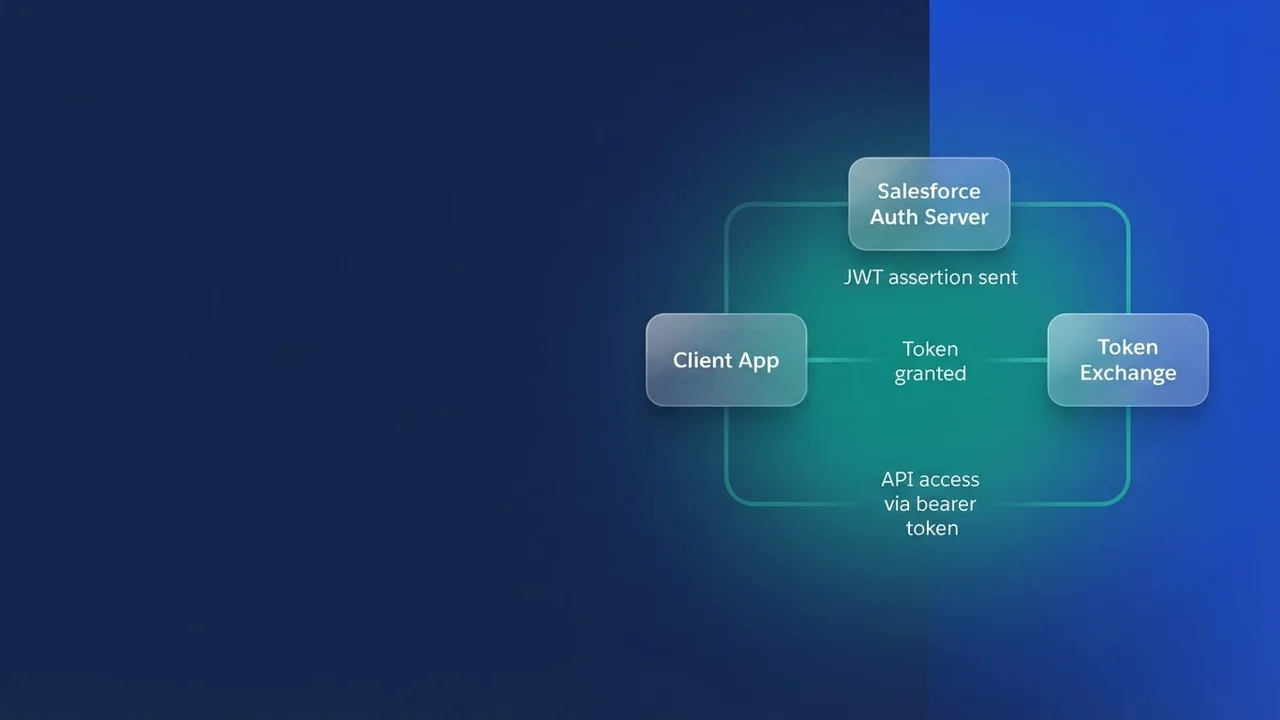

What changed since the JWT bearer guide
If you configured an External Client App last year for a packaged server-to-server integration, almost none of that work transfers to wiring an MCP client into your org. The Headless 360 MCP server has been available as a Beta Service since July 2026, under Salesforce's Beta Services Terms, and it comes with its own scope, API version floor and client configuration rules. Salesforce also restricted new Connected App creation as of Spring '26, so the app you would have reached for by habit is off the menu. Connected Apps are explicitly not supported for connecting an MCP client to an org.
The difference in architecture costs far more to get wrong than any setup screen does. A JWT bearer integration authenticates once, as a fixed integration user, using a certificate, and every record it touches carries that user's fingerprint. Headless 360 MCP takes the opposite posture: an interactive OAuth flow where the human authorises the client, and every tool call after that runs as that human. The server exposes four tools. Discover does semantic search across available operations, Describe returns operation specifications, Dispatch executes actions, and Dispatch (Read-Only) retrieves information without changing anything. Dispatch is the one that writes.
The requirements that gate everything else
Four things must be true before an MCP client will complete a handshake.
First, API version v67.0 or later. That is a hard floor. Older orgs and older client configurations that pin an API version will fail before any scope question comes up.
Second, an External Client App carrying mcp_api. In the scope picker that is "Access MCP servers (mcp_api)", paired with "Perform requests at any time (refresh_token)", a single picker entry that resolves to the scope string refresh_token, offline_access. That is why some guides list three scope values where the UI shows two boxes. Resist the urge to add "Manage user data via APIs (api)" while you are in there. The mcp_api scope exists precisely so that agent traffic does not need the full Platform API surface: REST, Tooling, Metadata and the rest. Adding api hands an agent everything, permanently, to fix a problem that is almost never a scope problem.
Third, JWT-based access tokens for named users, enabled under the app's security settings.
Fourth, a callback URL that matches the client exactly on protocol, domain and path. Mismatches here produce invalid redirect URI, usually from a trailing character or http against https.
| MCP client | Callback URL to register |
|---|---|
| Claude | https://claude.ai/api/mcp/auth_callback |
| Postman | https://oauth.pstmn.io/v1/callback or https://oauth.pstmn.io/v1/browser-callback |
| Cursor | http://localhost:8787/callback or cursor://anysphere.cursor-mcp/oauth/callback |
| ChatGPT | Retrieved from ChatGPT's Advanced settings |
The consumer key lives under Settings, then Consumer Key and Secret within OAuth Settings. Then wait. The app can take up to 30 minutes to become available and operational for the MCP client, and that window is responsible for a large share of the "I followed every step and it still fails" reports. I have watched a team rebuild an External Client App three times inside twenty minutes chasing a failure that was only propagation delay, and the rebuild reset the consumer key each time, so the client config they were testing against was stale too.
On the client side, the shape of the config varies by vendor, but the decisions are the same: which URL, and whether authentication is OAuth rather than a pasted static token.
{
  "mcpServers": {
    "sf-headless-360-prod": {
      "url": "https://api.salesforce.com/platform/mcp/v1/platform/headless-360",
      "auth": "oauth"
    },
    "sf-headless-360-uat": {
      "url": "https://api.salesforce.com/platform/mcp/v1/sandbox/platform/headless-360",
      "auth": "oauth"
    }
  }
}
Keep the two entries distinctly named. An agent that cannot tell production from UAT by the server name will eventually Dispatch against the wrong one.
Public or confidential: the one place the guidance splits
Community walkthroughs for the Claude quick-start recommend a fully public client: disable the secret requirement on the web server flow, disable it on the refresh token flow, enable PKCE, enable JWT-based tokens. Salesforce's own page for creating an External Client App for hosted MCP points the other way for web-based clients. It describes enabling "Require Secret for Web Server Flow", and reserves the no-secret posture for desktop applications, on the grounds that a secret embedded in a desktop binary can be recovered through decompilation unless the vendor confirms it is stored securely. That page does not mention a refresh-token-flow secret toggle at all, and does not discuss PKCE.
| Hosted web client (claude.ai) | Desktop or CLI client (local install) | |
|---|---|---|
| Where a secret would live | Vendor's server infrastructure | A file or binary on the user's machine |
| Require Secret for Web Server Flow | On | Off |
| What protects the exchange | Secret plus registered callback | PKCE plus registered callback |
| Failure mode if you get it wrong | Handshake fails loudly, you fix it | Secret extracted quietly, you never know |
My position: for a hosted web client that can hold a secret server-side, require the secret. For a locally installed desktop or CLI client, run public and rely on PKCE. A secret shipped inside a desktop binary can be pulled back out of it, and you will never know when someone has. The trade-off: the public posture leans entirely on exact callback matching and code exchange, so sloppy callback registration is more dangerous there than it looks.
Whichever way you go, build one External Client App per client. Separate apps for Claude, ChatGPT and Cursor cost you ten minutes each and give you independent revocation, independent policies and a readable audit trail. A single shared app gives you one switch that turns off everything at once, usually at the worst moment.
mcp_api is a scope, not a permission
This misconfiguration generates the most support traffic, and the assumption behind it sounds reasonable: I granted the scope, so the agent can do the thing. The Headless 360 documentation is blunt about it: "Object permissions (CRUD), field-level security (FLS), sharing rules, profile permissions, and permission sets all apply". MCP tools run with the same permissions as the user who authenticated with the External Client App, so the scope opens the channel and the user's permissions decide what travels down it.
The two failure classes look alike and have nothing in common:
invalid scopemeansmcp_apiis not enabled on the app, or the client requested something the app does not carry. Fix it in the External Client App.- Insufficient permissions on a Dispatch call means the authorising user lacks object permissions, field-level security, or record access through sharing. Fix it in a permission set. Touching the app's scopes will not help, and widening them to
apionly hides the problem behind a bigger hole.
There is a third category people miss entirely: OAuth Policies. If the app restricts access to a specific permission set or profile and the user is outside it, the flow is blocked before any tool runs, and the user sees an authorisation failure that reads nothing like a permissions problem.
Build a dedicated permission set for MCP access and assign it deliberately: one object to review when someone asks what the agent can reach, one assignment to remove when a person changes role. Avoid service-account patterns. Pointing every agent at one high-privilege user collapses attribution exactly where you want it most.
While you are in OAuth Policies, shorten the token lifetime. The default is a year, which is a long time for a stolen token to stay useful. Restrict by IP where the client's egress is predictable, and pre-authorise only the users who need it. Revocation lives in the OAuth Usage menu, individually or in bulk. To audit, filter API_CLIENT_CATEGORY to SALESFORCE_HOSTED_MCP in the Event Log File Browser and read STATUS_CODE, USER_NAME and CLIENT_IP together. Those three columns answer most of what your security team will ask.
Where JWT bearer still belongs
None of this retires the JWT bearer flow. It remains the right pattern for scheduled, unattended, server-to-server work: a nightly reconciliation job, a middleware tier calling into Salesforce with no human present. The rule that mattered most in that world still holds: never package a private key. If you distribute a managed package, distribute the structure of the integration and let each subscriber supply their own consumer key and their own certificate, held in custom metadata.
public with sharing class ShipmentLedgerTokenBroker {

    public class TokenException extends Exception {}

    public static String fetchAccessToken(String linkName) {
        Shipment_Ledger_Link__mdt link = Shipment_Ledger_Link__mdt.getInstance(linkName);
        if (link == null) {
            throw new TokenException('No ledger link configured for ' + linkName);
        }

        Auth.JWT claims = new Auth.JWT();
        claims.setIss(link.Consumer_Key__c);
        claims.setSub(link.Run_As_Username__c);
        claims.setAud(link.Audience_Url__c);
        claims.setValidityLength(180);

        Auth.JWS signedClaims = new Auth.JWS(claims, link.Certificate_Name__c);
        Auth.JWTBearerTokenExchange exchange =
            new Auth.JWTBearerTokenExchange(link.Token_Endpoint__c, signedClaims);

        return exchange.getAccessToken();
    }
}
Every value that identifies the org (consumer key, running user, audience, certificate name, token endpoint) comes from subscriber-supplied metadata, so the same code runs against production and sandbox by swapping a record rather than a deployment.
What the subscriber has to do after install
Ship the pattern, never the credentials, and write the install guide around four steps:
- The admin mints a certificate in their own org, self-signed or issued by a CA.
- They register an External Client App of their own and keep the resulting consumer key beside that certificate.
- Give them a setup screen instead of a data-entry chore: a small LWC that writes the consumer key and certificate name into your custom metadata.
- Include a permission set that opens your Apex classes and Custom Metadata Types, so the token exchange does not fall over on access you forgot to grant.
What I would not do is reach for this flow to make an MCP client work without an interactive login. It will appear to work. You will get a token, the client will connect, and you will have swapped a per-user permission model for one shared identity carrying whatever that user can see. The value of the MCP design is that the agent inherits one person's permissions and leaves that person's name on every call. Skipping the login trades that away to save a browser tab.
What to watch for
- Headless 360 MCP has been a Beta Service since July 2026 and carries Beta Services Terms. Plan pilots, and keep out any production commitment that assumes GA behaviour.
- Do not rebuild the app while you wait out the 30 minutes. You will only invalidate the consumer key your client is already holding.
- Callback drift shows up as
invalid redirect URI. Compare protocol, host and path character by character, custom URI schemes included. invalid client IDusually means right credentials, wrong org: the app lives somewhere other than the org the client is pointed at. Easy to hit when production and sandbox configs sit side by side.- Dispatch is a write path, and read-only retrieval has its own tool. If a use case only needs to read, restrict the authorising user's permissions so that Dispatch cannot do damage even when the model decides to try.
- Token lifetime is one year by default. Shorten it before the pilot expands, not after.
Leave a Comment