


Why you need a Muting Permission Set in your Permission Set Groups
When Permission Set Groups first launched, plenty of us thought profile-heavy orgs were finished. Then we hit the snag: what do you do when a group is 90% right but hands out one permission too many? The Muting Permission Set covers that case by letting you subtract access instead of adding it.
You have a set of permissions that works for most of the sales team, and you need a slightly restricted version for your interns. Rather than rebuild from scratch, you use a Muting Permission Set to turn off the sensitive parts. It is a cleaner way to handle security, and it keeps your list of permission sets from spiraling out of control.
What is a Muting Permission Set anyway?
Think of it as a reverse permission set. A normal one grants access; this one blocks it. You cannot assign a Muting Permission Set directly to a user, though. It exists only as a component inside a Permission Set Group, where it filters the other permission sets in that group.
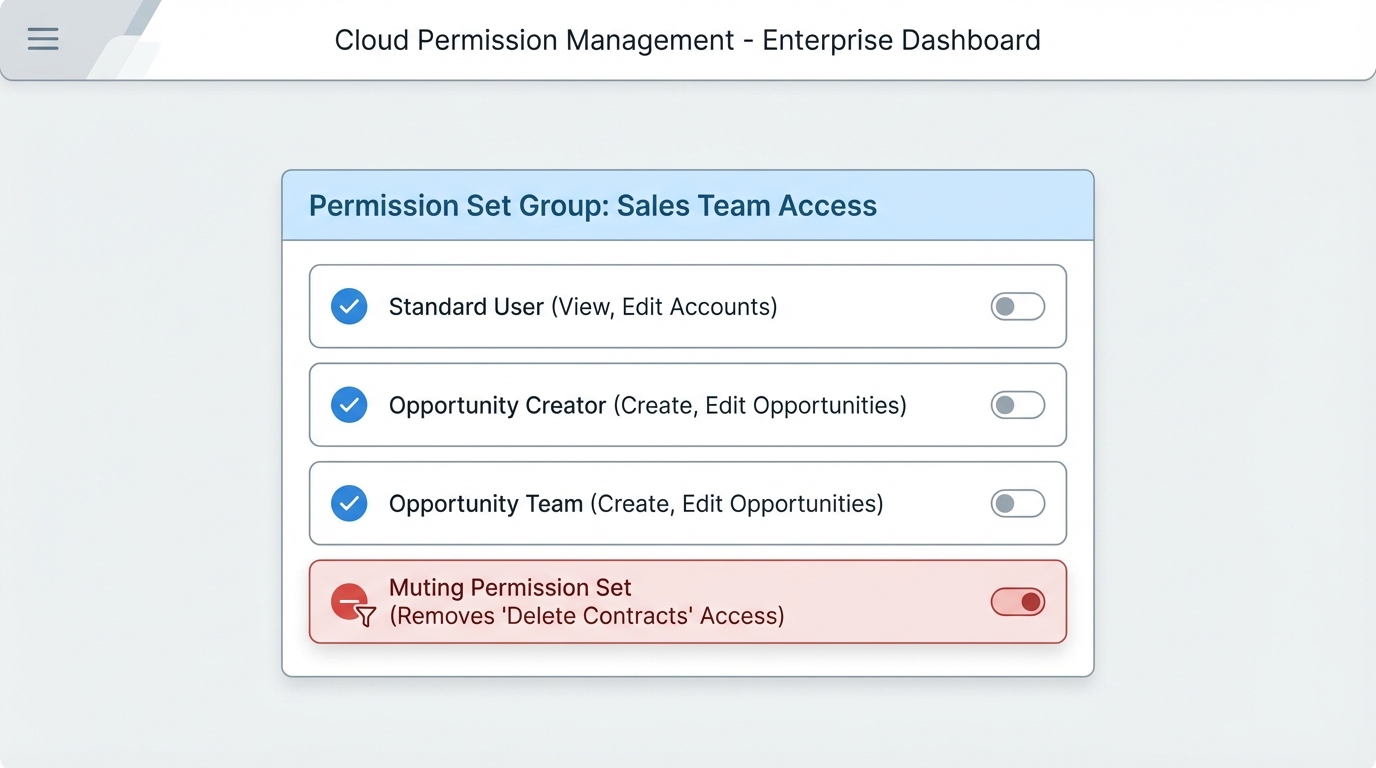
A Permission Set Group with a Muting Permission Set filtering the permissions the group grants.
Real-world use cases for the Muting Permission Set
In my experience this earns its keep when you are enforcing least privilege. Start with a broad group of permissions, then remove the high-risk ones like Delete or Modify All Data for specific user groups. It beats keeping dozens of nearly identical permission sets around.
- Interns and temp staff. Use your standard group and mute the ability to export reports or delete records.
- Environment differences. Maybe a permission should stay active in a Sandbox but be muted in Production while you finish a rollout.
- Overlapping sets. If two permission sets in a group clash, a mute defines exactly what the final access should be.
Plenty of people treat this as a global deny button, and it isn't one. If a user gets the permission from a profile or from a permission set outside the group, the mute won't stop them.
How a Muting Permission Set actually works
The rule is narrow: muting affects only the permissions granted inside that specific Permission Set Group. If you are cleaning up a messy security model, it is worth checking how you are managing roles vs profiles as well, so you don't leave holes elsewhere.
The precedence works like this:
- If the Group grants "Edit" and the Muting Permission Set disables "Edit," the result for that group is no "Edit" access.
- If the User's Profile grants "Edit," the mute in a group will NOT take that away.
- Muting can target almost anything: objects, fields, system permissions, even Apex class access.
Setting up the mute in the UI
Setup is short. Open your Permission Set Group and find the "Muting Permission Set in Group" section, then create a new one. I always name it something obvious like Mute_Delete_Permissions so the next admin knows exactly what it does. Inside, you check the "Muted" box next to each permission you want to kill.
Deploying via metadata
If you deploy through SFDX or a CI/CD tool, you will see this in the XML. The mutingPermissionSets tag sits right inside the Permission Set Group file. Here is how that snippet looks:
<PermissionSetGroup xmlns="http://soap.sforce.com/2006/04/metadata">
  <label>Sales Support Group</label>
  <permissionSets>
    <fullName>Standard_User_Access</fullName>
  </permissionSets>
  <mutingPermissionSets>
    <fullName>Mute_Sensitive_Actions</fullName>
  </mutingPermissionSets>
</PermissionSetGroup>
Don't make these common mistakes
Most teams get this wrong the first time, and the mistake is nearly always the same: assuming a Muting Permission Set works like a global "Deny" permission. It doesn't. It is strictly a subtraction tool for that one group. If the logic is getting complicated, step back and check that the model is clear before you add another layer.
Second, test in a sandbox. I have watched admins mute a permission expecting it to close a security hole, then find the user still had it through their profile. Use the "View Summary" button on the Permission Set Group to see the permissions that actually result. It saves a lot of headache during an audit.
Key takeaways
- A Muting Permission Set only works inside a Permission Set Group.
- You cannot assign one to a user, so don't go looking for it on the assignment screen.
- It only mutes permissions granted by other sets within the same group.
- It is the cleanest way to make a restricted version of a standard permission set without cloning it.
- Name them clearly, with a
Mute_prefix, so your teammates aren't guessing.
The point of all this is to keep the org simple. Instead of five versions of a "Sales" permission set, you keep one base set and a few groups with mutes on top. That is easier to live with and much easier to audit. Try it the next time you are tempted to hit "Clone" on a permission set.



Leave a Comment