
Why the Salesforce REST API is the go-to for integrations
If you're working in the ecosystem today, you're going to spend a lot of time with the Salesforce REST API. It's the backbone of almost every modern integration I've built, from simple mobile apps to complex middleware connections. But what is it, really? At its heart, it is just a way for two systems to talk over the web without a bunch of unnecessary baggage.
I remember when SOAP was the only real option for developers. It was heavy, rigid, and honestly a bit of a headache to parse. REST changed the game by being lightweight and using the same protocols the internet already uses. If you've ever used a browser, you've already used the basic concepts of REST. It's simple, it's fast, and it just works.
But don't let the simplicity fool you. There's a specific architecture here that makes it so reliable. It's built on a few core rules that keep things organized, even when you're scaling up to handle millions of records. One of the biggest things to understand is that it's stateless. The server doesn't remember your last request, so every single call you make has to have all the info the server needs to get the job done.
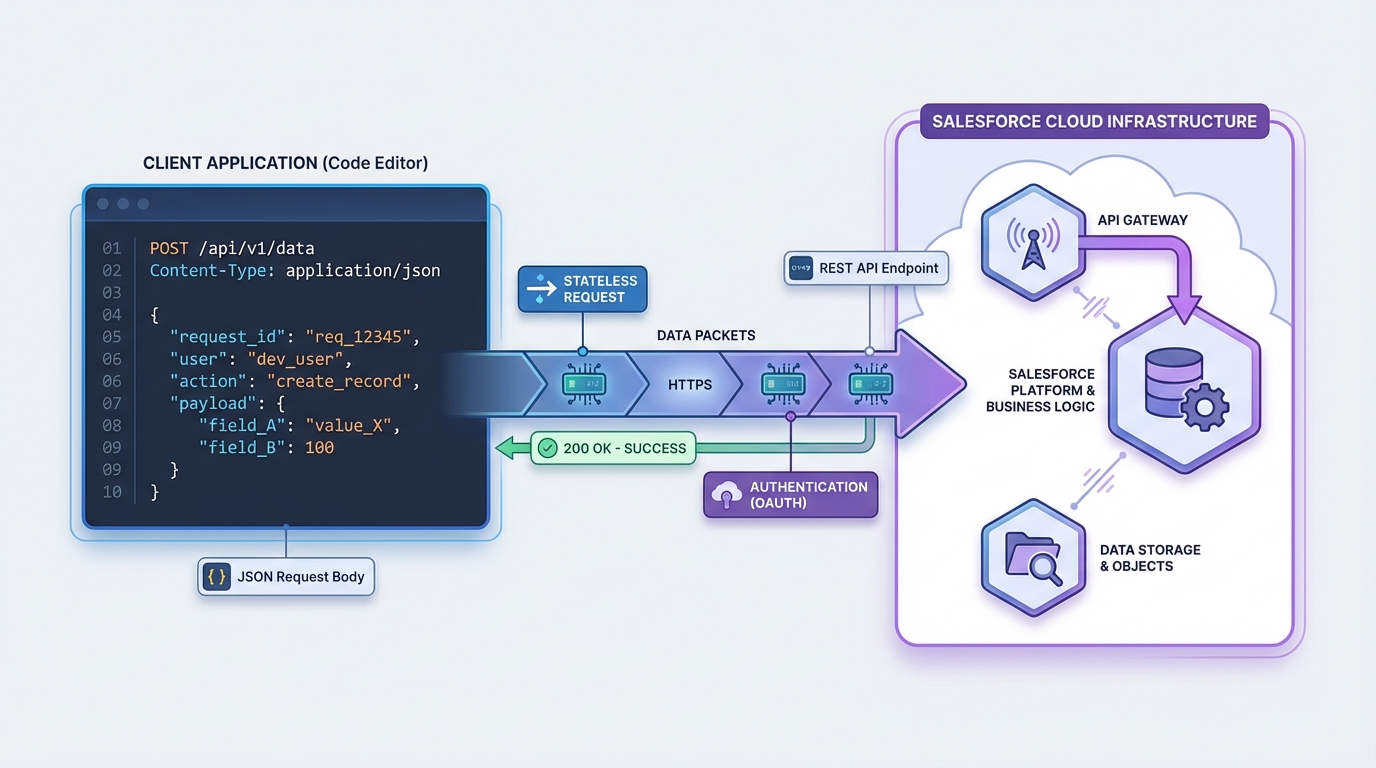
A technical architecture diagram illustrating the data flow between a client application and the Salesforce REST API.
How the Salesforce REST API handles data
When we talk about REST, we're talking about resources. In our world, those resources are things like Accounts, Contacts, or even custom objects. Each one has its own unique URL (or URI). You don't call a "function" to get data; you go to a specific address and ask for what's there. It's a much more intuitive way to think about data than the old-school procedural way of doing things.
One thing that trips people up is the difference between REST and other protocols. If you're coming from a background where you used WSDLs and heavy XML envelopes, you'll find REST a breath of fresh air. I've written a bit about SOAP vs REST before, and the main takeaway is usually about flexibility and speed. REST uses JSON most of the time, which is way easier for modern languages like JavaScript to handle.
The methods you actually need to know
In my experience, you'll spend 90 percent of your time using just four or five HTTP verbs. These map directly to the CRUD operations we use in the database. Here is how they break down:
- GET: This is for reading. You're just asking the server to show you a record or a list of records.
- POST: Use this when you want to create something new. You send the data in the body, and the server builds the record.
- PATCH: This is for updates. It's better than PUT because you only have to send the fields you want to change, not the whole record.
- DELETE: Pretty self-explanatory. It removes the resource from the system.
Pro Tip: Always check your headers. I've seen so many developers pull their hair out over a 415 error only to realize they forgot to set the Content-Type to application/json. It's the little things that get you.
Designing a better Salesforce REST API strategy
Look, anyone can make an API call, but doing it at scale is where things get interesting. When I'm working on a Salesforce API integration, I'm always thinking about limits and performance. You can't just hammer the endpoint with thousands of individual requests without hitting governor limits or slowing down the org.
So what does a good design look like? It starts with using the right status codes. Don't just return a 200 OK for everything. If a record was created, use 201. If a request was bad, use 400. This helps the calling system know exactly what happened without having to dig through the response body. Also, keep your resource names plural and consistent. It makes the API much easier for other developers to navigate.
A quick look at a request
Here is what a typical POST request might look like when you're creating an account. It's clean, direct, and easy to read.
POST /services/data/v60.0/sobjects/Account
{
  "Name": "Cloud Solutions Ltd",
  "Industry": "Technology"
}
The server will come back with a 201 Created status if everything went well. It'll also give you the ID of the new record, which you'll probably need for your next step. It's this predictable pattern that makes the Salesforce REST API so powerful for developers.
Key Takeaways
- Statelessness is key: Every request is independent and must contain all necessary authentication and data.
- JSON is the standard: While XML is supported, JSON is much lighter and easier to work with in modern LWCs and middleware.
- Use the right verbs: Stick to GET, POST, PATCH, and DELETE to keep your integration predictable.
- Mind your limits: Always design for bulk and be aware of your daily API request limits.
- Version your calls: Always include the API version in your URL to prevent your code from breaking when Salesforce updates the platform.
The bottom line
At the end of the day, the Salesforce REST API is about making life easier for developers. It follows the rules of the web, it's flexible, and it's built to handle the massive data volumes we deal with in the enterprise world. Whether you're building a custom UI or connecting to an external ERP, mastering these basics is going to save you a lot of time and frustration down the road. Just remember to keep your calls efficient and your error handling clean, and you'll be ahead of the curve.




Leave a Comment