


Why the Salesforce REST API is the go-to for integrations
If you're working in the ecosystem today, you're going to spend a lot of time with the Salesforce REST API. It's the backbone of almost every modern integration I've built, from simple mobile apps to complex middleware connections. It is a way for two systems to talk over the web without a bunch of unnecessary baggage.
I remember when SOAP was the only real option for developers. It was heavy, rigid, and honestly a bit of a headache to parse. REST is lightweight and uses the same protocols the internet already runs on, so if you've ever used a browser, you've already used the basic concepts.
The architecture underneath is what keeps it reliable, even when you're scaling up to handle millions of records. The first piece to understand is that it's stateless. The server doesn't remember your last request, so every single call has to carry all the info the server needs to get the job done.
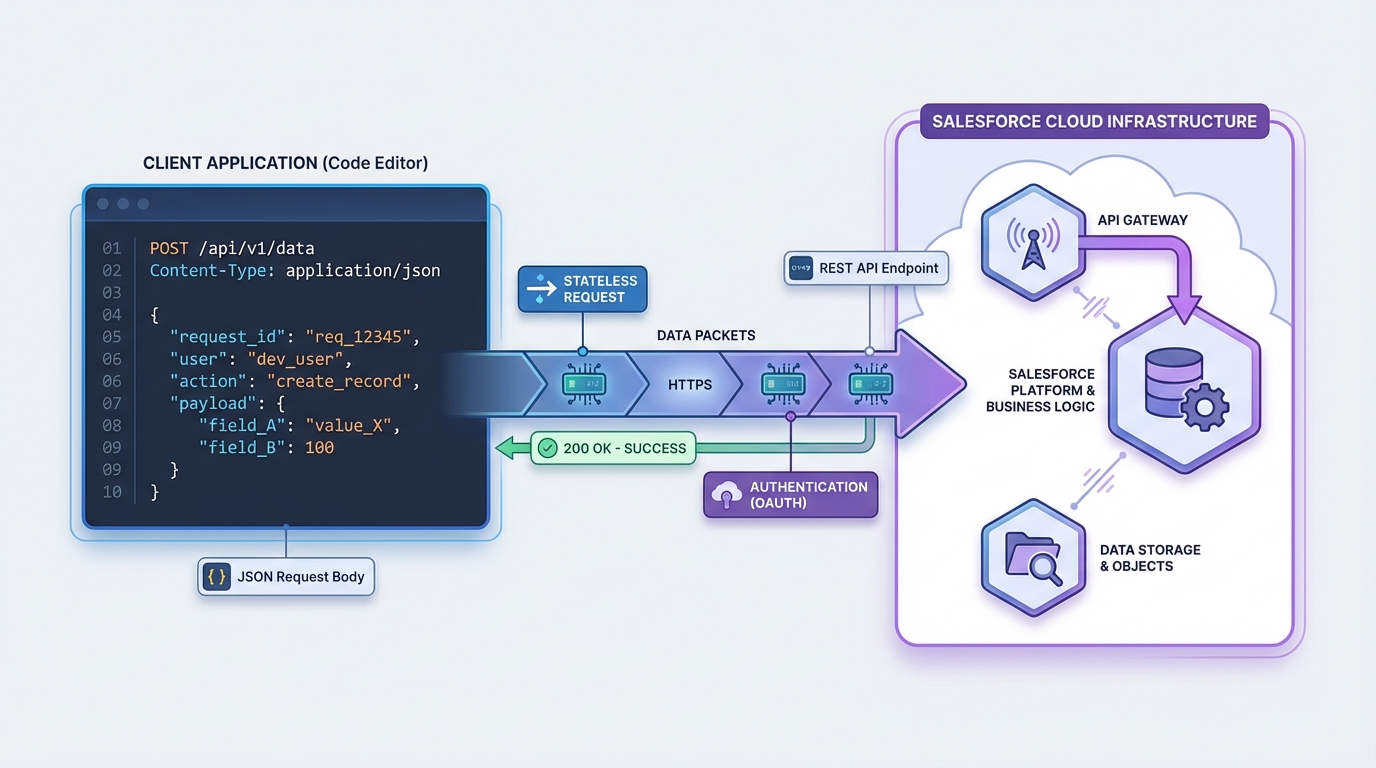
A technical architecture diagram illustrating the data flow between a client application and the Salesforce REST API.
How the Salesforce REST API handles data
When we talk about REST, we're talking about resources. In our world, those resources are Accounts, Contacts, or custom objects. Each one has its own URL (or URI). You don't call a "function" to get data; you go to a specific address and ask for what's there. It's a more intuitive way to think about data than the old-school procedural approach.
If you're coming from a background of WSDLs and heavy XML envelopes, REST will feel like a relief. I've written a bit about SOAP vs REST before, and the difference usually comes down to flexibility and speed. REST uses JSON most of the time, which is way easier for modern languages like JavaScript to handle.
The methods you actually need to know
In my experience, you'll spend 90 percent of your time using just four or five HTTP verbs, and they map directly onto the CRUD operations we use in the database.
- GET is for reading. You're asking the server to show you a record or a list of records.
- POST creates something new. You send the data in the body, and the server builds the record.
- PATCH is for updates. It's better than PUT because you only have to send the fields you want to change, not the whole record.
- DELETE removes the resource from the system.
Pro tip: always check your headers. I've seen developers pull their hair out over a 415 error only to realize they forgot to set the Content-Type to application/json. It's the little things that get you.
Designing a better Salesforce REST API strategy
Anyone can make an API call. Doing it at scale is where things get interesting. When I'm working on a Salesforce API integration, I'm thinking about limits and performance from the start. Hammer the endpoint with thousands of individual requests and you'll hit governor limits or slow the org down.
Good design starts with using the right status codes. Don't just return a 200 OK for everything. If a record was created, use 201. If a request was bad, use 400. That tells the calling system exactly what happened without it having to dig through the response body. Keep your resource names plural and consistent too, so the next developer can navigate the API without a map.
A quick look at a request
Here is what a typical POST request might look like when you're creating an account. It's clean, direct, and easy to read.
POST /services/data/v60.0/sobjects/Account
{
  "Name": "Cloud Solutions Ltd",
  "Industry": "Technology"
}
The server will come back with a 201 Created status if everything went well. It'll also give you the ID of the new record, which you'll probably need for your next step. That predictability is most of why the Salesforce REST API is pleasant to build on.
Key takeaways
- Every request is independent and must contain all necessary authentication and data.
- XML is supported, but JSON is much lighter and easier to work with in modern LWCs and middleware.
- Stick to GET, POST, PATCH, and DELETE to keep your integration predictable.
- Design for bulk, and keep an eye on your daily API request limits.
- Always include the API version in your URL to prevent your code from breaking when Salesforce updates the platform.
The bottom line
The Salesforce REST API is about making life easier for developers. It follows the rules of the web, it's flexible, and it's built to handle the data volumes we deal with in enterprise orgs. Whether you're building a custom UI or connecting to an external ERP, these basics will save you a lot of time and frustration down the road. Just keep your calls efficient and your error handling clean.



Leave a Comment