

If you've spent any time building Lightning components, you've definitely faced the choice between application and component events to handle data communication. It sounds simple on paper, but I've seen plenty of experienced developers get tangled up in which one to pick for a specific project requirement.
When you're in the middle of a sprint, it's tempting to just grab an application event because it "just works" everywhere. That shortcut usually leads to a maintenance nightmare later on. Here's how the two actually behave in the real world.
Understanding the scope of application vs component events
The biggest difference between these two is how they travel through your component tree. Think of a component event like a child shouting up the stairs to their parents. The message goes up the hierarchy, and only the ancestors can hear it and react. This is often called "bubbling," and it's very predictable.
Application events are more like a radio broadcast. You fire it off, and every single component in the entire app can hear it, provided they've tuned in by registering a handler. It doesn't matter if they are related or not. That sounds powerful, and it's also how you end up with "spaghetti code" where you can't tell what's triggering what.
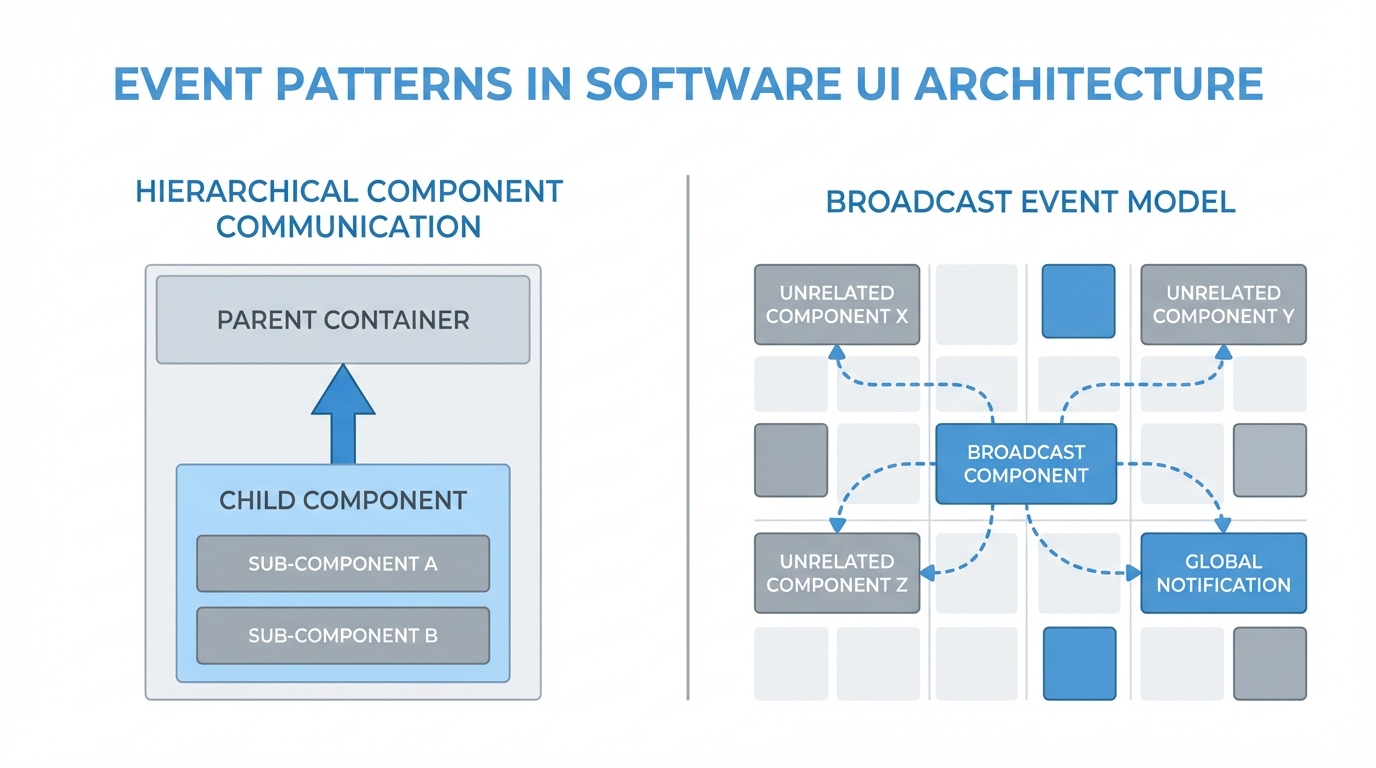
A technical diagram comparing the direct parent-child communication of component events with the broad, multi-component broadcast of application events.
Deciding between application vs component events
So, when should you use one over the other? In my experience, you should try to use a component event about 90% of the time. If you have a child component that needs to tell its parent to refresh a list or close a modal, that's a textbook case for a component event. It keeps things tidy and contained.
But what about those times when two components are totally unrelated? Maybe you have a header component and a footer component that both need to update when a user changes their profile. Since they aren't in the same parent-child tree, you'll need an application event. Just budget for the extra debugging time that comes with it.
A quick look at the code
Setting these up is pretty similar. The difference shows up in the way you call them in your controller. For a component event, you're looking for a specific name you've registered. For an application event, you're using the global $A.get() method.
Here's how you'd fire a component event in your controller:
var cmpEvent = component.getEvent("myEventName");
cmpEvent.setParams({"data": "Some cool info"});
cmpEvent.fire();
And here's the application event version:
var appEvent = $A.get("e.c:myAppEvent");
appEvent.setParams({"data": "Global info"});
appEvent.fire();
Notice the difference? The application event uses that "e." prefix. It's a small detail, but it's the key to the whole broadcast system. If you're also working with newer tech, you might want to see how this compares to LWC component communication which handles things a bit differently.
Performance and traceability
One thing that really trips people up is the performance hit. Application events are heavier because the framework has to check every single component to see if there's a listener. If you've got a complex page with dozens of components, firing application events constantly will slow things down. I've seen apps crawl because someone decided to use an application event for a simple button click.
Also, think about the next developer who has to touch your code. When they see a component event, they only have to look at the parent to see how it's handled. With an application event, they might have to search the entire codebase to find out who's listening. It makes the flow much harder to follow.
If you find yourself needing an application event, double-check your component structure first. Often, you can wrap unrelated components in a common parent and use a component event instead.
Don't forget that if you're calling Apex from these events, you'll still need to understand why we use the @AuraEnabled annotation to make sure your data actually gets to the server.
Key takeaways
- Component events bubble up. Use them for parent-child communication.
- Application events broadcast. Use them only when components are completely unrelated.
- Component events are better for performance and make your code easier to read.
- Always register your events in an .evt file before trying to use them.
- If you're building something new, consider if Lightning Message Service (LMS) is a better fit for your cross-component needs.
The choice comes down to scope. Keep it as local as possible. If you can solve the problem with a component event, do it, and only reach for the application event when you've truly run out of other options. It keeps your Salesforce org cleaner and your debugging sessions much shorter.

Leave a Comment