

Why Salesforce Integration Patterns Matter in the Real World
I've spent years fixing broken connections, and if there's one thing I've learned, it's that picking the right Salesforce Integration Patterns from the start saves you a massive headache later. Most of the time, developers jump straight into writing code without thinking about what happens when the external system goes down or the data volume triples. It's not just about making two systems talk; it's about making sure they don't stop talking when things get messy.
Look, there isn't a one-size-fits-all solution here. You've got to weigh things like latency, how much data you're moving, and whether the user actually needs to see a result immediately. In my experience, choosing the wrong pattern is usually why integrations fail during peak hours. Let's break down the main patterns we actually use on the job.
1. Request and Reply (Synchronous)
This is the most common pattern. A user clicks a button, Salesforce calls an external API, and the user waits for a response. It's simple, but it's also risky. If that external system takes ten seconds to respond, your user is staring at a loading spinner, and you're burning through your transaction limits.
I usually stick to this for things like real-time credit card authorizations or address validation where you literally can't move to the next step without that data. If you're wondering about the tech side, check out this guide on SOAP vs REST to see which protocol fits your specific request-reply needs.
Http http = new Http();
HttpRequest req = new HttpRequest();
req.setEndpoint('https://api.example.com/verify');
req.setMethod('POST');
req.setBody('{"id":"001xx000003DGbV"}');
HttpResponse res = http.send(req);
System.debug(res.getBody());
2. Fire and Forget (Asynchronous)
Here's the thing: most of the time, your user doesn't need to wait. If you're just sending an order to an ERP or logging an activity, use a "fire and forget" approach. Salesforce sends the message and moves on. We usually do this with Platform Events or Queueable Apex. It's much more resilient because if the external system is slow, it doesn't hang up the entire Salesforce UI. I've seen teams try to do everything synchronously and then wonder why their org feels sluggish.
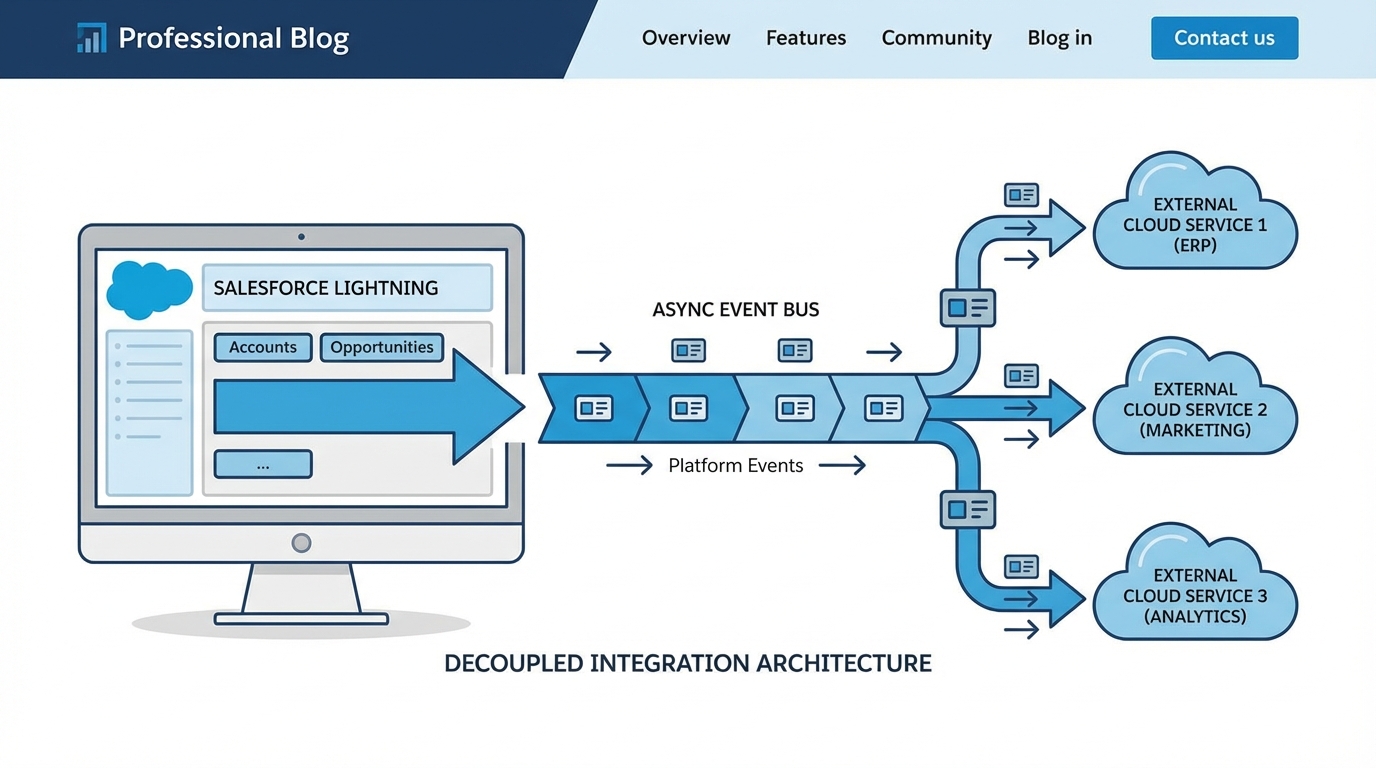
A technical architecture diagram showing a Salesforce Platform Event bus decoupling the user interface from external system processes to ensure system resilience.
Scaling with Salesforce Integration Patterns
When you start dealing with millions of records, those simple API calls won't cut it. You have to look at Salesforce Integration Patterns that handle bulk data or decoupled events. This is where you move away from "point-to-point" thinking and start thinking like an architect.
3. Batch Data Synchronization
If you're syncing 500,000 records from a legacy database every night, don't use a REST API call for each one. That's a great way to hit your limits by 9:00 AM. You want the Bulk API or an ETL tool like MuleSoft or Informatica. This pattern is all about high volume and low frequency. One thing that trips people up is managing large data volumes incorrectly, which can lead to row locks and timeouts during these big syncs.
4. Publish-Subscribe (Event-Driven)
This is probably the most overlooked feature for modern builds. Instead of Salesforce calling System A, System B, and System C, it just publishes a "Platform Event." Any system that cares about that event just listens for it. It totally decouples your systems. If System B goes offline for maintenance, Salesforce doesn't care. The event is out there, and the subscriber can pick it up when it's back online. It's a lifesaver for complex enterprise landscapes.
MyEvent__e event = new MyEvent__e(RecordId__c = '001xx000003DGbV');
Database.SaveResult sr = EventBus.publish(event);
System.debug('Published: ' + sr.isSuccess());
5. Remote Call-In (Inbound)
Sometimes the external system needs to be the one starting the conversation. This is your classic inbound integration. Whether it's a webhook from a payment gateway or a portal pushing updates, you're usually looking at Apex REST or the standard Salesforce APIs. Just make sure you're thinking about security here - use OAuth 2.0 and don't just open up a public endpoint without a plan.
6. Data Virtualization
Do you actually need to store that data in Salesforce? Honestly, most teams get this wrong. They sync millions of rows of "Read Only" shipping history just so users can see it. That's a waste of storage and money. Use Salesforce Connect (External Objects) to view that data in real-time without actually moving it into your database. It shows up looking like a standard object, but it lives in your external SQL database or ERP.
Pro Tip: Always design for failure. If your integration relies on a 200 OK response to function, you need a retry logic or an error logging framework to catch the 500s. Without it, you're flying blind.
Comparing Salesforce Integration Patterns
So what does this actually mean for your project? Here is a quick breakdown of how these Salesforce Integration Patterns stack up against each other when you're making the call on which to use.
| Pattern | Timing | Best Use Case | Coupling |
|---|---|---|---|
| Request-Reply | Synchronous | Address validation, Payments | Tight |
| Fire and Forget | Asynchronous | ERP notifications, Logging | Loose |
| Batch Sync | Scheduled | Nightly data warehouse updates | Loose |
| Pub/Sub | Near Real-Time | Multi-system updates, Microservices | Very Loose |
| Virtualization | On-Demand | Viewing large external history logs | N/A |
Key Takeaways
- Always favor asynchronous patterns like "Fire and Forget" unless the user absolutely needs the data right this second.
- Use Platform Events or CDC if you need to notify multiple systems at once without writing complex code for each one.
- Don't sleep on asynchronous Apex limits; even "fire and forget" has boundaries you need to respect.
- Virtualization is your friend for large datasets that don't need to be searched or reported on heavily inside Salesforce.
- Middleware (like MuleSoft) is worth the investment if you have more than three systems that need to talk to each other in a "spaghetti" mess.
Choosing the right path isn't just about the code. It's about knowing your limits and understanding how the business actually uses the data. Start by asking: "What happens if this call fails?" If the answer is "The whole system breaks," you probably need to rethink your pattern. Stick to decoupled, asynchronous designs whenever you can, and your future self will thank you when the API limits don't hit the ceiling at noon.




Leave a Comment