
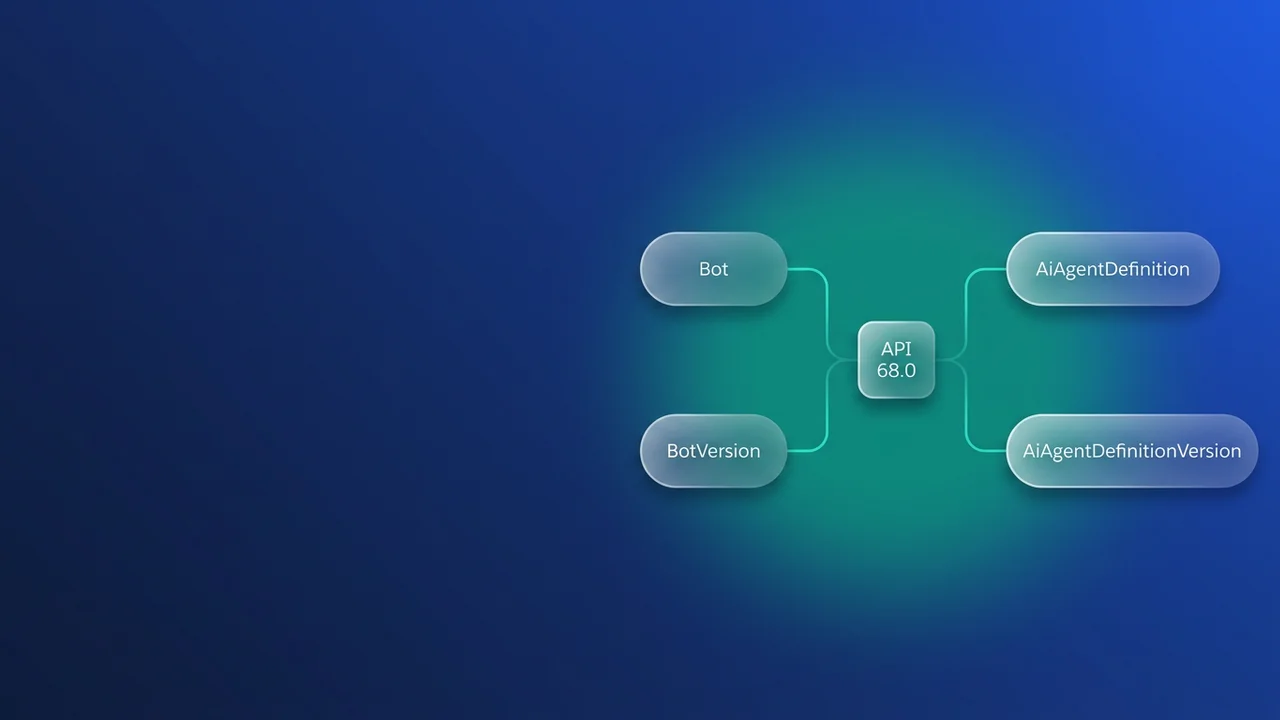

If your pipeline moved to API 68.0 and the agent retrieve started failing, the error is accurate. At 68.0, Bot and BotVersion belong to classic Einstein Bots only, and Agentforce agents move as AiAgentDefinition and AiAgentDefinitionVersion. Winter '27 reached production orgs in October 2026, so every org can take the new types today. The rename itself is mechanical. What fails deploys is a half-finished switch, such as a manifest that still lists BotVersion or an agent user that exists only in the source org.
What moved where at API 68.0
Up to 67.0, one agent with a single version was split across Bot (with its BotVersion files), GenAiPlannerBundle and AiAuthoringBundle. At 68.0 the agent and each of its versions get their own types, the planner folds into the version file, and the Agent Script source keeps its own bundle. The content survives the move unchanged; only names and packaging differ.
| Before 68.0 | At 68.0 | SFDX folder | Member name |
|---|---|---|---|
Bot, agent-level settings (ClaimsTriageAgent.bot-meta.xml) |
AiAgentDefinition | aiAgents |
ClaimsTriageAgent |
BotVersion (v2.botVersion-meta.xml) |
AiAgentDefinitionVersion | aiAgentDefinitionVersions |
ClaimsTriageAgent#2 |
GenAiPlannerBundle (ClaimsTriageAgent_v2) |
<planner> element inside the version file |
(merged into the version) | (none) |
AiAuthoringBundle (newest unsuffixed, older ones _1, _2) |
AiAuthoringBundle, always suffixed | aiAuthoringBundles |
ClaimsTriageAgent_2 |
The definition holds the agent's type, description, context variables and other agent-level settings. Each version file holds that version's settings, conversation variables and messages, plus an inline <planner> with its subagents and actions.
Three naming changes affect anything that diffs or parses these files.
The authoring bundle name is now stable. At 67.0 and earlier, the newest bundle had no suffix, so the folder you were editing got a new name on the next retrieve after someone created a version. At 68.0 every bundle carries its version suffix from the start, and ClaimsTriageAgent_1 keeps that name after version 2 exists.
Generated suffixes on subagents and actions are gone. A name like PolicyLookup_18a40c7f2e91d3b becomes PolicyLookup. The suffixed fullName and developerName elements are removed, localDeveloperName is the name, and subagents reference actions through it. Folders inside the version use the names you gave them, such as PolicyLookup/FetchPolicyByNumber. These names stay the same across versions, so a diff between version 2 and version 3 shows what changed in behaviour without hundreds of renamed identifiers.
The version file also has welcomeMessage, errorMessage and escalationMessage elements. Each one is the first message of the Welcome, Error_Handling or Transfer_To_Agent dialog, and Salesforce builds those dialogs from them on deploy.
Writing the manifest with the # member syntax
Versions are addressed with a # delimiter. ClaimsTriageAgent#2 is one version, ClaimsTriageAgent#* is every version of that agent, and * is every version of every agent. Here is a 68.0 manifest for an agent with three versions:
<?xml version="1.0" encoding="UTF-8"?>
<Package xmlns="http://soap.sforce.com/2006/04/metadata">
    <types>
        <members>ClaimsTriageAgent</members>
        <name>AiAgentDefinition</name>
    </types>
    <types>
        <members>ClaimsTriageAgent#*</members>
        <name>AiAgentDefinitionVersion</name>
    </types>
    <types>
        <members>ClaimsTriageAgent_1</members>
        <members>ClaimsTriageAgent_2</members>
        <members>ClaimsTriageAgent_3</members>
        <name>AiAuthoringBundle</name>
    </types>
    <types>
        <members>ClaimsCoverageService</members>
        <name>ApexClass</name>
    </types>
    <types>
        <members>Claims_Create_Followup_Task</members>
        <name>Flow</name>
    </types>
    <version>68.0</version>
</Package>
I would default to #* for agents that are still changing. You don't edit the manifest when someone adds a version, and source and target stay aligned, which matters because a mismatch blocks later deploys (more on that below). The cost is that you can't hold one version back. If you need to, name versions explicitly and accept that you'll edit the manifest every time.
On the command line, wrap the value in double quotes. Otherwise the shell treats # as the start of a comment and * as a glob:
# The # member syntax and the dependency flag need CLI 2.149.9 or later
sf update
sf project retrieve start \
  --metadata "AiAgentDefinitionVersion:ClaimsTriageAgent#*" \
  --target-org claims-dev
Without a manifest, the CLI uses sourceApiVersion from sfdx-project.json, and that has to be 68.0 for these types to resolve.
Retrieving dependencies without burning the daily cap
Without extra flags, a retrieve returns only what you name. --metadata AiAgentDefinitionVersion on its own returns every version of every agent, but no parent definitions, no authoring bundles and nothing the actions call. Adding --root-type-with-dependencies AiAgentDefinitionVersion also pulls each version's AiAgentDefinition, its AiAuthoringBundle, the flows, Apex classes and prompt templates its actions invoke, and any global subagents and actions it uses:
sf project retrieve start \
  --metadata "AiAgentDefinitionVersion:ClaimsTriageAgent#3" \
  --root-type-with-dependencies AiAgentDefinitionVersion \
  --target-org claims-dev
From API 64.0 to 67.0, dependency retrieval only worked on a whole Bot with all its versions, so being able to pull one version is a real improvement. The limits are tight, though:
- 25 retrieve requests with dependencies per day, each capped at 100 components.
- One level deep. If an action calls
ClaimsCoverageServiceand that class callsClaimsRateTable, you get only the first class. - Custom objects, custom fields and Data 360 dependencies aren't included, so list them yourself.
Because of the cap, keep this flag out of CI. If a build runs it on every push, parallel branches will use up the 25 requests before lunch. Run it as a developer step when an agent's action set changes, check the output, add the second-level classes and fields by hand, commit, and let the pipeline deploy from the explicit manifest.
The Move an Agent guide recommends the flag over listing flows, Apex and prompt templates yourself. Listing them explicitly gives up that convenience in exchange for a pipeline that doesn't spend the daily cap.
The compiled Agent Script in the version's agentScript folder belongs to the version itself and arrives with or without the flag.
The four validations that fail a half-migrated deploy
- Legacy and new types for the same agent in one deployment. A version can't be deployed alongside the matching legacy BotVersion. This usually happens when someone adds the new types to a manifest and forgets to remove the old ones.
- A version with no definition, or a definition with no version. If the target org doesn't already have the AiAgentDefinition, it has to be in the same deploy, and a new definition on its own fails too. The first deploy to any org needs both.
- An Agent Script agent deployed without its AiAuthoringBundle. The
agentScriptfolder inside the version is compiled output and can't stand in for the source, so ship the bundle with the version. - The agent user. Retrieved metadata carries the source org's agent username, and that user usually doesn't exist in the target.
For a draft agent, fix the agent user with string replacement. The username sits in the .agent file's default_agent_user property, so the replacement has to cover .agent files as well as *-meta.xml:
{
  "packageDirectories": [{ "path": "force-app", "default": true }],
  "sourceApiVersion": "68.0",
  "replacements": [
    {
      "glob": "force-app/**/*-meta.xml",
      "stringToReplace": "[email protected]",
      "replaceWithEnv": "CLAIMS_AGENT_USERNAME"
    },
    {
      "glob": "force-app/**/*.agent",
      "stringToReplace": "[email protected]",
      "replaceWithEnv": "CLAIMS_AGENT_USERNAME"
    }
  ]
}
export CLAIMS_AGENT_USERNAME="[email protected]"
sf project deploy start --manifest manifest/claims-agent.xml --target-org claims-uat
Committed agents are harder. The Move an Agent guide says string replacement can't change a committed agent's username, and a committed version can't be edited at all. The string-replacement example page says its method works for committed and uncommitted agents. Until Salesforce reconciles the two pages, treat replacement on committed agents as not yet confirmed and plan for the strict reading: create a new version with the correct user. If a draft lands without replacement, update the agent user manually before anyone runs it. Whichever user you pick needs permissions for everything the agent does, down to read access on the custom fields its actions query.
Moving an existing pipeline to 68.0
Winter '27 reached production in October 2026, so the 68.0 types are available in every org and nothing forces you to wait. Staying on 67.0 is now a choice you make per manifest: pin its <version> to 67.0 and Bot and BotVersion keep working for that manifest. Both orgs in a deploy still have to be on 68.0 for the new types, a rule that comes back whenever a preview sandbox runs ahead of production. If you raise sourceApiVersion before the target org is on 68.0, the target can't accept the files you retrieved. Keeping one manifest per target, each with its own <version>, lets you move paths one at a time.
To switch a path:
- Run
sf updateand confirm the CLI is 2.149.9 or later. - Set the manifest
<version>andsourceApiVersionto68.0. - Retrieve the agents fresh from the org instead of converting the old files by hand.
- Commit the switch on its own. Every agent folder and file name changes, and you want that diff kept apart from logic changes in review.
- Point any scripts that read GenAiPlannerBundle or suffixed names at
<planner>andlocalDeveloperName. - Add a guard so a manifest can't mix eras:
#!/usr/bin/env bash
# check-agent-manifest.sh: fail when agent types don't match the manifest API version
set -euo pipefail
manifest="${1:?usage: check-agent-manifest.sh path/to/package.xml}"

api=$(sed -n 's:.*<version>\([0-9.]*\)</version>.*:\1:p' "$manifest")
[[ -n $api ]] || { echo "ERROR: no <version> in $manifest" >&2; exit 1; }
major=${api%%.*}
has_type() { grep -q "<name>$1</name>" "$manifest"; }

if (( major >= 68 )); then
  # Bot and BotVersion stay legal at 68.0 for classic Einstein Bots; this blocks BotVersion assuming the project has no classic bots (see the allowlist note below)
  for legacy in BotVersion GenAiPlannerBundle; do
    if has_type "$legacy"; then
      echo "ERROR: $manifest is API $api but lists $legacy; use AiAgentDefinitionVersion" >&2
      exit 1
    fi
  done
  if has_type AiAgentDefinitionVersion && ! has_type AiAgentDefinition; then
    echo "WARN: versions without AiAgentDefinition; a first deploy to this org will fail" >&2
  fi
else
  if has_type AiAgentDefinition || has_type AiAgentDefinitionVersion; then
    echo "ERROR: $manifest is API $api; AiAgentDefinition types need 68.0 in both orgs" >&2
    exit 1
  fi
fi
If your org still runs classic Einstein Bots that use BotVersion, give the guard an allowlist of those bot names instead of deleting the check.
What to watch for
- Managed packaging isn't supported for AiAgentDefinition or AiAgentDefinitionVersion. ISVs shipping agents need a different distribution plan for now.
- After a deploy, the source and target agents must match, or later deploys are blocked. If someone creates a version directly in the target, create the matching version in source.
- Don't hand-edit retrieved agent metadata beyond the username replacement. Salesforce warns that deploying modified agent metadata can corrupt the org.
- Salesforce advises against keeping the compiled
agentScriptfolder in source control. Whether excluding it through.forceignoreaffects deploys is not yet confirmed, so test that in a scratch org before you rely on it. - Check edition availability before you plan a migration: the release note lists Enterprise, Performance, Unlimited and Developer Editions with Foundations or Agentforce 1 Editions.

Leave a Comment