

Choosing the right Salesforce sandbox types for your project
If you've ever broken a production org by pushing a "simple" flow change, you know why we need a safe place to play. I've spent years in various orgs, and the biggest mistake I see is teams using the wrong environment for the task at hand: a developer trying to run a full performance test in a tiny sandbox, or a QA lead demanding a Full Copy for a basic UI check.
A sandbox is a copy of your production environment. You can build, break and fix things in it without your actual users ever knowing. Some sandboxes only copy your metadata (the "skeleton" of your org), others copy every single record you've got, and which one you need depends on the sprint in front of you.
The four Salesforce sandbox types
Salesforce gives us four main options. Each one has a specific purpose, and picking the right one usually comes down to two things: how much data you need and how often you need to refresh it. If you're constantly switching between multiple orgs, you might even want to use a Salesforce environment switcher to keep things organized.
1. Developer sandbox
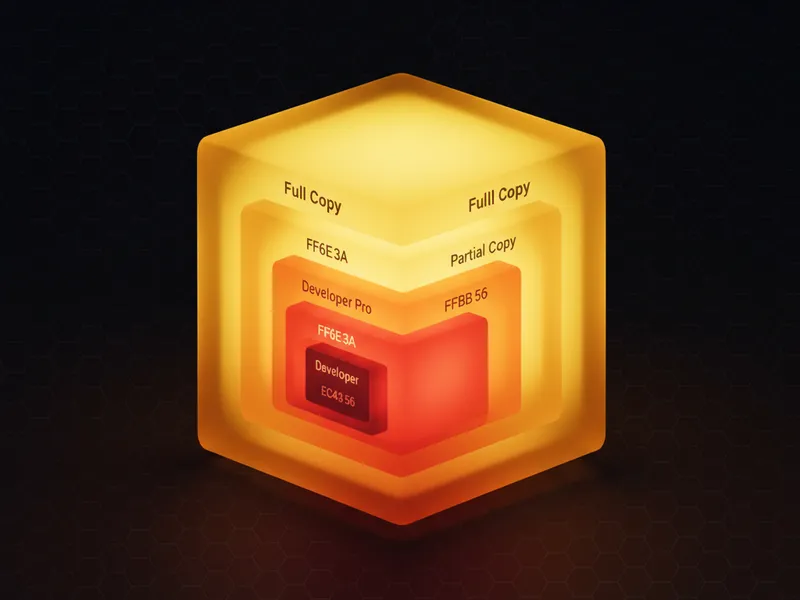
This is the workhorse for individual devs. It copies your production metadata but brings over none of your actual records. You get a tiny bit of storage (200MB), which is enough for basic test data you create yourself, and you can refresh it every day. I usually tell my teams to use these for "unit testing", meaning making sure the code doesn't crash before it moves to a shared environment.
2. Developer Pro sandbox
Think of this as the Developer sandbox's older sibling. It still doesn't copy production data, but it gives you more storage (1GB). That extra room helps with integration testing, where you need to load in a larger set of mock data from an external system, and with small team projects where several people are building in the same space. Like the standard version, you can refresh this one every 24 hours.
3. Partial Copy sandbox
Now we're getting into the data. A Partial Copy sandbox includes your metadata and a sample of your production data. You use a "Sandbox Template" to tell Salesforce exactly which objects you want to copy. It's limited to 5GB and 10,000 records per object, which is usually plenty for Quality Assurance (QA) or User Acceptance Testing (UAT). The catch is the refresh window: every 5 days. Mess up the data on day one and you're stuck with it for a while, so keep a plan for Salesforce sandbox recovery handy.
4. Full sandbox
This one is a 1-to-1 mirror of your production org, including all your data, attachments and setup. It's what you want for performance testing or final regression testing, but it's expensive and slow to refresh: you have to wait 29 days between refreshes, so use it wisely. If you're managing large data volumes, this is the only place you can really see how your queries will perform at scale.
One thing that trips people up: just because you have a Full Sandbox doesn't mean you should use it for everything. It's like using a sledgehammer to hang a picture frame. Keep your daily dev work in the smaller boxes and save the Full Copy for the final stage before deployment.
Best practices for managing Salesforce sandbox types
Most teams get the architecture wrong because they don't plan for the refresh cycles. If you refresh a sandbox while a developer is halfway through a feature, their work is gone. Always coordinate with the team before hitting that refresh button.
- Use Sandbox Templates instead of grabbing everything for a Partial Copy. Be surgical and pick the objects that actually matter for the test.
- If you're copying production data into a sandbox, mask the sensitive fields like emails and phone numbers. You don't want a test script accidentally emailing real customers.
- Automate the post-refresh setup. I've seen teams waste days manually updating API endpoints and usernames after a refresh, and an Apex post-copy script handles all of it.
- Each of the Salesforce sandbox types has its own storage ceiling, and when you hit it things start failing in weird ways that are hard to debug.
Key takeaways
- Developer and Developer Pro: building and unit testing, metadata only, 1-day refresh.
- Partial Copy: QA and UAT, sample data chosen by template, 5-day refresh.
- Full sandbox: performance and final testing, full data copy, 29-day refresh.
- Always use the smallest environment that fits the task, to save time and money.
Picking between Salesforce sandbox types comes down to how your team works, as much as to what's available in your contract. If you're a solo admin, a few Developer sandboxes and a Partial Copy might be all you ever need. For enterprise teams, a clear "promotion path" from Developer to Partial to Full is the only way I've found to keep production from breaking. Start with the smallest box that fits, and don't be afraid to refresh when things get messy.


Leave a Comment