


If you've spent any time in a complex org, you've probably realized that messy code is a one-way ticket to technical debt, which is where Apex Design Patterns come in. I've seen teams hit governor limits purely because they query the same metadata over and over in different parts of one transaction.
Apex Design Patterns have a reputation as computer science homework. In practice they are reusable ways to structure code so it doesn't break the moment you try to scale. Salesforce is a multi-tenant environment, so we adapt the standard patterns to play nice with things like SOQL limits and heap size.
Why Apex Design Patterns actually matter for your org
In my experience, developers start looking into patterns when their triggers get out of control. Don't wait for a "CPU Time Limit Exceeded" error to start writing better code. These structures keep you from duplicating logic and make unit tests much easier to write. Mostly they make your life easier when you come back to modify this code six months from now.
There are dozens of patterns out there, but two do the heavy lifting in most Salesforce projects: Singleton and Factory. Here is how I actually use them in the field.
Mastering the Singleton pattern in Salesforce
The Singleton pattern makes sure a class only ever has one instance during a single execution context. Say you have a custom object that stores discount rates for different regions. If three triggers and five service classes all want those rates, you can end up running the same SOQL query eight times. That's a waste of resources.
One thing that trips people up: Singletons in Apex only last for the duration of the transaction. They don't persist across different users or different requests, but they're a lifesaver for staying under limits during bulk processing.
Here's how I'd set this up to manage regional discounts. The constructor stays private so nobody can use the "new" keyword outside the class, and a static method hands out the instance.
public class RegionDiscountManager {
    private static RegionDiscountManager instance;
    private Map<String, Decimal> regionDiscountMap;

    // Private constructor - no "new" allowed elsewhere
    private RegionDiscountManager() {
        regionDiscountMap = new Map<String, Decimal>();
        for (Region_Discount__c rd : [SELECT Region__c, Discount__c FROM Region_Discount__c]) {
            if (rd.Region__c != null) {
                regionDiscountMap.put(rd.Region__c.toLowerCase(), rd.Discount__c);
            }
        }
    }

    public static RegionDiscountManager getInstance() {
        if (instance == null) {
            instance = new RegionDiscountManager();
        }
        return instance;
    }

    public Decimal getDiscount(String region) {
        if (region == null) return 0;
        return regionDiscountMap.get(region.toLowerCase());
    }
}
Now when you use this in a trigger, it doesn't matter whether you're processing 1 record or 200. The query runs once. Small change, big difference in performance.
trigger CaseTrigger on Case (before insert) {
    RegionDiscountManager rdm = RegionDiscountManager.getInstance();
    for (Case c : Trigger.new) {
        c.Discount__c = rdm.getDiscount(c.Region__c);
    }
}
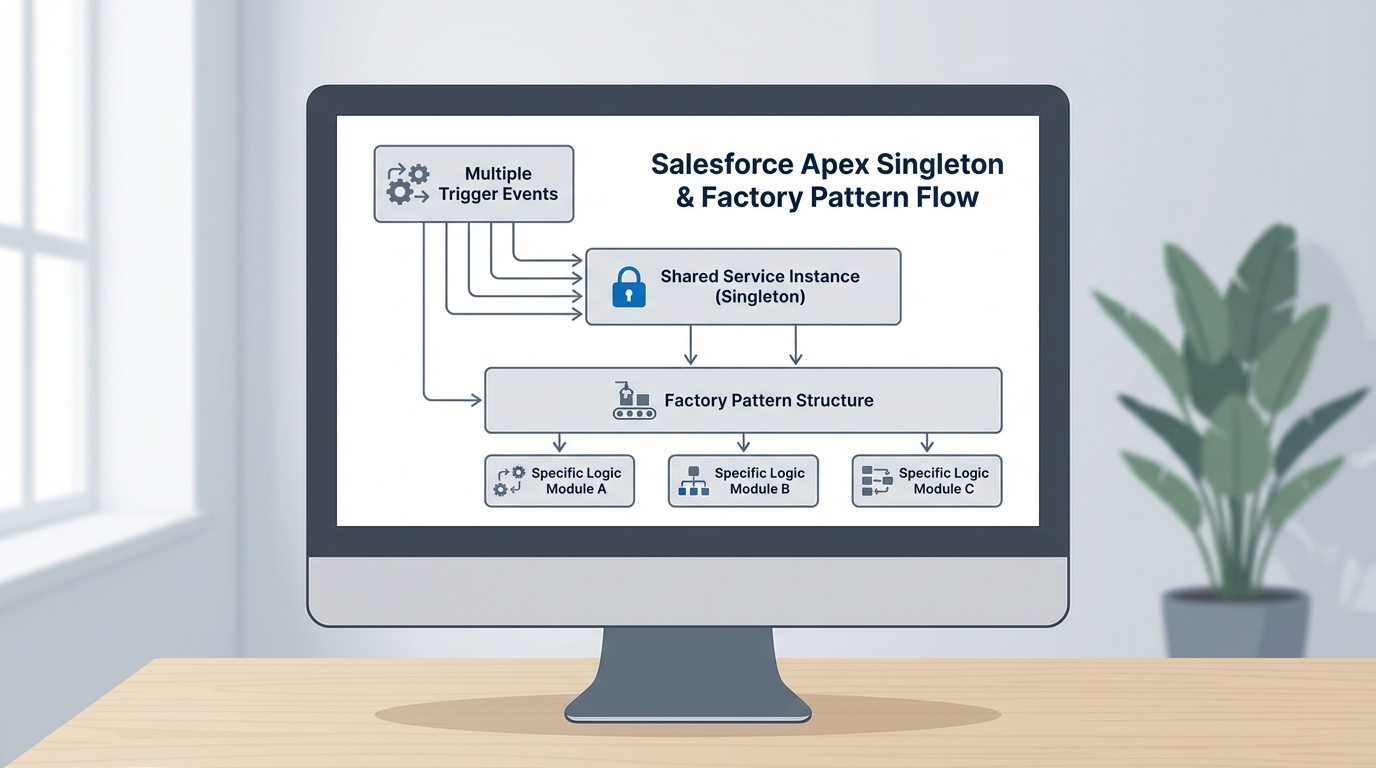
The Singleton holds the shared instance; the Factory decides which implementation runs.
Simplifying logic with the Factory pattern
Next is the Factory pattern. You use it when you need to create different objects based on some criteria and you don't want to clutter your main code with 50 "if-else" statements. I find it especially useful when the business logic changes based on an Account type or a Lead source.
If you're still deciding between Apex vs Flow for this kind of logic, the Factory pattern is a strong argument for using code when the branching logic gets too complex for a canvas. Here's how you'd set up a discount strategy factory.
public interface IDiscountStrategy {
    Decimal calculate(Decimal amount);
}

public class CustomerDiscount implements IDiscountStrategy {
    public Decimal calculate(Decimal amount) { return amount * 0.10; }
}

public class PartnerDiscount implements IDiscountStrategy {
    public Decimal calculate(Decimal amount) { return amount * 0.20; }
}

public class DiscountFactory {
    public static IDiscountStrategy getStrategy(String accType) {
        if (accType == 'Customer') return new CustomerDiscount();
        if (accType == 'Partner') return new PartnerDiscount();
        return new CustomerDiscount(); // default
    }
}
Your trigger or service class never needs to know how the discount is calculated. It asks the factory for a strategy and runs it, which keeps the implementation easy to extend. Add a "Distributor" type later and you write one new class and update the factory. The existing logic stays untouched.
Key takeaways
- Singleton: cache data or settings for the duration of a transaction. This is the one that saves you from redundant SOQL.
- Factory: handle complex branching logic. It keeps your main code clean by moving object creation to a dedicated spot.
- Keep it simple. Don't use a pattern for the sake of using one. If a helper method works, stick with that.
- Bulkification: these patterns should support bulk record processing, not get in its way.
Why this matters for your career
Honestly, most teams get this wrong. They write "spaghetti code" that works for a week and falls apart when the data volume grows. Knowing when and how to apply Apex Design Patterns is what separates a junior dev from a senior architect.
If you want to go further, look at the new features in the Salesforce Spring 26 release, because some of the new Apex features might change how you think about data handling. The fundamental patterns stay the same either way.
Start small. Try a Singleton for your next custom metadata lookup, and watch what the debug log does.


Leave a Comment