


I've sat on both sides of the interview desk more times than I can count, and most Salesforce Apex interview questions come down to how you handle the platform's unique constraints. Memorized definitions only get you so far. What they want is evidence you've spent time in a real codebase solving real problems.
If you're looking for a broader list to study, check out these 50 Salesforce developer interview questions to get a feel for the variety out there. Here I'm sticking to the core Apex that can make or break your technical round.
Mastering core Salesforce Apex interview questions
Start with what Apex actually is: an object-oriented language that's tightly coupled with the Salesforce database. The part that sets it apart is the multitenant environment. You aren't writing code for one user, you're sharing resources with everyone else on the server, and that's why governor limits exist.
public class HelloWorld {
    public static void sayHello() {
        System.debug('Hello, Salesforce World!');
    }
}
Why collections are the bread and butter
When you're answering these questions, don't stop at what a Map is. Talk about why you use one. Collections are how you bulkify your code, and if you're processing one record at a time, you're doing it wrong.
- List: use these when order matters or when you just need a simple bucket of records.
- Set: perfect for deduplicating IDs. I use them constantly to collect IDs from a list of records before running a SOQL query.
- Map: the most powerful tool in your kit. It lets you link records together without nested loops.
// Building a Map from a SOQL result
Map<Id, Account> accountMap = new Map<Id, Account>(
    [SELECT Id, Name FROM Account WHERE Industry = 'Technology']
);
Triggers and the order of execution
Triggers are where most of the magic happens, and most of the bugs. One thing that trips people up is the order of execution: you need to know when a validation rule fires versus when a flow or a trigger runs. Most teams also get trigger handlers wrong by putting logic directly inside the trigger file.
I've written specifically about Apex Trigger Interview Questions before, but the main thing is keeping your logic out of the trigger itself. Use a handler class. This makes your code easier to test and keeps your "before" and "after" contexts clean.
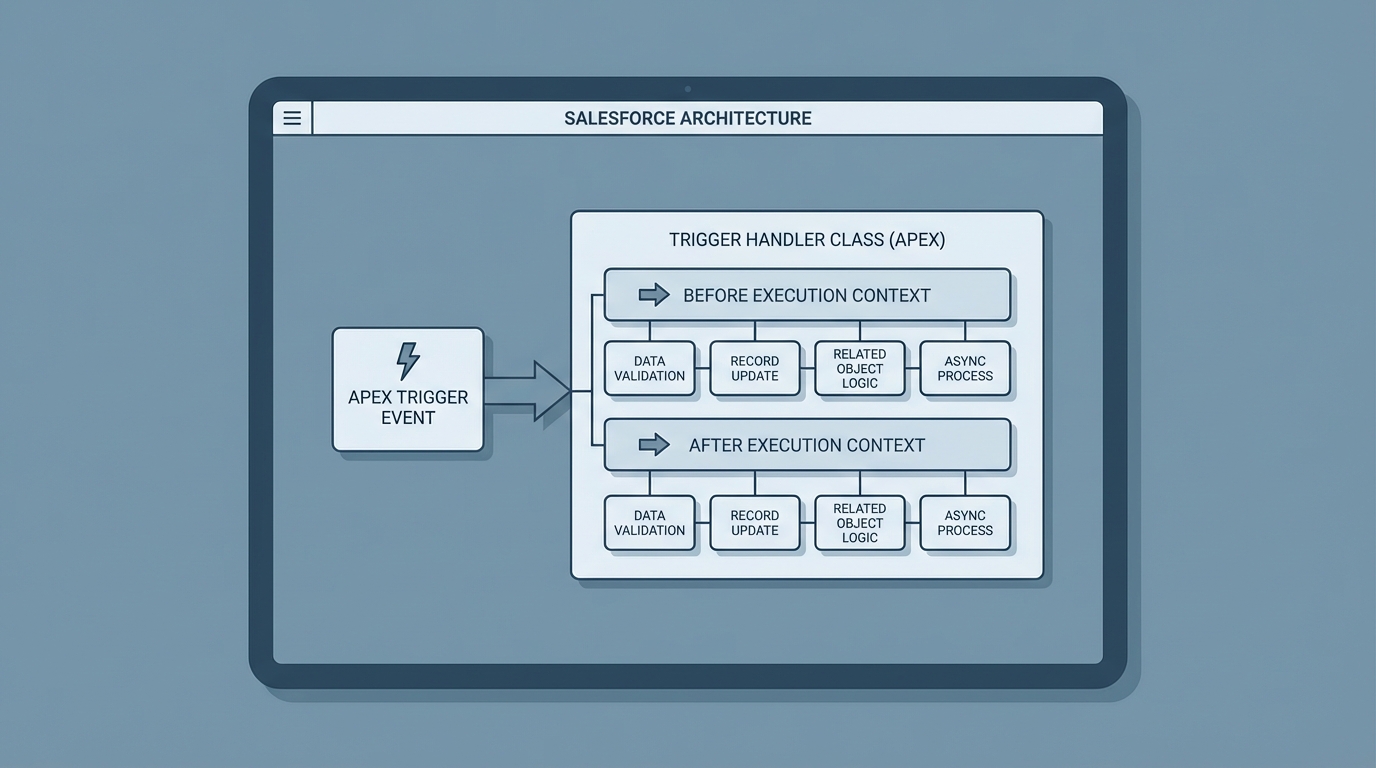
A professional architecture diagram illustrating the Apex Trigger Handler design pattern and execution contexts.
Governor limits and Salesforce Apex interview questions
The "101 SOQL Error" is basically a rite of passage for Salesforce devs. Governor limits are there to make sure your code doesn't hog all the CPU time or memory on the server. When an interviewer asks about this, they want to hear that you know how to stay under the 100-query limit for synchronous transactions.
"I once saw a dev try to run a SOQL query inside a for-loop that processed 200 records. It worked in the sandbox with 5 records, but blew up the second it hit production. Don't be that person. Always move your queries outside of loops."
When to go asynchronous
Sometimes you just have too much work to do in one go. That's when you move to async processing. If you want to go deeper on timing, this guide on Asynchronous Apex in Salesforce covers the differences between the types.
- @future: good for simple things like making a callout to an external API. You can only pass primitives (like Strings or IDs), though.
- Queueable: my favorite. You can pass complex objects, and you can chain jobs together, so it's much more flexible than future methods.
- Batch Apex: use this when you're dealing with millions of records. It breaks the work into small chunks so you don't hit the heap size limit.
@future(callout=true)
public static void sendDataToExternalSystem(Set<Id> accountIds) {
    List<Account> accounts = [SELECT Id, Name FROM Account WHERE Id IN :accountIds];
    // HTTP callout logic here
}
Best practices for the real world
Bulkification isn't optional. You have to assume your code will always be hit with 200 records at once. Use static variables to handle recursion, too. I've seen plenty of triggers that accidentally call themselves in an infinite loop, and it isn't pretty.
And don't forget about testing. Writing a test that just gets 75 percent coverage is a waste of time. Test the "negative" cases. What happens when the data is bad? Use Test.startTest() and Test.stopTest() to reset your governor limits and force async code to run synchronously so you can assert the results.
Key takeaways
- Always use Maps to avoid nested loops and stay under query limits.
- Keep triggers thin by using a handler pattern.
- Move long-running logic to Queueable or Batch Apex.
- Use
Limitsclass methods to check how much "room" you have left in a transaction. - Prepare for Salesforce Apex interview questions by practicing scenario-based problems rather than definitions.
Wrapping this up
These basics will do more for you than get you through an interview. They're how you build stuff that actually works and is easy to maintain. When you're in that room, show them you understand the "why" behind the code. If you can explain how to stay under governor limits while handling bulk data, you're already ahead of most candidates.


Leave a Comment