


What exactly is Salesforce OmniStudio?
I've spent a lot of time lately explaining Salesforce OmniStudio to teams that are used to just building everything in LWC or Flow. It's a different beast. If you're coming from a traditional developer background, think of it as a high-speed toolkit for building complex, industry-specific front ends and data layers without having to write thousands of lines of custom code. It's the tech Salesforce got when they bought Vlocity, and it's become the backbone of their Industry Clouds like Health Cloud and Public Sector Solutions.
The first time I saw the interface I was a bit overwhelmed. Once you get the hang of it you realize the whole thing is about modularity. You build a set of reusable parts that can talk to each other and to external systems without breaking a sweat. It's meant for those heavy-lift UI requirements where a standard Screen Flow just won't cut it.
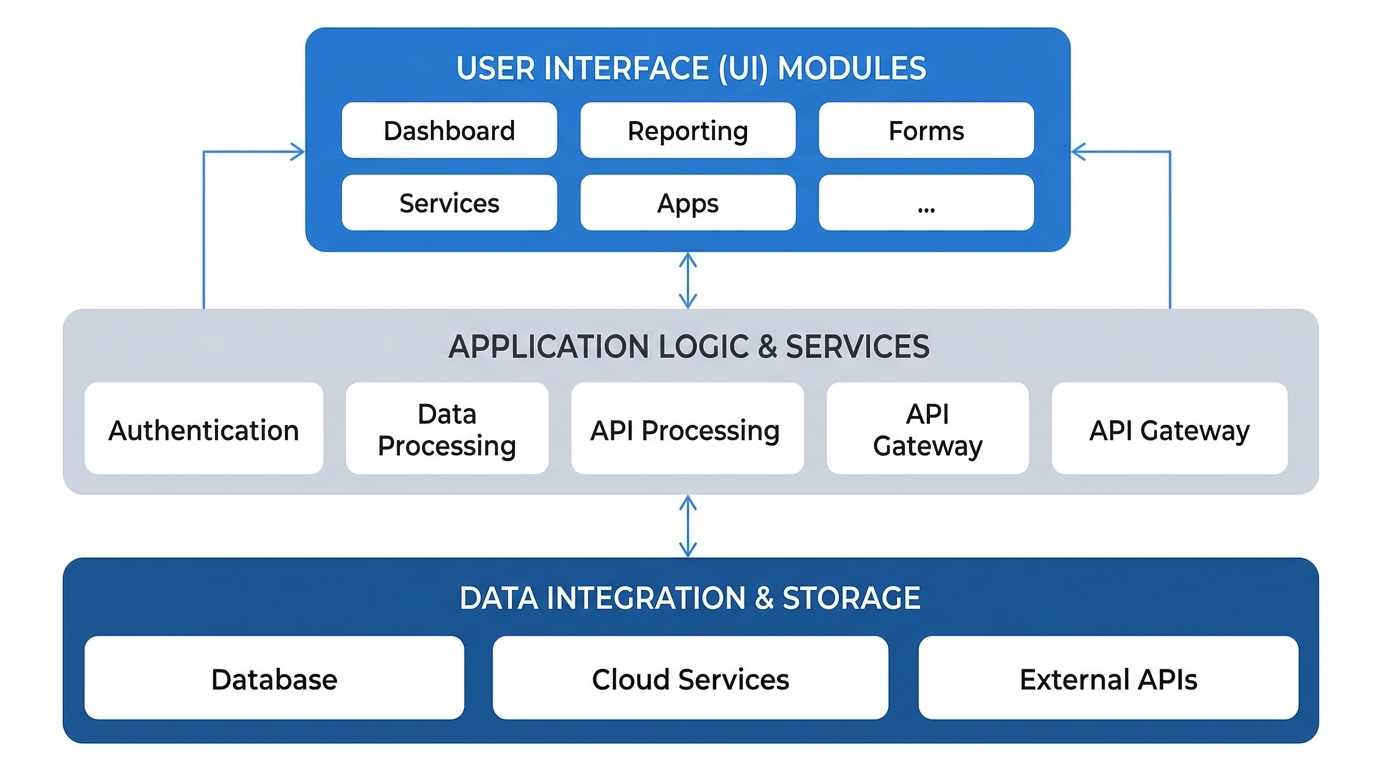
A technical architecture diagram showing the modular layers of a software system including UI components and data integration blocks.
Getting around the Salesforce OmniStudio architecture
You can't just jump in and start clicking without knowing the four main pillars. I've seen teams try to use an OmniScript for everything, and honestly, they usually regret it later. You need to know which tool fits the job.
The UI layer: OmniScripts and FlexCards
OmniScripts are your guided processes. If you need a customer to fill out a complex insurance claim or a multi-step service request, this is your tool. It handles the branching logic and the data mapping. They can get messy fast if you don't stay organized, so I highly recommend this guide to OmniScript naming conventions to keep your sanity as your project grows.
Then you have FlexCards. These are the lightweight UI components that show contextual data. Think of a Customer 360 view where you see recent orders, open cases, and billing status all in one spot. They're great because you can embed them almost anywhere. Just like scripts, you'll want to follow solid FlexCard naming conventions so your team can actually find what you built six months from now.
The data layer: DataRaptors and Integration Procedures
This is where the real work happens. DataRaptors are essentially your data mappers. They handle the Get, Save, and Transform operations for Salesforce data. If you need to do something more complex (calling an external API, transforming that JSON, then updating three different objects) you use an Integration Procedure (IP).
Pro tip: always try to move your logic into an Integration Procedure instead of putting it directly in an OmniScript. IPs are server-side, which means they're faster and you can reuse them across different UI components.
When should you actually use Salesforce OmniStudio?
So why not just use Flow? In my experience, Salesforce OmniStudio earns its place when you have thick logic and high-volume data needs. If you're building a portal where users need to interact with external data in real time, OmniStudio is almost always the better choice. It handles complex JSON structures much more gracefully than Flow does.
It isn't a silver bullet, though. There's a learning curve here. You've got to understand how to build the JSON payloads and how the data flows from the IP to the UI. If you're just doing a simple internal record update, stick to a standard Flow. Don't over-engineer it just because you have the license.
Interview tips for the real world
If you're heading into an interview and they ask about this, don't just recite the documentation. Talk about the trade-offs. Mention how it reduces the need for custom Apex controllers and how it speeds up time to market for new features. Mention bulk handling and caching, because those are the things senior devs care about. If you can explain why you'd choose an Integration Procedure over a standard DataRaptor, you'll stand out.
// Example of how an IP looks in the background (Simplified)
{
  "ProcedureSteps": [
    { "Action": "DR_Get_Account_Details" },
    { "Action": "HTTP_Get_Weather_Data" },
    { "Action": "Transform_Final_Response" }
  ]
}
Key takeaways
- Salesforce OmniStudio is a low-code suite for building industry-specific digital experiences.
- OmniScripts handle guided user paths, while FlexCards display bite-sized data.
- Integration Procedures are the server-side workhorses that keep your UI fast.
- Use it when Flow isn't powerful enough or when you need to handle complex external integrations.
- Keep your components organized with strict naming conventions from day one.
Getting good at Salesforce OmniStudio is about learning how to think in components. Once you stop trying to build monolithic pages and start building reusable data services and UI cards, your development speed picks up. It's a useful toolset to have in your pocket, especially as more companies move toward Industry Cloud solutions. Just remember to keep it simple where you can and only bring out the heavy hitters when the business requirements actually demand it.


Leave a Comment