


Prepping for Salesforce Connect interview questions
If you are heading into a technical role, you'll almost certainly get asked Salesforce Connect interview questions. It sounds simple on paper and gets complicated fast once limits and licensing come up. I've been on both sides of the interview table, and the candidates who stand out treat this as an architectural decision rather than a way to link data together.
The thing to hold onto is that Salesforce Connect shows you data where it already lives instead of copying it. We've all seen projects where someone syncs millions of rows of legacy data into custom objects, which is a nightmare for managing Salesforce large data volumes. Connect lets you see that data in real time without storing it in your org.
What exactly is Salesforce Connect?
It surfaces data from an external system, say an ERP or another Salesforce org, as if that data lived inside your own. It does this with external objects. They look and behave a lot like the custom objects you already use, except they don't count against your data storage limits. You'll recognize them by the __x suffix in the API name.
When a user opens a tab or a related list for an external object, Salesforce doesn't look at its own database. It sends a request to the external system, the data comes back, renders in the UI, and then it's gone again. It's a live window into your other systems.
The building blocks you need to know
- External data source. This is the connection setup. It tells Salesforce where to go, how to log in, and what kind of "language" (adapter) to speak.
- Adapters. These are the translators. Out of the box you get OData (2.0 or 4.0), which is common for SAP or Microsoft systems, plus a Cross-Org adapter for connecting two Salesforce environments.
- Apex custom adapters. If the external system doesn't speak OData, you aren't stuck. You can write your own adapter in Apex to handle a unique API.
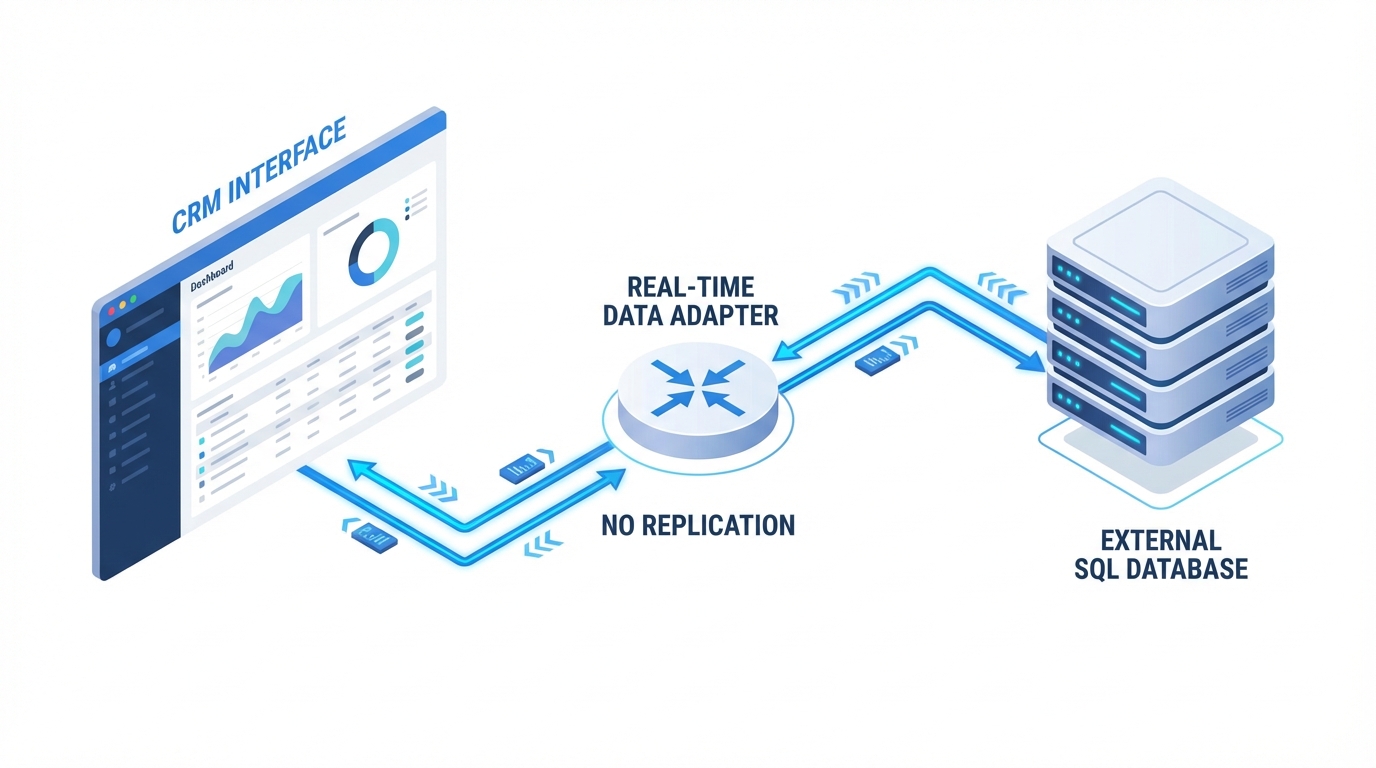
An architectural diagram showing a real-time integration between a CRM system and an external database using an API adapter.
Answering Salesforce Connect interview questions about use cases
When an interviewer asks when to use this, don't just say "to show data." Be specific. I've seen teams get the most out of it when they have massive datasets sitting in an old SQL database that they only need to look at occasionally. You don't want to pay for Salesforce storage for 10 million old invoices that nobody ever edits.
The other case is data that changes every few minutes. Sync that with a batch job and you're always looking at stale info. With Connect the external system stays the source of truth, because every read is a live fetch. That's a strong answer when the conversation turns to Salesforce integration options and real-time access is the priority.
Pro tip: bring up cost versus benefit during the interview. Salesforce Connect is a paid add-on. If a client only needs to see five records a day, a simple LWC with an API call might be cheaper than buying a Connect license.
The limits and "gotchas" that trip people up
There are real trade-offs here, and naming them is how you show you've done this outside a demo org. Performance is only as good as the external system, so if that old ERP is slow, your Salesforce page is slow too. And because the data isn't in Salesforce, you can't use it in standard reports the way you do with native data.
Then there's SOQL. You can query external objects, but complex work like full-text searches and certain aggregates is not easy. Here is what a query looks like:
SELECT Id, OrderNumber__c, TotalAmount__c FROM ERP_Order__x WHERE Status__c = 'Shipped'
Ordinary enough, except that behind the scenes Salesforce is translating that SOQL into an OData call. If the external system doesn't support a specific filter, the query fails. I've hit that one in the field more than once.
How to set it up (high level)
- Define the source. Go to Setup, find External Data Sources, and plug in your URL and credentials.
- Choose auth. Decide whether everyone shares one Named Principal account or each user logs in to the external system with their own credentials.
- Sync. Click the "Validate and Sync" button and Salesforce reads the external metadata and builds the external objects for you.
- Relate the data. Use External Lookups or Indirect Lookups to link these new objects to your Accounts or Contacts.
Key takeaways for your next interview
- External objects don't use Salesforce data storage, which is where most of the cost saving comes from.
- The connection is live. No sync delay, but you're at the mercy of the external system's speed.
- Know the difference between External and Indirect lookups. Explaining those cleanly gets you through most Salesforce Connect interview questions.
- Most people assume it's read-only. It supports Create, Edit, and Delete too, if the adapter and the external system allow it.
Wrapping it up
Salesforce Connect isn't the right answer every time. When you need to show massive amounts of external data without the headache of a custom integration or the storage bill, it's hard to beat. Just check the licensing costs before you recommend it to a client. Most candidates get the "how" right and fumble the "why," and being able to explain the business value alongside the technical limits is what gets you through Salesforce Connect interview questions.


Leave a Comment