


Understanding Screen Flow vs Autolaunched Flow
Deciding between a Screen Flow and an Autolaunched Flow is usually the first real hurdle you hit when you start a new automation. I've seen plenty of admins get halfway through a build and realize they picked the wrong type because they never worked out how the user would actually interact with the thing. Frustrating, but easy to avoid once you know what to look for.
The choice comes down to visibility. Does a human need to see what is happening, or should it happen silently in the background? If you are still getting a handle on the basics, a guide to Salesforce flow types covers the wider set. This post sticks to the trade-offs between these two.
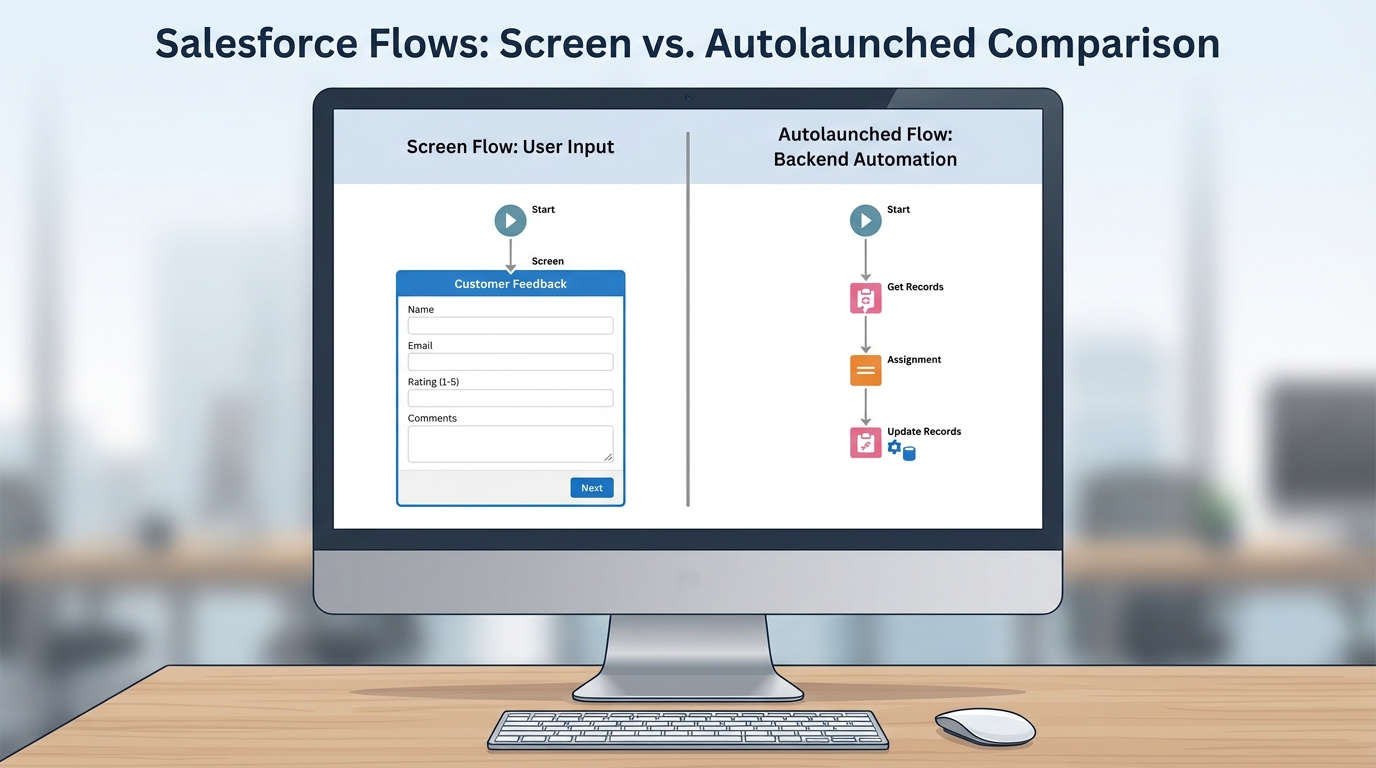
Salesforce Flow Builder side by side: a Screen Flow with user interface elements next to an Autolaunched Flow built from background logic elements.
The core differences: Screen Flow vs Autolaunched Flow
Screen Flows are built for interaction. They are the only flow type that lets you use the "Screen" element, which is where you build your forms, display text, or let users upload files. You usually launch one from a button on a record page, a Quick Action, or straight from a Lightning page it sits on. I've used them for everything from a simple "New Lead" wizard to multi-page applications that replaced old Visualforce pages.
Autolaunched Flows are "headless," meaning they have no user interface. They live for the logic, running in the background when something else sets them off: a record being updated, a schedule, or a call from Apex. One thing that trips people up is that "Autolaunched Flow" is a broad term in the Flow Builder, but they have no screens, and that is the part that matters. If you need to crunch numbers or update 50 related records without the user ever knowing, this is your tool.
Execution and context
A Screen Flow almost always runs in the context of the user who clicked the button. If that user cannot edit a particular field, the flow fails unless you have set it to run in "System Context." Even then, the user is the one driving the bus.
Autolaunched Flows are a different beast. Depending on how they are triggered, they might run as the user or in the system context. A record-triggered flow usually runs in the system context, which is great for data integrity because you are not worrying about every single user's profile permissions. Be careful with that, though. I've seen teams accidentally bypass security rules because they did not realize their background automation had "god mode" permissions.
Pro tip: If you find yourself building the same logic in three different Screen Flows, move that logic into an Autolaunched Flow. You can call it as a "Subflow," which makes your life a lot easier when the logic has to change later. You only have to fix it in one place.
Choosing Screen Flow vs Autolaunched Flow for your project
So how do you actually pick? I ask myself two questions. Do I need input from a human that is not already on the record? And does this have to happen immediately after a specific event? If I'm building a guided experience for a sales rep to "Close-Win" an opportunity while capturing notes along the way, that is a Screen Flow every time.
If I need a set of tasks created automatically every time a new Account is created, I'm reaching for an Autolaunched Flow, specifically a record-triggered one. You will use these when you are working with Apex too. Starting one from code looks like this:
Map<String, Object> inputs = new Map<String, Object>{'recordId' => myId};
Flow.Interview.My_Background_Process flow = new Flow.Interview.My_Background_Process(inputs);
flow.start();
That keeps the complicated logic in Flow while Apex does the heavy lifting. Following Salesforce Flow best practices keeps your automation clean and easy to debug whichever type you choose.
Common use cases
- Screen Flow: multi-step account setup wizards, custom "Delete" buttons with a confirmation screen, and data collection forms for Experience Cloud sites.
- Autolaunched Flow: nightly data cleanups, calculating totals across related records, and sending platform events to external systems.
Key takeaways
- Screen Flows have screens. Autolaunched Flows are headless.
- Screen Flows are manual, launched from buttons and actions. Autolaunched Flows are automatic, launched from triggers, schedules, or Apex.
- Screen Flows usually follow user permissions. Autolaunched Flows often run in system context.
- Only Screen Flows let users go "Back" or "Next."
- Use Autolaunched Flows as subflows to keep your logic DRY (Don't Repeat Yourself).
Pick whichever one fits the job in front of you. If you need to talk to a user, go with a Screen Flow. If you need to talk to the database, go with an Autolaunched Flow. Once you get the hang of passing variables between them, you can build some pretty sophisticated systems without ever writing a line of code.


Leave a Comment