
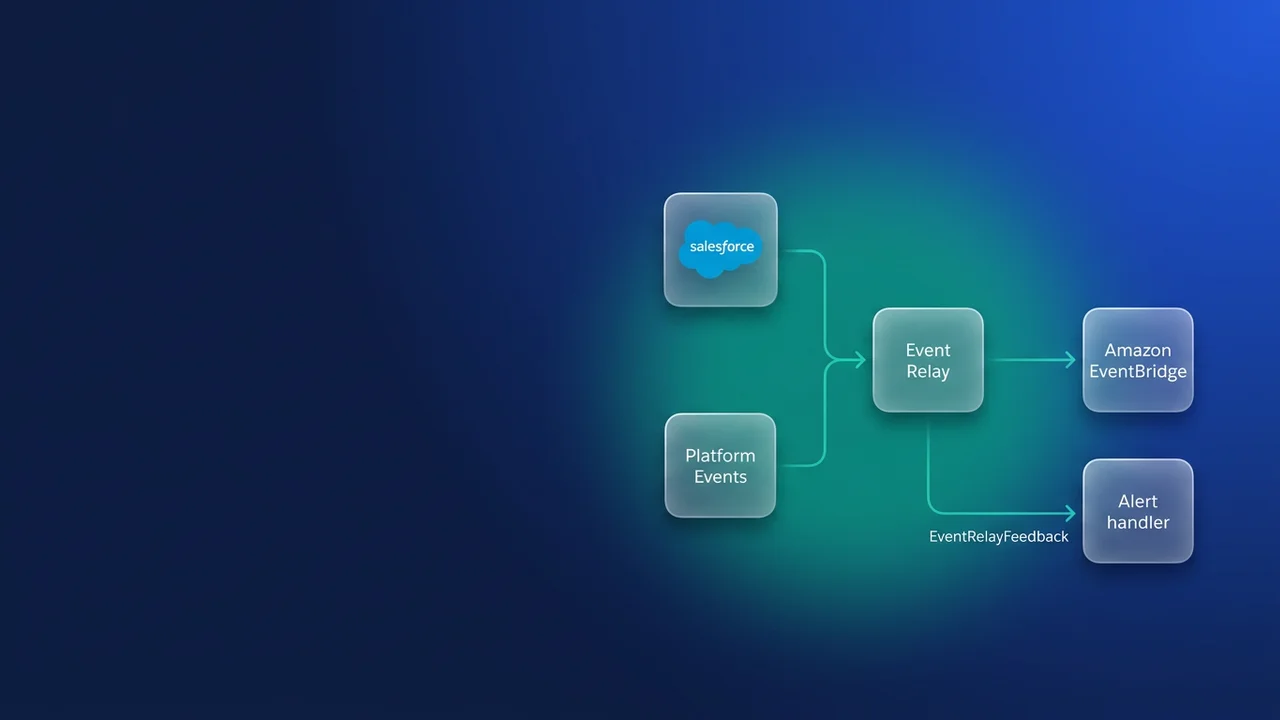

Your org publishes Invoice_Posted__e from Apex, and a finance ledger service in AWS has to receive every one of those events. Event Relay can put them straight onto an Amazon EventBridge partner bus with no middleware and no AWS keys stored in Salesforce. The trouble shows up in operations. A failed relay alerts nobody, the recovery setting decides whether an outage leaves you with gaps or duplicates, and every relayed event uses up the same daily delivery allocation as your other subscribers. Here is how I would build it so that the 2am page, if it ever comes, is easy to diagnose.
What Event Relay carries, and which orgs can use it
Event Relay supports three kinds of event: custom high-volume platform events (the default for any new custom platform event), Change Data Capture events, and Real-Time Event Monitoring events. It runs in Enterprise, Unlimited and Developer editions. Government Cloud is not supported. On the AWS side it only works with default regions, so if your platform team has standardised on an opt-in region, the relay needs to target a default region instead.
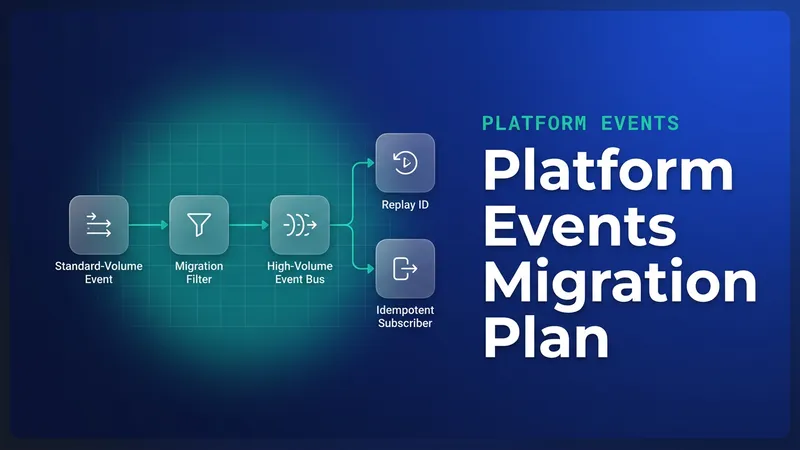
Standard-volume platform events are missing from that list. If your integration still publishes standard-volume custom events, you have to migrate them to high-volume before you can relay them. Standard-volume custom events retire in Summer '27, so you will be doing that migration anyway. Our standard-volume retirement migration plan walks through it. For background on how relays sit next to CometD, empApi and Pub/Sub, see the streaming API mechanisms guide.
Building the Salesforce side
The relay has three metadata parts, and the order you create them in matters because one of them can't be edited later.
The named credential
The URL takes the form arn:aws:US-EAST-1:123456789012: the literal prefix, an uppercase region, then the AWS account ID. You don't store access keys or an IAM role. Salesforce is a registered EventBridge partner, and AWS trusts the partner event source you accept on its side. The region has to be uppercase.
Get this right the first time: after a relay uses the credential, you can't change the account or region without deleting and recreating the relay. I create one named credential per target AWS account (for example AWS_Finance_EventBridge), and after every sandbox refresh I check which account the sandbox's copy points at before anything is started.
The channel and the publisher
A channel groups the event types you want relayed, and its API name ends in __chn. I would create Finance_Events__chn and add Invoice_Posted__e as a member. A relay links exactly one channel to one named credential, so group events by destination.
The publisher is ordinary Apex. The event carries a revision number because invoices in this scenario can be legitimately re-posted after a correction. That number matters later for idempotency.
public class InvoicePostingPublisher {
    public static void publishPosted(List<Invoice__c> invoices) {
        List<Invoice_Posted__e> events = new List<Invoice_Posted__e>();
        for (Invoice__c inv : invoices) {
            events.add(new Invoice_Posted__e(
                Invoice_Number__c = inv.Name,
                Account_Number__c = inv.Account_Number__c,
                Amount__c = inv.Total_Amount__c,
                Currency__c = inv.Currency__c,
                Revision__c = inv.Posting_Revision__c,
                Posted_At__c = System.now()
            ));
        }

        List<Database.SaveResult> results = EventBus.publish(events);
        for (Integer i = 0; i < results.size(); i++) {
            if (!results[i].isSuccess()) {
                for (Database.Error err : results[i].getErrors()) {
                    System.debug(LoggingLevel.ERROR,
                        'Invoice_Posted__e failed for ' + invoices[i].Name +
                        ': ' + err.getStatusCode() + ' ' + err.getMessage());
                }
            }
        }
    }
}
A successful SaveResult means the event bus accepted the event. Whether AWS ever received it is a separate question, and the monitoring section below answers it.
The relay itself
The relay is an EventRelayConfig record, created through the Tooling API on v56.0 or later. Querying it requires View Setup and Configuration. Creating, updating or deleting it requires Customize Application.
curl -X POST "$INSTANCE_URL/services/data/v62.0/tooling/sobjects/EventRelayConfig" \
  -H "Authorization: Bearer $ACCESS_TOKEN" \
  -H "Content-Type: application/json" \
  -d @invoice-relay.json
{
  "FullName": "Invoice_Ledger_Relay",
  "Metadata": {
    "label": "Invoice Ledger Relay",
    "eventChannel": "Finance_Events__chn",
    "destinationResourceName": "callout:AWS_Finance_EventBridge",
    "relayOption": "{\"ReplayRecovery\":\"EARLIEST\"}",
    "state": "STOP"
  }
}
A new relay starts stopped. After creation you can update only state and relayOption. eventChannel and destinationResourceName are fixed for the life of the record. Creating the relay registers a partner event source in the target AWS account in a pending state. Someone on the AWS side associates it with a partner event bus, and only then do you PATCH state to RUN. If you start the relay before the source is associated, you will be debugging a problem with nothing on the AWS end to receive the events.
Consuming on AWS with an idempotent writer
What lands on the bus is an EventBridge envelope. detail-type is the event API name, source is aws.partner/salesforce.com/<orgId>/<channelId>, your fields sit under detail.payload, and detail.schemaId is included too. Two IDs are easy to mix up. The top-level id belongs to EventBridge, while detail.id is the Salesforce event identifier.
The rule matches on detail-type:
{
  "source": [{ "prefix": "aws.partner/salesforce.com/" }],
  "detail-type": ["Invoice_Posted__e"]
}
Route the rule to an SQS queue with a dead-letter queue rather than directly to Lambda. The queue absorbs bursts when a batch job posts thousands of invoices at once, caps Lambda concurrency, and handles retries. The Lambda then writes to DynamoDB with a conditional put.
import { DynamoDBClient, PutItemCommand } from "@aws-sdk/client-dynamodb";

const ddb = new DynamoDBClient({});
const TABLE = process.env.LEDGER_TABLE;

export const handler = async (sqsEvent) => {
  const batchItemFailures = [];

  for (const record of sqsEvent.Records) {
    try {
      const envelope = JSON.parse(record.body);
      const p = envelope.detail.payload;
      const ledgerKey = `${p.Invoice_Number__c}#${p.Revision__c}`;

      await ddb.send(new PutItemCommand({
        TableName: TABLE,
        Item: {
          ledgerKey: { S: ledgerKey },
          accountNumber: { S: String(p.Account_Number__c) },
          amount: { N: String(p.Amount__c) },
          currency: { S: String(p.Currency__c) },
          postedAt: { S: String(p.Posted_At__c) },
          sfEventId: { S: envelope.detail.id }
        },
        ConditionExpression: "attribute_not_exists(ledgerKey)"
      }));
    } catch (err) {
      if (err.name === "ConditionalCheckFailedException") {
        continue; // already posted, so a duplicate counts as success
      }
      console.error("ledger write failed", record.messageId, err);
      batchItemFailures.push({ itemIdentifier: record.messageId });
    }
  }

  return { batchItemFailures };
};
The partial batch response only takes effect if ReportBatchItemFailures is enabled on the event source mapping. The ConditionalCheckFailedException branch is the line that does the work: because a duplicate counts as success, replays never pile up in the DLQ, and the DLQ only ever holds real failures.
I key on the business key (invoice number plus revision) rather than detail.id. Whether detail.id stays the same when the relay re-delivers under EARLIEST is not yet confirmed, and even if it does, it won't catch the more common case of Apex publishing the same invoice twice. I have seen a trigger re-run on an invoice update because a later automation touched the record, and the ledger booked the amount twice. A business key absorbs both kinds of duplicate. detail.id is still worth storing for tracing.
Recovery modes and the failures nobody reports
In normal operation the relay resumes from the last event it relayed. relayOption only matters "in rare occasions" when it can't resume from that point. In that case LATEST (the default) skips everything published during the outage, and EARLIEST re-delivers everything still on the bus, which is up to 72 hours of events.
My position: use EARLIEST for anything with money or fulfilment behind it, and pair it with the idempotent writer above. A gap you don't know about is worse than a duplicate you discard. LATEST is acceptable when the downstream can reconcile from the source system, for example with a nightly job that compares invoice totals.
The other failure mode is silence. Salesforce does not notify anyone when a relay fails. The only record is EventRelayFeedback (API v56.0+), which has one row per relay, linked through EventRelayConfigId.
SELECT Status, ErrorCode, ErrorMessage, ErrorTime, ErrorIdentifier,
       LastRelayedEventTime, EventRelayConfigId
FROM EventRelayFeedback
Status is RUNNING, PAUSED or STOPPED, and defaults to STOPPED. A paused relay keeps its position and, on resume, continues from where it was, as long as the events are still within retention. A stopped relay loses LastRelayedEventTime and the error fields, and on resume it relays only new events. If you have to halt a relay during an AWS change, pause it, and treat any stop as a position reset that needs reconciliation afterwards.
Schedule a check from day one:
public class EventRelayHealthCheck implements Schedulable {
    public void execute(SchedulableContext ctx) {
        Datetime windowStart = System.now().addMinutes(-30);
        List<String> problems = new List<String>();

        for (EventRelayFeedback fb : [
            SELECT Status, ErrorCode, ErrorMessage, ErrorTime,
                   LastRelayedEventTime, EventRelayConfigId
            FROM EventRelayFeedback
        ]) {
            Boolean notRunning = fb.Status != 'RUNNING';
            Boolean recentError = fb.ErrorTime != null && fb.ErrorTime >= windowStart;
            if (notRunning || recentError) {
                problems.add(fb.EventRelayConfigId + ' status=' + fb.Status +
                    ' error=' + fb.ErrorCode + ' ' + fb.ErrorMessage +
                    ' lastRelayed=' + fb.LastRelayedEventTime);
            }
        }

        if (!problems.isEmpty()) {
            Messaging.SingleEmailMessage mail = new Messaging.SingleEmailMessage();
            mail.setToAddresses(new List<String>{ Label.Integration_Alert_Email });
            mail.setSubject('Event Relay unhealthy');
            mail.setPlainTextBody(String.join(problems, '\n'));
            Messaging.sendEmail(new List<Messaging.SingleEmailMessage>{ mail });
        }
    }
}
System.schedule('Event relay health :00', '0 0 * * * ?', new EventRelayHealthCheck());
System.schedule('Event relay health :30', '0 30 * * * ?', new EventRelayHealthCheck());
If invoices post around the clock, also alert when LastRelayedEventTime is older than your normal gap between postings. Status reports the relay's state; a stale LastRelayedEventTime is how you notice that nothing has gone out recently.
Sizing, cost, and when to choose something else
Each relayed event can be at most 256 KB. Anything larger never reaches EventBridge, so keep long text out of the payload and send a key the consumer can use to fetch the details.
The tighter limit is the 24-hour event delivery allocation: 50,000 on Performance and Unlimited, 25,000 on Enterprise, 10,000 on Developer. CometD clients, Pub/Sub API clients, empApi components and event relays all share it. In an Enterprise org relaying 14,000 invoices a day, a data warehouse Pub/Sub subscriber reading the same event takes you past 25,000. Events over the allocation stay on the bus and can be retrieved within the 72-hour retention window, but at that point you are planning catch-up. An add-on adds 100,000 a day (3 million a month) and moves you to a monthly usage-based entitlement.
Event Relay costs nothing extra on the Salesforce side beyond the allocation. AWS bills partner events at $1.00 per million and counts each 64 KB chunk as one event, so a 150 KB event bills as three. At 14,000 small events a day the AWS bill is well under a dollar a month, so the allocation is what you size against.
| Event Relay | Pub/Sub API subscriber | REST or CDC-style polling | |
|---|---|---|---|
| Middleware you run | None | A gRPC client you host | A scheduler and client you host |
| Auth | Named credential, partner trust, no keys | OAuth client in your service | OAuth client in your service |
| Who tracks position | Salesforce, plus relayOption fallback | You store the replay ID | You store a timestamp watermark |
| Allocation impact | Shared delivery allocation | Shared delivery allocation | API request limits instead |
| Event types | High-volume custom, CDC, Real-Time Event Monitoring | Broader, including standard-volume | Any queryable data |
| Failure visibility | Poll EventRelayFeedback | Your own client logs | Your own job logs |
If AWS is the destination and your events are high-volume or CDC, I would pick Event Relay, since no subscriber has to be deployed or patched. Pick Pub/Sub API when you need fine control over replay or a destination outside EventBridge. Polling is still a reasonable choice for low-frequency syncs, as covered in CDC vs polling.
What to watch for
- The AWS copy becomes a durable store with its own retention and erasure needs. Deleting the invoice in Salesforce leaves the DynamoDB item in place, so add the ledger table to your RTBF and CCPA deletion process.
- Named credential account and region are permanent once a relay uses them. Recreating the relay also means accepting a new partner event source in AWS.
- Opt-in AWS regions and Government Cloud orgs are not supported.
- Events over 256 KB never reach EventBridge, so there is nothing on the AWS side to debug.
- Setting a relay to STOP throws away its position. Pause it instead whenever you can.
- Whether
detail.idstays the same across EARLIEST re-delivery is not confirmed, so don't make it your only deduplication key.

Leave a Comment