
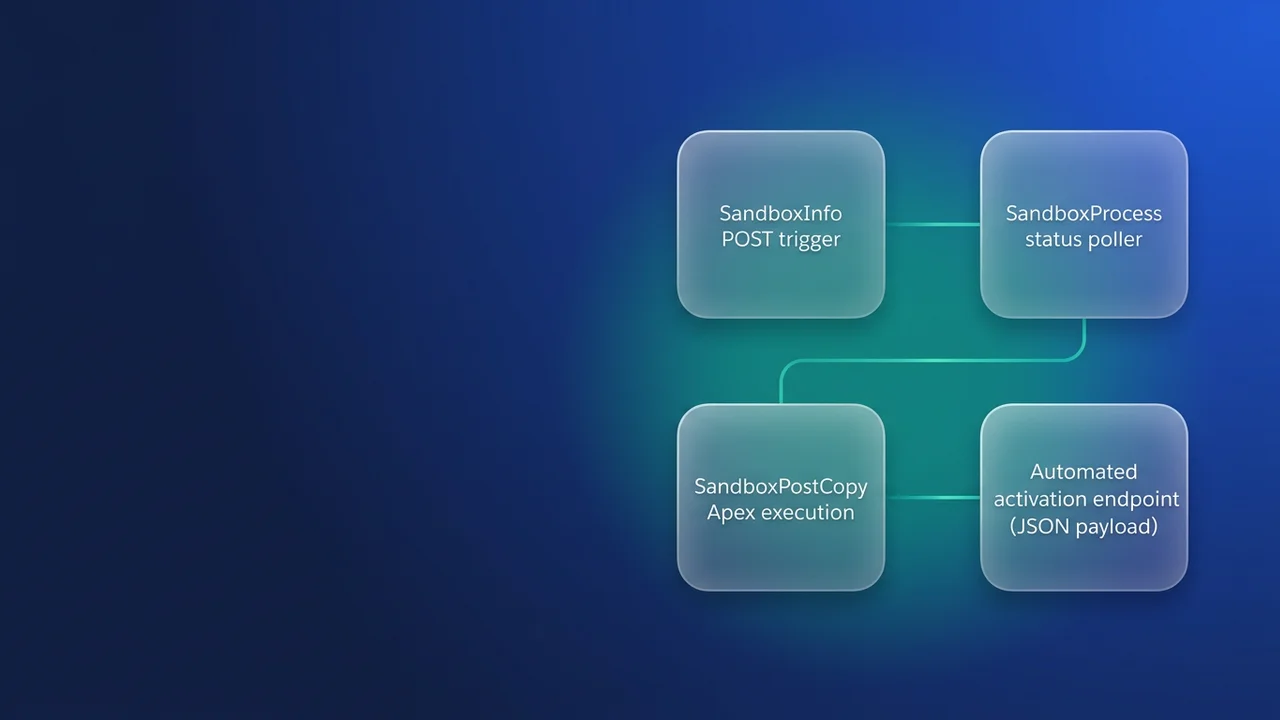

A release team that refreshes its Partial Copy UAT sandbox every sprint ends up clicking the same buttons in Setup, waiting most of a day, forgetting to activate, and then fixing the production integration endpoints the copy brought along. The Tooling API exposes that lifecycle as two objects, SandboxInfo and SandboxProcess, so a pipeline job can run it the same way every time. Below are the calls and the mistakes to avoid.
What the Refresh button is doing underneath
SandboxInfo (API 35.0 and later) is the definition of a sandbox: its name, license type, post-copy class, history settings and template. Creating a SandboxInfo record creates a new sandbox. Updating one refreshes it. The documentation puts it in one line: "To start a sandbox refresh, edit the SandboxInfo record."
Each create or update automatically writes a SandboxProcess record. A sandbox picks up one SandboxProcess per copy, and the most recent one is its current state. That record holds Status, CopyProgress, StartDate, EndDate, the org ID of the new copy (SandboxOrganization, API 37.0 and later) and the RefreshAction field you use to activate.
This split has two practical consequences. First, a refresh is a PATCH. SandboxInfo supports create, delete, query, retrieve, update, upsert and describeSObjects, and over REST it accepts GET, HEAD, POST, PATCH and DELETE. A DELETE on SandboxInfo deletes the sandbox and frees its license, and nothing in the API asks a script to confirm it first. If that has already happened to you, the deleted sandbox recovery guide covers your options.
Second, activation happens on a different object from the refresh. Because activation is a separate call on SandboxProcess, a pipeline can decide when the cutover happens.
Reading LicenseType
LicenseType is a restricted picklist with the same values on both objects. It is also the fastest way to answer "which sandbox type is this org?" from a script.
| LicenseType value | Setup label | Where I would typically use it |
|---|---|---|
DEVELOPER |
Developer | Individual feature work, metadata only |
DEVELOPER_PRO |
Developer Pro | Integration builds that need more storage |
PARTIAL |
Partial Copy | UAT and QA with a sampled data set |
FULL |
Full | Staging, performance runs, release rehearsal |
COURTESY_FULL |
Courtesy Full | Handle like FULL in scripts |
ADVANCED_DEV |
Lightning Developer Pro | Handle like DEVELOPER_PRO in scripts |
ADVANCED_FULL |
Lightning Full | Handle like FULL in scripts |
FULL_PLUS |
Scale | Large-volume and load testing |
Refresh intervals and storage per type are covered in the sandbox types guide. The Tooling API documentation does not list them.
To look up the definition, query SandboxInfo through the Tooling query endpoint, authenticated against production:
SELECT Id, SandboxName, LicenseType, AutoActivate, HistoryDays, ApexClassId, TemplateId
FROM SandboxInfo
WHERE SandboxName = 'uat'
Starting the refresh from a pipeline
The refresh call is a PATCH to the SandboxInfo record. I always send LicenseType explicitly so the request states what the job expects, and I keep AutoActivate false for any sandbox other people depend on. The script checks the HTTP code, because a rejected refresh would otherwise fall through to polling the previous SandboxProcess.
INSTANCE="https://yourcompany.my.salesforce.com"
API="v65.0"
TOKEN="$SF_ACCESS_TOKEN"

# Resolve the SandboxInfo Id for the UAT sandbox
SANDBOX_INFO_ID=$(curl -s -G "$INSTANCE/services/data/$API/tooling/query/" \
  -H "Authorization: Bearer $TOKEN" \
  --data-urlencode "q=SELECT Id FROM SandboxInfo WHERE SandboxName = 'uat'" \
  | jq -r '.records[0].Id')

# Start the refresh and stop unless Salesforce answers 204
REFRESH_CODE=$(curl -s -w '%{http_code}' -o /dev/null \
  -X PATCH "$INSTANCE/services/data/$API/tooling/sobjects/SandboxInfo/$SANDBOX_INFO_ID" \
  -H "Authorization: Bearer $TOKEN" \
  -H "Content-Type: application/json" \
  -d '{
    "LicenseType": "PARTIAL",
    "AutoActivate": false,
    "ApexClassId": "01pXXXXXXXXXXXXXXX",
    "HistoryDays": 0
  }')

if [ "$REFRESH_CODE" != "204" ]; then
  echo "Refresh request rejected with HTTP $REFRESH_CODE"
  exit 1
fi
The other fields on the record each control one part of the copy:
ApexClassId(API 36.0 and later) points to an Apex class that runs after each copy of the sandbox.HistoryDayssets how many days of object history are copied. Valid values are -1 (all available), 0, 10, 20, 30, 60, 90, 120, 150 and 180, with 0 as the default. I leave it at 0 for UAT because history makes the copy bigger and testers rarely need it.CopyChattercopies archived Chatter data to the sandbox when true (default false).TemplateIdreferences a PartitionLevelScheme, which is the sandbox template. Setting it requires the ManageSandboxes permission.Features(API 59.0 and later) accepts only['SandboxStorage'], which doubles data storage for Developer and Developer Pro sandboxes. It cannot be used on Partial Copy or Full.ActivationUserGroupId(API 60.0 and later) names a public group whose members can access the sandbox. The creator is added by default.
The post-copy class
The class referenced by ApexClassId implements SandboxPostCopy. Salesforce calls runApexClass(SandboxContext context), and the context gives you organizationId(), sandboxId() and sandboxName(). This one switches off outbound integrations in a hierarchy custom setting and hands contact email masking to a batch, so large volumes stay within governor limits:
global class UatPostCopy implements SandboxPostCopy {
    global void runApexClass(SandboxContext context) {
        Integration_Switch__c sw = Integration_Switch__c.getOrgDefaults();
        sw.SetupOwnerId = context.organizationId();
        sw.Outbound_Enabled__c = false;
        sw.Environment_Label__c = context.sandboxName();
        upsert sw;

        Database.executeBatch(new MaskContactEmailsBatch(), 2000);
    }
}

public class MaskContactEmailsBatch implements Database.Batchable<SObject> {
    public Database.QueryLocator start(Database.BatchableContext bc) {
        return Database.getQueryLocator(
            'SELECT Id, Email FROM Contact WHERE Email != null'
        );
    }

    public void execute(Database.BatchableContext bc, List<Contact> scope) {
        for (Contact c : scope) {
            if (!c.Email.endsWith('.invalid')) {
                c.Email = c.Email.replace('@', '=') + '@example.invalid';
            }
        }
        Database.update(scope, false);
    }

    public void finish(Database.BatchableContext bc) {}
}
Long addresses can exceed the Email field's 80-character length once the suffix is added, and Database.update(scope, false) lets those rows fail on their own while the rest of the chunk saves. The .invalid check makes the batch safe to run more than once. Cover the class with a test method that calls Test.testSandboxPostCopyScript(new UatPostCopy(), orgId, sandboxId, 'uat') so it deploys to production, where the SandboxInfo reference has to resolve.
Polling status and activating on your terms
A Partial or Full copy takes hours, so poll the latest SandboxProcess at long intervals. The statuses you will see include Pending, Processing, Pending Activation, Activation Processing and Completed, with Suspended, Stopped, Locked, Locking, Discarding, Deleting, Deleted and Sampling also possible. CopyProgress reports how much of the copy is done, except on template-based Full and Partial sandboxes. The SandboxProcess doc lists a coded value for each Status for use in SOQL, so each case pattern below matches both the label and the code.
while true; do
  RESULT=$(curl -s -G "$INSTANCE/services/data/$API/tooling/query/" \
    -H "Authorization: Bearer $TOKEN" \
    --data-urlencode "q=SELECT Id, Status, CopyProgress, SandboxOrganization FROM SandboxProcess WHERE SandboxInfoId = '$SANDBOX_INFO_ID' ORDER BY CreatedDate DESC LIMIT 1")
  STATUS=$(echo "$RESULT" | jq -r '.records[0].Status')
  PROCESS_ID=$(echo "$RESULT" | jq -r '.records[0].Id')
  echo "$(date -u +%H:%M) $STATUS $(echo "$RESULT" | jq -r '.records[0].CopyProgress')"

  case "$STATUS" in
    "Pending Activation"|"4") break ;;
    "Completed"|"1") echo "Refresh already active"; exit 0 ;;
    "Suspended"|"S"|"Stopped"|"G") echo "Copy halted"; exit 1 ;;
    "Discarding"|"F"|"Deleting"|"E"|"Deleted"|"D") echo "Unexpected status $STATUS"; exit 1 ;;
  esac
  sleep 900
done

# Cutover: swap the new copy in for the old sandbox
curl -s -X PATCH "$INSTANCE/services/data/$API/tooling/sobjects/SandboxProcess/$PROCESS_ID" \
  -H "Authorization: Bearer $TOKEN" \
  -H "Content-Type: application/json" \
  -d '{"RefreshAction": "ACTIVATE"}'
RefreshAction accepts ACTIVATE or DISCARD. Set it on the latest SandboxProcess for the sandbox once Status is Pending Activation. A token issued at the start of a ten-hour job will probably expire before the loop ends, so have the pipeline refresh its access token inside the loop.
With AutoActivate true, the new copy replaces the live sandbox as soon as it is ready, so anyone working in it is cut off mid-session. On any shared Partial or Full sandbox I keep it false and put the ACTIVATE call behind a manual approval or a scheduled window, such as after the last test session of the day, so the downtime lands when the team expects it. The cost is that someone has to approve it, and a copy left sitting in Pending Activation helps nobody. For personal Developer sandboxes, AutoActivate true is fine.
If you need more detail than CopyProgress, SandboxProcessStage breaks the copy into StageType and StageNumber rows with their own Status, StartTime and EndTime, plus EstimatedTotalWork, CompletedWork and ActualTotalWork. When IsActualWorkFinal is true, use ActualTotalWork in place of the estimate.
Cloning a sandbox instead of copying production
A hotfix sandbox often needs to match UAT, which production no longer does by the end of a sprint. From API 37.0, POST a new SandboxInfo with SourceId set to the Id of the SandboxInfo you want to clone:
{
  "SandboxName": "uatfix",
  "LicenseType": "PARTIAL",
  "SourceId": "0GQXXXXXXXXXXXXXXX",
  "ApexClassId": "01pXXXXXXXXXXXXXXX"
}
Send it to /services/data/v65.0/tooling/sobjects/SandboxInfo/ and track the returned Id with the same polling loop. With ApexClassId set, the post-copy class runs on the clone as well, which is one more reason to make it idempotent. If your pipeline already uses Salesforce CLI, sf org refresh sandbox and sf org create sandbox --clone wrap the same objects. I still prefer raw HTTP in CI because it runs from any runner and every field the job sends is visible in the request.
What to watch for
The integration user needs the Manage Sandboxes permission in production (the doc calls it out explicitly for TemplateId). Run the job as a dedicated integration user so a leaked personal token cannot be used to delete sandboxes.
Refresh intervals per license type are not covered in the Tooling API doc. I would expect an API refresh to be held to the same interval as the Setup button, so check the last EndDate on SandboxProcess before sending the PATCH.
Partial copy templates change what you can observe. CopyProgress is unavailable for template-based Full and Partial sandboxes, so poll on Status alone for those.
If a SandboxProcess stays Suspended or Stopped for more than an hour, the documentation says to contact Salesforce support. Have the pipeline raise an alert at that point and stop, since retrying a halted copy only adds noise to the support case.
Add a CI check that fails any script sending -X DELETE to a SandboxInfo URL unless it carries an explicit approval flag.


Leave a Comment