

If you've spent any time writing Apex, you've definitely wrestled with Trigger.new vs Trigger.newMap. It's one of those fundamental concepts that seems simple until you're staring at a MapException or trying to figure out why your code is crawling. I've seen plenty of developers default to lists for everything because they're comfortable, but that's a habit that'll eventually bite you in a large org.
In my experience, choosing the wrong one usually leads to messy nested loops or logic that just doesn't scale. So, let's break down how these actually work and when you should use one over the other in your daily work.
Understanding Trigger.new vs Trigger.newMap in Real Scenarios
At its core, Trigger.new is just a List<sObject>. It contains the new versions of whatever records just hit the trigger. If you're doing a simple field validation or a basic update where you don't need to look up other records, this is your go-to tool. I usually reach for this when I just need to loop through everything and check a value. For example, if you need to make sure a field isn't empty before a record is saved, a simple for-each loop on the list works perfectly.
But here's the thing: lists are great for order, but they're terrible for finding a specific record by its Id. If you're trying to find one specific Account in a list of 200, you have to loop through the whole thing. That's a waste of resources.
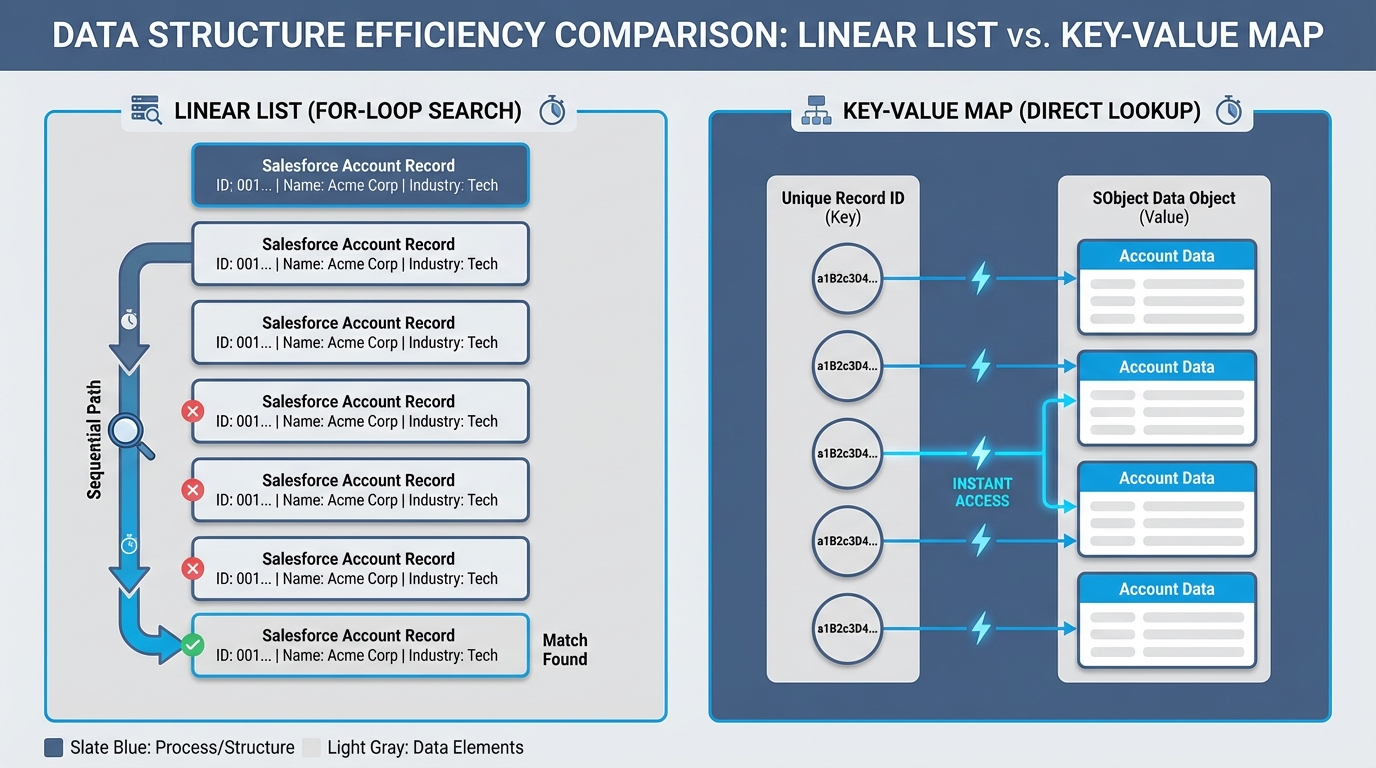
A technical diagram comparing the linear search process of an Apex list versus the direct key-value lookup efficiency of an Apex map for Salesforce records.
Which one should you pick? Trigger.new vs Trigger.newMap
Now, let's talk about the map. When we look at Trigger.new vs Trigger.newMap, the map version is a Map<Id, sObject>. This means you can grab any record instantly if you have its Id. No looping required. This is probably the most overlooked feature by juniors who are just trying to get their code to pass a unit test.
In my experience, this is where performance gains actually happen. If you're trying to compare new values against old values, or if you're trying to cross-reference records from a different collection, using a map is non-negotiable. Honestly, most teams get this wrong when they first start building complex triggers, and they end up with code that hits CPU limits during bulk uploads.
Pro tip: Always check if your context variable is null before you start calling methods on it. It sounds obvious, but it's a common cause of trigger failures when people try to use
Trigger.newMapin abefore insertcontext.
Availability and Context Gotchas
One thing that trips people up is that these aren't always available. You can't just use Trigger.newMap whenever you want. For instance, in a before insert trigger, the records don't have Ids yet because they haven't been saved to the database. So, Trigger.newMap will be null. I've seen senior devs forget this and break a deployment-it happens to the best of us.
- Trigger.new is available in almost every context except
delete. - Trigger.newMap is available in
after insert, and allupdateandundeleteevents.
If you're still getting comfortable with how these fire, check out this guide on what a Salesforce Apex Trigger is. It's also worth looking into Apex trigger interview questions if you want to see how these concepts are tested in the real world.
Practical Example: Comparing Changes
Let's look at a classic scenario: checking if a field changed during an update. This is where the Trigger.new vs Trigger.newMap distinction really matters. You'll want to use Trigger.newMap alongside Trigger.oldMap to do a quick side-by-side comparison. It's much cleaner than trying to manage two different lists.
// Fast way to check for changes
for (Id accId : Trigger.newMap.keySet()) {
    Account newRecord = Trigger.newMap.get(accId);
    Account oldRecord = Trigger.oldMap.get(accId);

    if (newRecord.AnnualRevenue != oldRecord.AnnualRevenue) {
        // The revenue changed, so take action here
    }
}
So what does this actually mean for your code? It means you're writing "O(1)" lookups instead of "O(n)" loops. When you're dealing with large data volumes, this difference is the reason your code either runs in 100ms or 5 seconds.
Key Takeaways
When you're deciding between Trigger.new vs Trigger.newMap, keep these points in mind:
- Use
Trigger.newfor simple iteration andbefore insertlogic where Ids don't exist yet. - Use
Trigger.newMapfor fast lookups and comparing old vs. new values. - Avoid nested loops by using the map to find related records by Id.
- Remember that
Trigger.newMapis null inbefore insert.
The short answer? Use the right tool for the job. If you just need to check a value on the record itself, the list is fine. If you need to do anything involving Ids or comparisons, the map is your best friend. Start making it a habit to use maps for lookups, and your future self-and your users-will thank you for the faster code.




Leave a Comment