


Trigger.newMap is a Salesforce Apex context variable typed as Map<Id, sObject> that stores newly processed records keyed by their IDs. It provides direct O(1) record lookups and is available in after insert, update, and undelete trigger events. Because records have not yet been assigned IDs in a before insert context, Trigger.newMap evaluates to null during that phase.
Choosing the wrong one leads to messy nested loops or logic that does not scale. Here is how each one behaves and when I reach for it.
Understanding Trigger.new vs Trigger.newMap in real scenarios
Trigger.new is a List<sObject>. It holds the new versions of whatever records just hit the trigger. For simple field validation, or a basic update where you do not need to look anything else up, that is all you need. I reach for it when the job is looping through everything and checking a value. Making sure a field is not empty before the record saves is a for-each loop on the list and nothing more.
Lists are good at order and bad at finding a specific record by its Id. Finding one Account in a list of 200 means walking the whole list, which wastes resources you did not need to spend.
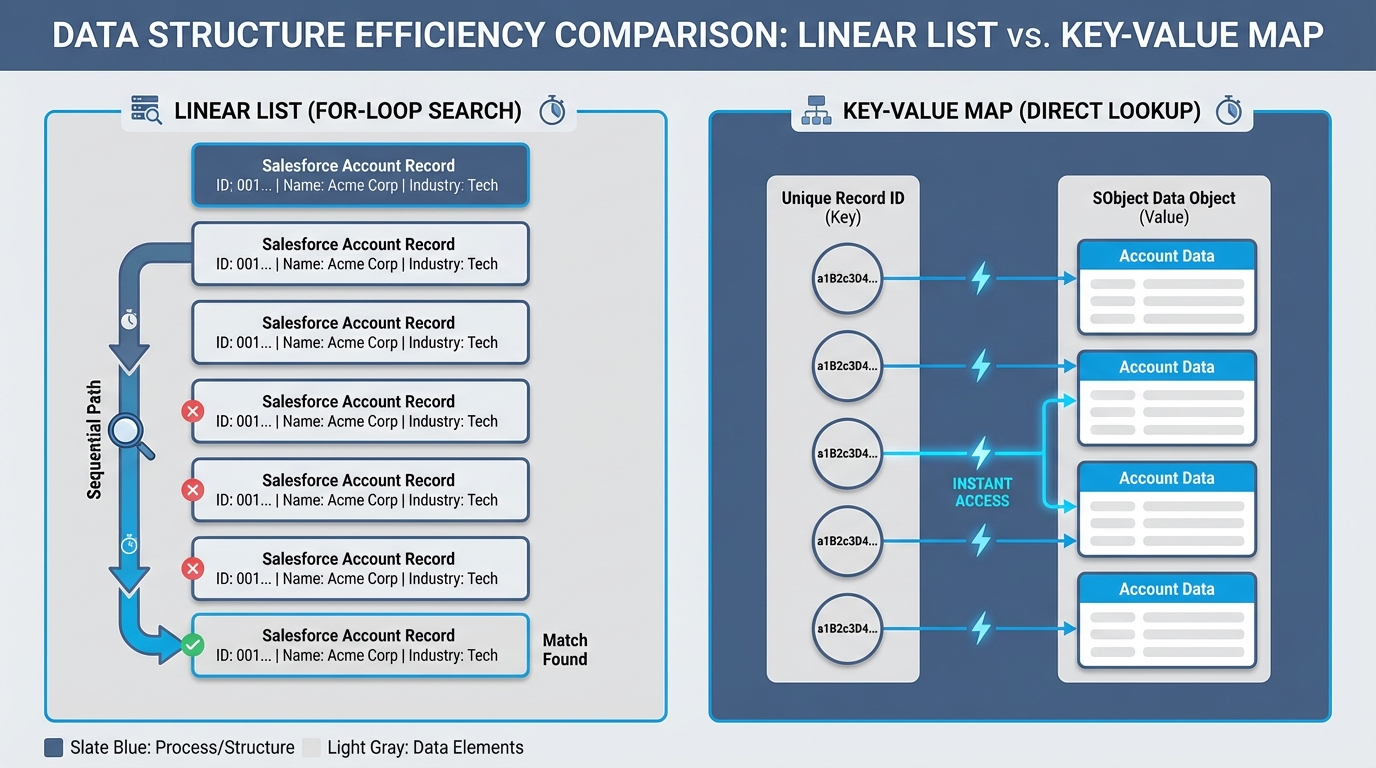
The list walks every element to find one record. The map goes straight to it.
Which one should you pick? Trigger.new vs Trigger.newMap
Trigger.newMap is a Map<Id, sObject>. Hand it an Id and the record comes back instantly, no looping required. Juniors who are trying to get their code past a unit test overlook this more than anything else.
In my experience this is where the performance actually comes from. Comparing new values against old values, or cross-referencing records from a different collection, wants a map. Most teams get this wrong on their first complex trigger and end up with code that hits CPU limits during bulk uploads.
Pro tip: check your context variable for null before you start calling methods on it. It sounds obvious, and it is still a common cause of trigger failures when someone uses
Trigger.newMapin abefore insertcontext.
Availability and context gotchas
These are not always available. In a before insert trigger the records have no Ids yet, because nothing has been saved to the database, so Trigger.newMap is null. I have watched senior devs forget that and break a deployment. It happens to the best of us.
Trigger.newis available in almost every context exceptdelete.Trigger.newMapis available inafter insert, and allupdateandundeleteevents.
Still getting comfortable with how these fire? Start with this guide on what a Salesforce Apex Trigger is. The post on Apex trigger interview questions shows how these concepts get tested in the real world.
Practical example: comparing changes
Checking whether a field changed during an update is the classic case, and this is where the distinction really matters. Use Trigger.newMap alongside Trigger.oldMap for the side-by-side comparison. It is much cleaner than juggling two separate lists.
// Fast way to check for changes
for (Id accId : Trigger.newMap.keySet()) {
    Account newRecord = Trigger.newMap.get(accId);
    Account oldRecord = Trigger.oldMap.get(accId);

    if (newRecord.AnnualRevenue != oldRecord.AnnualRevenue) {
        // The revenue changed, so take action here
    }
}
That is an "O(1)" lookup instead of an "O(n)" loop. When you are dealing with large data volumes, the difference decides whether your code runs in 100ms or 5 seconds.
Key takeaways
When you are deciding between the two, keep these points in mind.
- Use
Trigger.newfor simple iteration andbefore insertlogic where Ids do not exist yet. - Use
Trigger.newMapfor fast lookups and for comparing old and new values. - Avoid nested loops by using the map to find related records by Id.
- Remember that
Trigger.newMapis null inbefore insert.
If you only need to check a value on the record itself, the list is fine. Anything involving Ids or comparisons wants the map. Make that your default for lookups and the code stays fast when the bulk loads arrive.



Leave a Comment