


Why you'll need Salesforce manual sharing
If a frustrated user has ever pinged you because they can't see a specific record, you have probably looked at Salesforce manual sharing as the quick fix. It is the safety valve. When your Org-Wide Defaults (OWD) and hierarchy are locked down tight, manual sharing grants access to a single record without you overhauling the security model around it.
A sales rep needs to help out on a deal that's technically owned by another team. You don't want to rework your Salesforce roles vs profiles setup for one-off collaboration. Manual sharing lets an owner or an admin pick a user, a group, or a role and grant exactly that record at exactly that level of access.
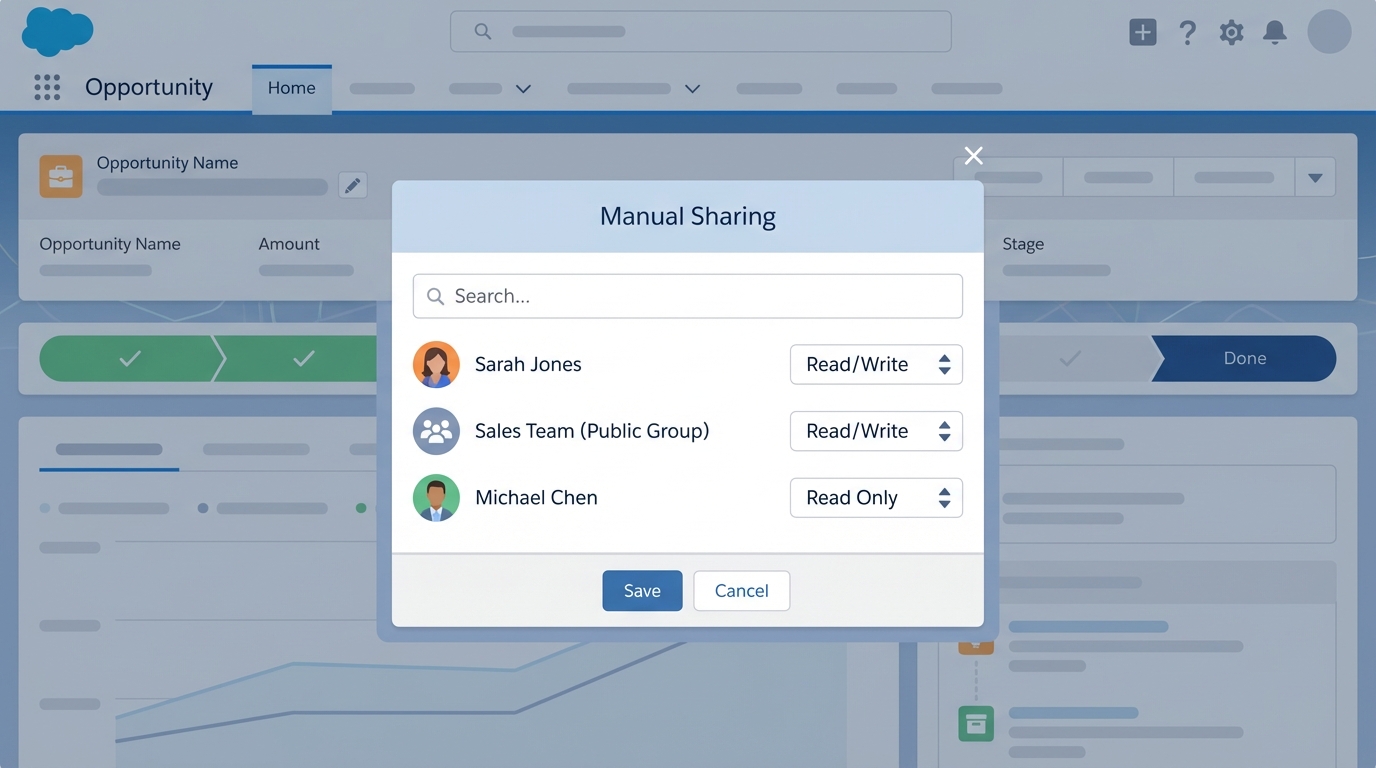
The Salesforce manual sharing dialog, where specific users are granted individual access levels to a record.
Common scenarios for Salesforce manual sharing
In my experience it works best on the exceptions to the rule. If you find yourself manually sharing every single record, your sharing rules are probably broken. For these situations, though, it fits:
- One-off collaborations where a user needs to jump into a record they don't normally touch.
- Temporary access for a contractor who just needs to update a few specific accounts.
- Executive overrides where a leader needs visibility into a sensitive record that's otherwise hidden.
Manual sharing is "manual" for a reason: it doesn't scale. If you're doing this 50 times a day, look at automation instead. I've seen teams try to manage thousands of manual shares and it always ends in a messy audit trail that nobody wants to touch.
How Salesforce manual sharing works under the hood
If you're a dev or a curious admin, it helps to know that Salesforce doesn't just "remember" these shares in thin air. Every object has a Share table. A custom object called Project__c has a hidden table called Project__Share. For accounts, it's AccountShare.
Each row in that table is a permission slip. It records who gets access (UserOrGroupId), which record they get (ParentId), and what they can do with it (AccessLevel). The part that matters most is the RowCause. When you share something through the UI, the RowCause is set to "Manual", which is how Salesforce keeps that share separate from the ones your automated rules create.
Change the owner of a record and Salesforce wipes out all the manual shares on it. I've watched this trip up admins in the middle of a data migration. Always back up your share tables before a big owner shuffle.
Creating shares: UI vs Apex
Most of your users will just use the "Sharing" button on the record page, which is simple and works. Sometimes you need code instead. When you're weighing Apex vs Flow for sharing, Apex gives you the most control over those share tables.
Here's a quick look at how you'd do this in Apex for a custom object:
// Quick example of sharing a record via code
CustomObject__Share jobShare = new CustomObject__Share();
jobShare.ParentId = 'a0Bxxxxxxxxxxxx'; // The record ID
jobShare.UserOrGroupId = '005xxxxxxxxxxxx'; // The User ID
jobShare.AccessLevel = 'Edit'; // Give them edit rights
jobShare.RowCause = Schema.CustomObject__Share.RowCause.Manual;
insert jobShare;
The limits of Salesforce manual sharing
Before you go all-in, know the catches. Manual shares don't cascade. Share an Account and the user doesn't automatically get access to every related custom object record unless those are controlled by parent. You have to be intentional about what you're opening up.
Permissions still matter too. You can't share a record with someone who doesn't have "Read" access to that object on their profile. Manual sharing only handles record-level access, never object-level security. Reporting on it is a bit of a pain as well. There's no standard report that lists every manual share in the system, so you usually end up querying the share tables directly or reaching for a specialized tool.
Key takeaways
- Treat Salesforce manual sharing as an exception handler, not as your main security strategy.
- Shares are stored in object-specific tables like
AccountShareorCustomObject__Share. - Manual shares are deleted automatically if the record owner changes.
- Users still need object-level permissions (Profile/Permission Set) to see the records you share.
- Prefer automated sharing rules whenever the logic is predictable and repeatable.
Manual sharing is a good tool to keep in your back pocket. It's the quickest way to solve an "I can't see this" problem without breaking your wider security architecture. Just don't lean on it to prop up a role hierarchy that was designed badly. Keep it simple, document why you granted each one, and the next security audit goes a lot easier.


Leave a Comment