
If you've ever dealt with a high-volume integration, you know that standard Platform Event Triggers can sometimes hit a wall. I've seen teams build beautiful event-driven architectures only to watch their event bus backlog grow because a single-threaded subscriber couldn't keep up with the incoming flood of data. It's frustrating, but there's a specific way to fix it without rewriting your entire logic.
Parallel platform event subscribers are essentially the "secret sauce" for scaling your processing. Instead of one instance of your trigger trying to chew through thousands of events, Salesforce lets you split that work across multiple parallel instances. It's a bit like opening more checkout lanes at a grocery store when the line gets too long. Let's look at how this actually works in a real project.
Scaling Platform Event Triggers with Parallel Processing
When you're dealing with Platform Event Triggers, everything runs on an event bus powered by Apache Kafka. By default, you get one subscriber. But when volumes spike, that single subscriber becomes a bottleneck. Parallel subscribers solve this by partitioning the stream. Each event is assigned to a specific partition, and each partition gets its own trigger instance.
The best part? Salesforce handles the load balancing for you. If you use the default settings, it uses the EventUUID to decide which partition an event goes to. This means you don't have to worry about two different subscribers trying to process the same event at the same time. It's a clean way to handle managing large data volumes without the usual locking headaches.
When to use deterministic partition keys
Now, here's where it gets interesting. Sometimes you can't just let Salesforce pick a random partition. If you're processing order updates, you probably need Order A's events to stay in the exact order they were sent. In that case, you'd use a deterministic partition key, like an Account ID or a Region. This ensures all events for that specific key go to the same subscriber instance, preserving the sequence. But be careful. If one Account has 90% of your data, you'll end up with a "hotspot" where one subscriber is slammed while the others sit idle.
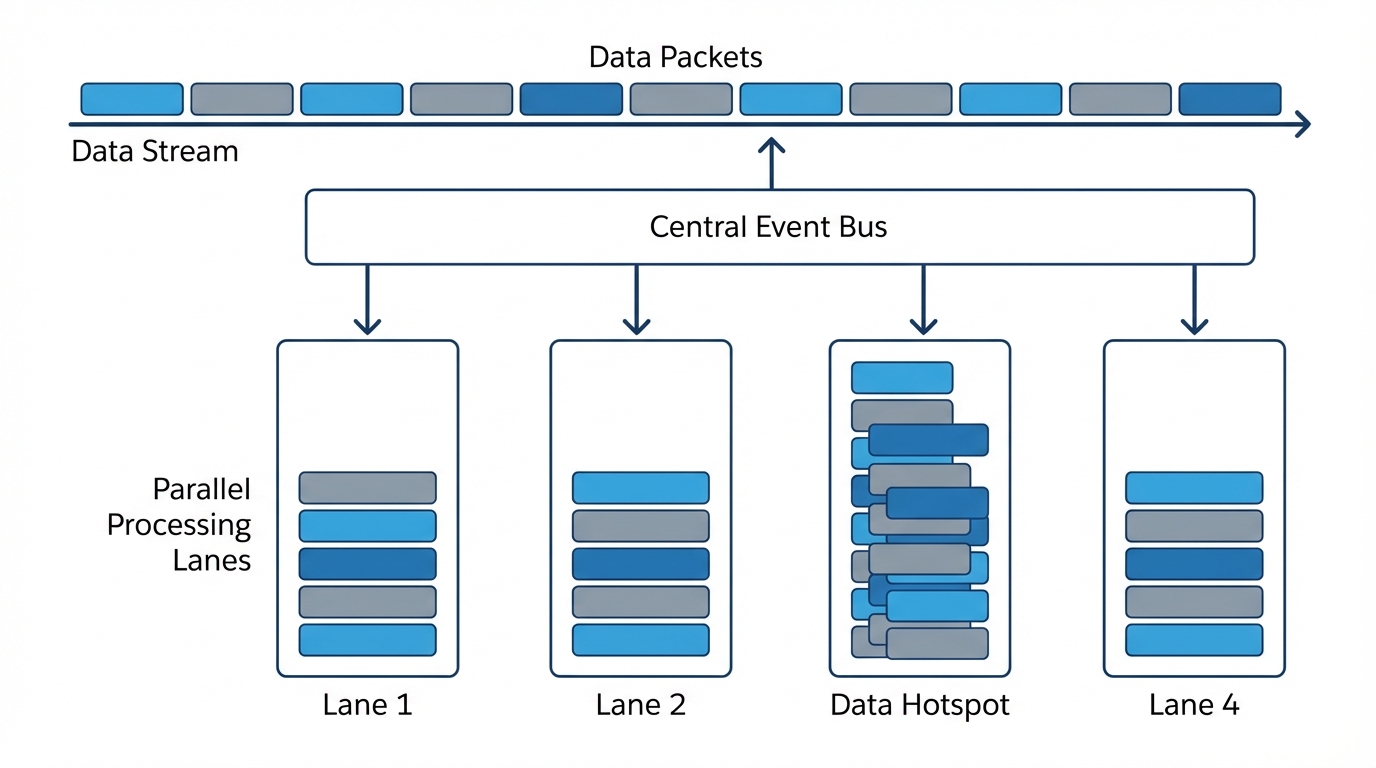
An architecture diagram showing platform events being distributed into parallel subscriber lanes, with one lane showing a data hotspot.
Configuring Your Platform Event Triggers for Scale
You won't find a checkbox for this in the standard Setup UI. You have to use the PlatformEventSubscriberConfig metadata type. It's a bit of extra work, but it's worth it. Here is the basic XML you'll need to deploy to get this running.
I usually recommend starting with 2 to 4 partitions. I've seen folks go straight to 10, but honestly, you often hit diminishing returns after 5 or 6. Plus, you have to stay mindful of your asynchronous Apex limits because each partition counts as its own process.
Writing the Apex Handler
When you're building Platform Event Triggers for high-volume work, keep your trigger thin. Don't put logic in the trigger itself. Use a handler class and, if possible, some kind of logging framework to track what's happening. Here's a pattern I've used to keep things organized.
public with sharing class InboundOrderEventSubHandler {
public static void handleInboundOrders(List
// PE trigger batch sizes can go up to 2000 records
for (SObject orderEvent : orderEvents) {
  Inbound\_Order\_Status\_\_c orderStatus = new Inbound\_Order\_Status\_\_c();
  orderStatus.Status\_\_c = (String) orderEvent.get('Status\_\_c');
  orderStatus.Event\_Uuid\_\_c = (String) orderEvent.get('EventUuid');
  orderStatus.Batch\_Id\_\_c = batchId;
  ordersToInsert.add(orderStatus);
}

if (!ordersToInsert.isEmpty()) {
  insert ordersToInsert;
}
} }
Pro Tip: Don't expect every batch to be exactly 2,000 records. When you first start the subscriber, you'll often see "cold-start" batches where the partitions pick up just a few records to get moving. Your code needs to handle 1 record just as well as 2,000.
Best Practices for Platform Event Triggers at Scale
I've learned a few hard lessons while setting these up in production environments. Here's what you should keep in mind:
- Don't over-partition: Going from 1 to 3 partitions usually gives you a massive speed boost. Going from 7 to 10? Not so much. Stick to what you actually need.
- Check your schema: If your Platform Event was created before 2019, it might not support this. You'll need to update the metadata to the latest version.
- Watch for repartitioning delays: If you change the number of partitions while the system is busy, it can cause a temporary pause in processing. Do these updates during low-traffic windows.
- Instrumentation is key: Since these run in the background, you won't see errors in the UI. Make sure you're logging successes and failures to a custom object so you can actually see if a partition is stuck.
Key Takeaways
- Parallel subscribers turn Platform Event Triggers from a single-lane road into a multi-lane highway.
- Use
PlatformEventSubscriberConfigto set the number of partitions and the running user. - Default partitioning (EventUUID) is great for load balancing; deterministic keys are necessary for keeping specific records in order.
- Start with 2-4 partitions and monitor performance before cranking it up to 10.
Things to Watch Out For
Look, Platform Event Triggers are powerful, but they aren't magic. One thing that trips people up is the lack of a "guaranteed delivery" UI. If a subscriber fails repeatedly, it might stop. You need to build your own retry logic or monitoring. Also, remember that debug logs for parallel subscribers can be a pain to find since they run under the user you defined in the config, not necessarily the user who published the event.
So, should you use this? If you're seeing "Event Bus Backlog" errors or your processing just isn't keeping up with your external systems, then yes. It's a relatively low-code way to get a lot more throughput out of the platform. Just make sure you test your partitioning logic in a sandbox first so you don't accidentally break the order of your data.




Leave a Comment