
Choosing Salesforce Integration Patterns for Real-World Projects
If you have been around the ecosystem for a while, you know that picking the right Salesforce Integration Patterns can make or break your project's long-term health. It is easy to just grab the first tool you see, but that is how technical debt starts to pile up. I have seen teams spend weeks debugging failed syncs just because they chose a pattern that did not fit their scale.
When we talk about pushing data out of Salesforce asynchronously, the two heavy hitters are Outbound Messages and Platform Events. One is a veteran that has been around forever, and the other is the modern, event-driven standard. So, how do you decide? Let's break this down based on what actually happens in the field.
Why Outbound Messages Still Have a Place
Outbound Messages (OM) are like that old truck in your garage. It might not have the fancy touchscreens, but it starts every time and gets the job done. It is a declarative, SOAP-based way to send record data to a single endpoint. You don't need to write a single line of Apex to get it moving.
One thing that trips people up is thinking OMs are "dead" because they use SOAP. But here's the thing: they have built-in retry logic. If your middleware goes down, Salesforce will keep trying to deliver that message for 24 hours. That is a huge win for reliability without you having to build a custom error-handling framework. I've used these for simple ERP syncs where the target system just needed a basic XML packet whenever an Order was activated. It's low effort and it works.
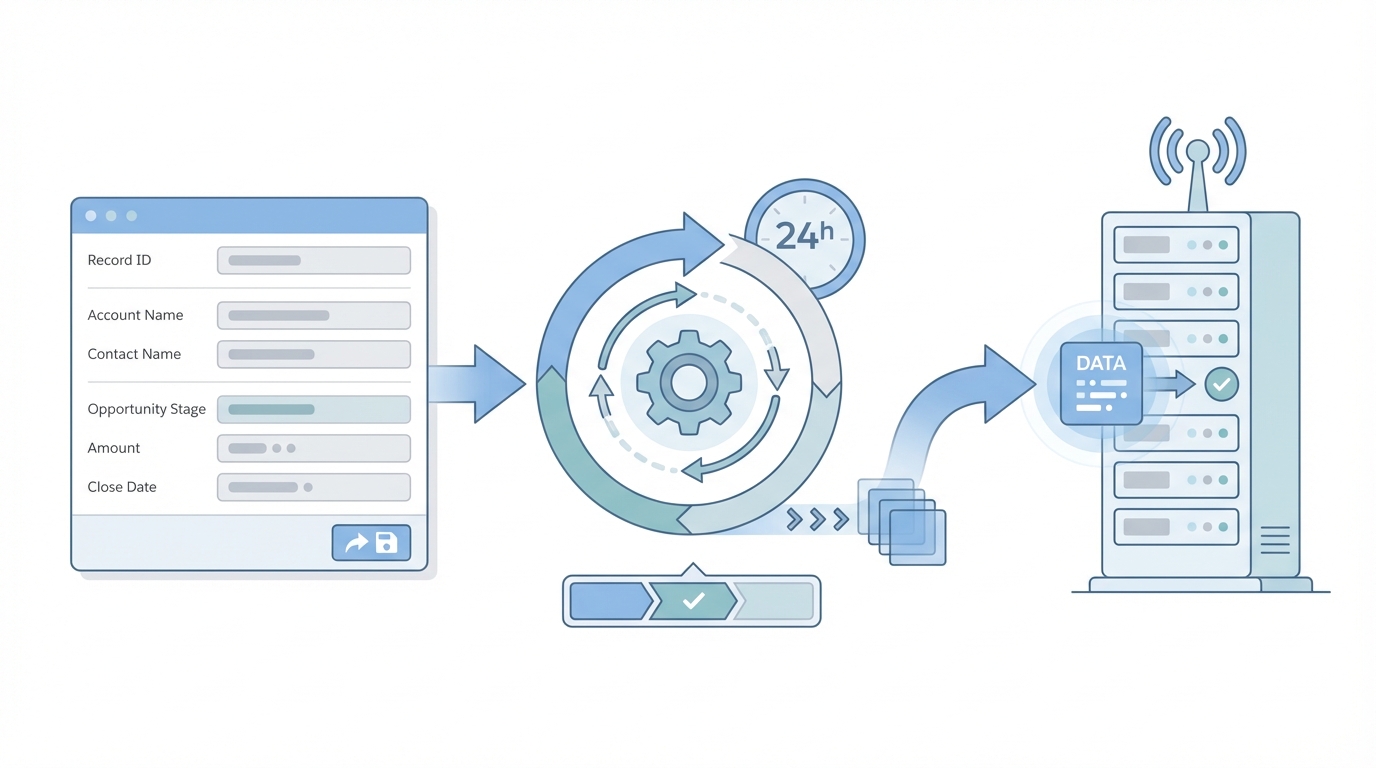
A technical architecture diagram showing a Salesforce Outbound Message connecting a single source to a single destination with a retry queue.
The Downside of the Old Way
But there is a catch. Outbound Messages are strictly point-to-point. You have one sender and one receiver. If you suddenly need three different systems to know when an Account is updated, you are stuck creating three separate messages. It does not scale well, and the XML payload can be a bit clunky to work with if your team is used to modern JSON APIs. If you are looking for more flexibility, you might want to check out this guide on Salesforce API Integration: A Guide for Scalable Design to see how these fit into a bigger picture.
Moving Toward Modern Salesforce Integration Patterns with Platform Events
Now, let's talk about Platform Events. This is where Salesforce is heading. It is built on a publish-and-subscribe model, which means Salesforce just yells the event out into the "Event Bus," and anyone who is listening can grab it. It is loosely coupled, which is basically architect-speak for "if one system breaks, the others don't care."
I've seen teams use Platform Events to handle everything from real-time dashboard updates to complex multi-system orchestrations. Since they use a JSON-based model, they are much easier for modern web developers to digest. Plus, you can have multiple subscribers - like a Mulesoft instance, a Heroku app, and an internal Apex trigger - all listening to the same event. This is a core part of building modern Salesforce Integration Patterns that actually scale.
I've seen too many architects over-engineer a simple notification. If you just need to tell one system that a record changed and you don't want to write code, don't be afraid of the Outbound Message. But if you're building a "digital nervous system" for your company, Platform Events are the only way to go.
Comparing the Two Approaches
So what does this actually mean for your day-to-day? Here is a quick look at how they stack up against each other:
| Feature | Outbound Message | Platform Events |
|---|---|---|
| Protocol | SOAP / XML | JSON / CometD |
| Setup | Declarative (Point-and-click) | Declarative or Apex |
| Retries | Automatic (24 hours) | Manual (via Replay ID) |
| Subscribers | One endpoint | Multiple subscribers |
| Volume | Good for low to mid volume | High-Volume ready |
When to Use Each
Use Outbound Messages when you have a single, legacy endpoint that loves XML and you want the "guaranteed delivery" feel without writing code. It's great for simple "fire and forget" tasks. But if you are building an ecosystem where multiple services need to react to business events in real-time, Platform Events are your best bet. Just remember that with Platform Events, you have to manage your own "replay" logic if a subscriber misses something. It's also worth looking into how these interact with Asynchronous Apex in Salesforce to make sure you aren't hitting governor limits.
Best Practices for the Real World
Look, no matter which of these Salesforce Integration Patterns you choose, you have to worry about idempotency. That is just a fancy way of saying "make sure you don't process the same message twice." Networks glitch, and messages get sent twice. Always include a unique ID so the receiving system knows it has already seen that specific update.
Another tip: if you're using Platform Events, use the "Publish After Commit" setting. There is nothing worse than firing an event for a record that failed to save because of a validation rule. It creates a mess of "ghost data" in your external systems that is a nightmare to clean up. Honestly, most teams get this wrong the first time, so save yourself the headache and set it to after-commit from day one.
Key Takeaways
- Outbound Messages are perfect for simple, point-to-point SOAP integrations with built-in retries.
- Platform Events are the standard for modern, scalable, and multi-consumer architectures.
- Idempotency is king. Always design your endpoints to handle duplicate messages gracefully.
- Choose based on the consumer. If your middleware can't handle CometD or Streaming APIs, Platform Events might be more trouble than they're worth.
- Standardize your Salesforce Integration Patterns. Don't just pick whatever feels easy that day; pick the one that fits your long-term strategy.
At the end of the day, neither tool is a magic bullet. The right choice depends on your specific stack and how much data you are moving. If you're just starting out, keep it simple. If you're growing fast, start looking at the event-driven route. Just make sure you're thinking about how it will look two years from now when the record volume has tripled. Sound familiar? We've all been there.



Leave a Comment