

If you've been working in the ecosystem for a while, you've definitely run into the Salesforce Apex Trigger. It's the go-to tool when you need to handle complex business logic that standard automation just can't touch. But even though it's a staple for developers, I still see a lot of confusion about when to write code and when to stick with declarative tools.
What is a Salesforce Apex Trigger exactly?
At its core, a Salesforce Apex Trigger is just a script that lives on the server and waits for something to happen to your data. Whether you're inserting a new Lead or updating an old Account, the trigger listens for that event and runs your custom code before or after the change hits the database. It's part of the same transaction, so if the code fails, the whole data change rolls back. That's a huge win for data integrity.
Now, I've seen teams try to put every single piece of logic into triggers, but that's a recipe for a maintenance nightmare. Triggers run in the system context, meaning they usually bypass user permissions. This gives you a lot of power, but it also means you've got to be careful about what you're letting happen under the hood. It's a tool for when you need to go beyond the basics.
When should you actually use a Salesforce Apex Trigger?
Here's the thing: Flow has become incredibly powerful lately. I usually tell people to start there first. But there's a ceiling. If you're trying to decide between the two, you might want to check out this guide on Apex vs Flow to see where that line is drawn. Generally, you'll want to reach for code in a few specific spots.
1. Handling massive data volumes
If you're processing thousands of records at once, Flow can sometimes struggle with performance or hit governor limits faster than you'd like. Apex is just more efficient at handling collections. When I'm dealing with complex multi-object updates that need to be lightning-fast, I almost always go with a trigger.
2. Advanced validation and math
Standard validation rules are great for simple stuff, like making sure a field isn't empty. But what if you need to query three different objects and run a complex calculation before allowing a record to save? That's where a trigger shines. You can write sophisticated logic that checks historical data or cross-references related records in ways a formula just can't.
3. Complex transaction control
Sometimes you need total control over how a transaction succeeds or fails. If you need to ensure that five different things happen across five different objects-and if any one of them fails, none of them should save-Apex gives you that granular control. It ensures your data doesn't end up in a "half-baked" state.
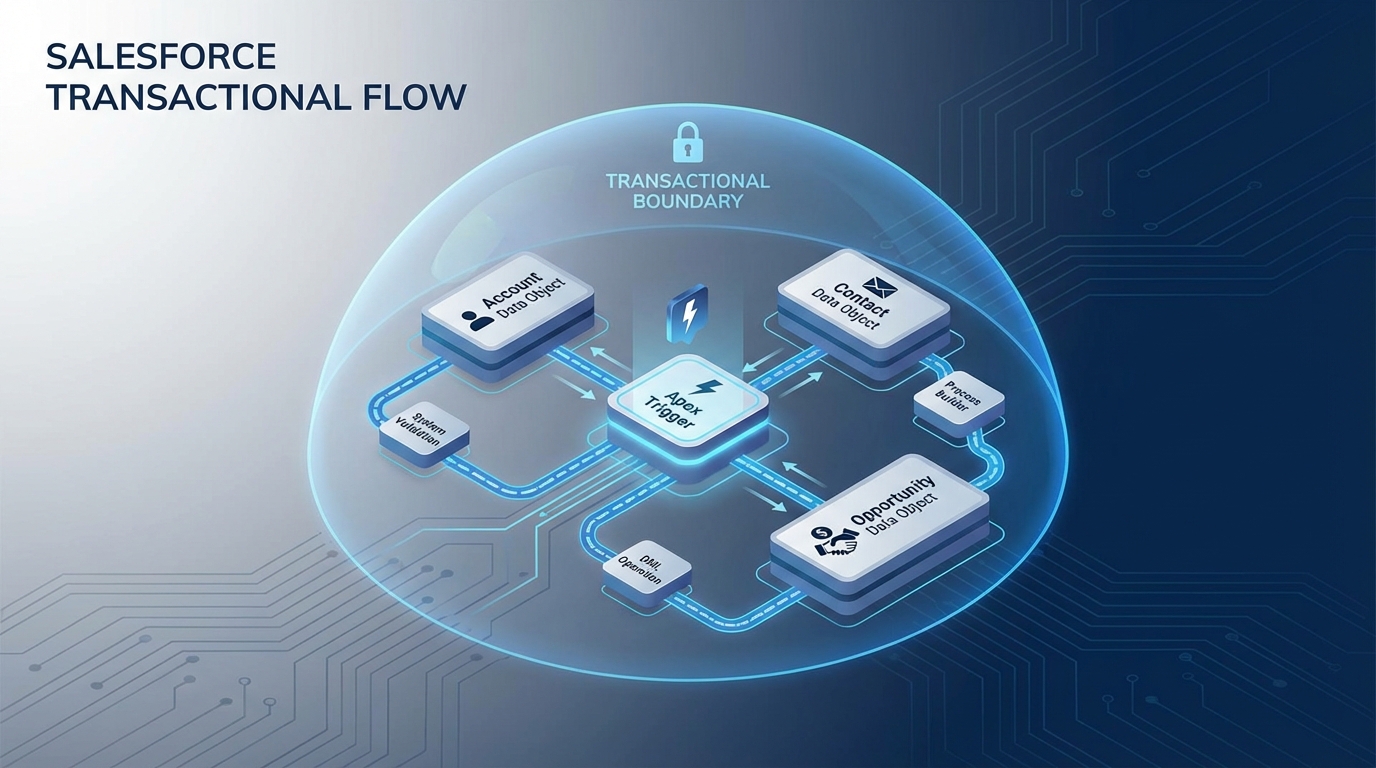
A technical architecture diagram showing a Salesforce Apex trigger coordinating updates across multiple related database objects to ensure data integrity.
Trigger Types and how they work
You'll hear people talk about "before" and "after" triggers. It sounds simple, but getting this wrong is one of the most common mistakes I see. "Before" triggers are for when you want to update fields on the same record or validate data before it's saved. Since the record hasn't been committed yet, you don't even need an extra DML statement to save your changes.
"After" triggers are a different beast. You use these when you need to work with the record ID (which doesn't exist until it's saved) or when you need to update other records. If you're prepping for a technical role, you might want to look at some Apex Trigger interview questions to see how these scenarios play out in the real world.
- Before Insert/Update: Use these for validation and setting default values on the same record.
- After Insert/Update: Use these for creating related records or syncing data to other objects.
- Before Delete: Perfect for preventing a record from being deleted based on specific criteria.
One quick tip from the field: Always keep your triggers "thin." Don't write all your logic inside the trigger file itself. Use a handler class. It makes your code much easier to test and keeps your org from becoming a tangled mess of spaghetti code.
Best practices for your Salesforce Apex Trigger
Look, we've all written a messy trigger at some point. But if you want your org to scale, there are a few rules you just can't break. The big one is bulkification. You should never, ever put a SOQL query or a DML statement inside a loop. I've seen entire orgs grind to a halt because a developer forgot this and hit a governor limit during a data load.
Another thing that trips people up is recursion. That's when your trigger updates a record, which then fires the same trigger again, and again, until the system kills the process. You've got to use static variables or a proper framework to keep that from happening. And please, only have one trigger per object. If you have five different triggers on the Account object, you'll have no idea what order they're running in, and debugging will be a nightmare.
Key Takeaways
- One Trigger per Object: Use a handler framework to keep things organized.
- Bulkify Everything: Always assume you're processing 200 records at a time, not just one.
- Flow First: If Flow can do it efficiently, let it. Save Apex for the heavy lifting.
- Watch the Limits: Keep queries and DML out of your loops to stay under governor limits.
Wrapping things up
At the end of the day, a Salesforce Apex Trigger is a power tool. When you need it, nothing else will do the job quite as well. It gives you the flexibility to build almost anything you can imagine, but it also requires a bit more discipline than building a Flow. Stick to the handler pattern, keep your logic bulkified, and you'll be in good shape.
If you're just starting out, don't be intimidated by the code. Start small with a simple "before" trigger to set a field value, and build up from there. Once you get the hang of how the execution order works, you'll wonder how you ever managed without them.




Leave a Comment