


The core differences in validation rules vs triggers
We've all been there. You're looking at a new business requirement and trying to decide between validation rules vs triggers to keep your data clean. It's one of those early choices that either makes your life easy or leaves you with a technical debt nightmare six months down the road.
I'm a big fan of keeping things simple. If you can solve a problem without writing a single line of code, you're usually winning. But sometimes a formula just won't cut it. I've seen teams force complex logic into massive, unreadable formulas when they should have moved that logic into Apex.
Here are the practical differences, so you can make the right call for your org.
1. Purpose and scope
Validation rules are your first line of defense for data quality. Their whole job is to stop a record from being saved if it doesn't meet your criteria. Think of them as a gatekeeper. They're perfect for simple checks, like making sure a phone number is formatted correctly or that a "Reason" field is filled out when an Opportunity is lost.
Triggers are a different beast entirely. An Apex trigger is programmatic. It checks data, and it can also change data, create related records, or talk to external systems. You can use one to throw errors, but that's usually a small part of what it's doing.
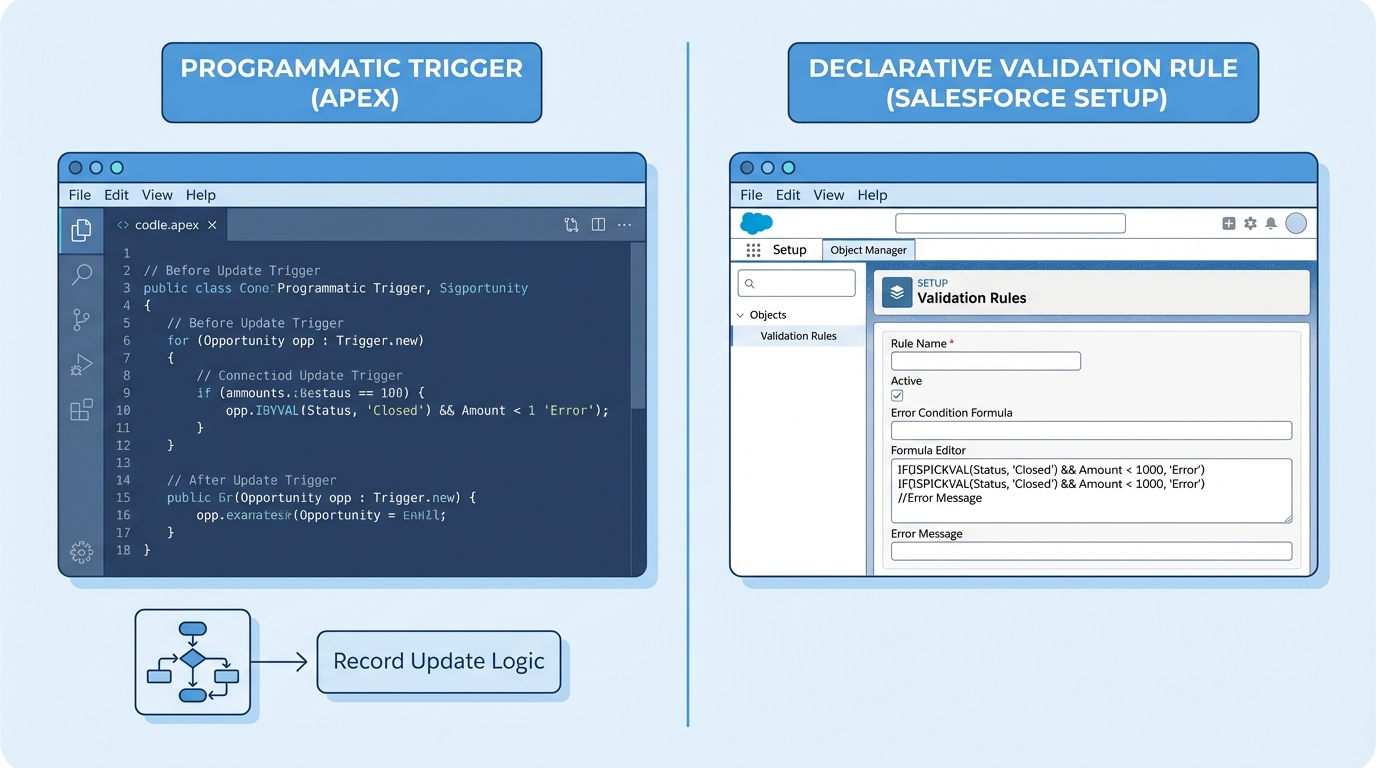
An Apex code editor sitting next to the standard validation rule formula editor.
2. Complexity and logic
Validation rules use formulas. If you can't express your logic in a formula, you can't use a validation rule. They're great for something like a validation rule for Customer ID formatting, where the logic is self-contained within that one record.
Triggers handle the messy stuff. If you need to query three other objects, check a custom setting, and then decide whether to allow the save, you're in trigger territory. Formulas can't look at other records or perform complex math across collections. Code can.
Pro tip: If your validation rule formula is starting to look like a novel, that's a sign the logic belongs in a Flow or a trigger, where it stays maintainable.
3. Execution timing
Validation rules run very early in the save process. If the rule evaluates to true, the whole thing stops right there. The user sees an error, and no data is committed to the database.
Triggers give you more options. "Before" triggers are great for updating fields on the same record, and "after" triggers are what you use for logic that needs the record ID or has to update other related records. One thing that trips people up with validation rules vs triggers is that validation rules actually run multiple times during certain operations, like a lead convert or an upsert.
When to choose validation rules vs triggers for your project
Choosing between validation rules vs triggers often comes down to who needs to maintain the system. If you have a team of admins, they can easily tweak a validation rule in the UI. If you bury that logic in a trigger, they're stuck waiting for a developer to write code, run tests, and deploy a change set.
4. User feedback and UX
Validation rules give immediate, clear feedback. You can put the error message right next to the field that's causing the problem, which is a smooth experience for the user.
Triggers can also show errors using the addError() method, but it's often less "pretty." If you're running a bulk upload through the Data Loader, a trigger error might just look like a cryptic row failure in a CSV. For a user in the browser, a well-written addError() message still gets the point across.
5. Bulk behavior and performance
Validation rules are bulk-safe by default. Salesforce handles the heavy lifting for you, so you don't have to worry about governor limits when writing a formula.
Triggers are a different story. If you don't write your trigger to handle collections of records, you'll hit SOQL limits faster than you can say "System.LimitException." You have to be intentional about bulkification. I always tell junior devs that if they aren't thinking about how their code handles 200 records at once, they aren't ready to push to production.
6. Testing and deployment
Validation rules don't require Apex test classes. You build them, test them manually in a sandbox, and move them over. It's fast.
Triggers require at least 75% test coverage, but honestly, you should be aiming for 100% logic coverage. You need positive tests, negative tests, and bulk tests. It adds a lot of overhead to your development cycle. When you're deciding when to use code over automation, always factor in the time it takes to write and maintain those tests.
Comparing the two side by side
| Feature | Validation Rules | Apex Triggers |
|---|---|---|
| Configuration | Declarative (No-code) | Programmatic (Code) |
| Maintenance | Easy for Admins | Requires Developers |
| Complexity | Simple formula logic | Advanced business logic |
| Error Messages | Field-level or Page-level | Custom via addError() |
| Unit Tests | Not Required | Mandatory |
Key takeaways
- Use validation rules for simple, single-object data integrity checks.
- Go with triggers when you need to perform DML on other objects or call external services.
- Validation rules are easier to maintain and don't require deployment of test classes.
- The validation rules vs triggers debate usually ends with "use the simplest tool that works."
- Always keep the end-user in mind; if they need to fix the data, make sure the error message makes sense.
In my experience, the best approach is to start with a validation rule. If you find yourself hitting the limits of what a formula can do, or if you're trying to validate data based on values in a completely different object, that's when you step up to a trigger or a Record-Triggered Flow. Don't over-complicate things just because you can.



Leave a Comment