

Salesforce Platform Events vs Outbound Message is reshaping how Salesforce professionals work — and this article breaks down everything you need to know.
If you have been around the Salesforce ecosystem for a minute, you know that choosing the right integration pattern can make or break your project. I have had plenty of late-night calls about Salesforce Platform Events vs Outbound Message, and honestly, the right answer usually depends on how much technical debt you are willing to live with. It is not just about which one is newer; it is about what your tech stack can actually handle right now.
Why the Salesforce Platform Events vs Outbound Message choice is tricky
I have seen teams get stuck because they want the shiny new thing, but their middleware is still living in 2012. Outbound Messages (OM) are like that old reliable truck in your garage. They use SOAP and XML, which feels a bit dated, but they just work for simple, point-to-point tasks. They even handle their own retries for 24 hours without you writing a single line of code.
But then you have Platform Events (PE). These are the modern, event-driven way to do things. They use JSON and a publish-subscribe model. This means one event can trigger actions in five different systems at the same time. So, when you are looking at a Salesforce Platform Events vs Outbound Message comparison, you have to ask yourself: do I need a simple notification, or am I building a complex web of services?
The technical nitty-gritty
- The Protocol: Outbound Messages are strictly SOAP/XML. Platform Events use JSON over the Event Bus.
- Delivery: OM is a one-to-one relationship. PE is one-to-many, which is a huge win for scalability.
- Retention: If your system goes down, OM retries for a day. PE keeps events on the bus for up to 72 hours, letting you "replay" what you missed.
- Security: OM uses basic auth or mutual TLS. PE is built on OAuth 2.0, which is much better for modern security standards.
When to stick with Outbound Messages
Look, I know everyone wants to move to REST, but sometimes an Outbound Message is just easier. If you are connecting to a legacy ERP that only understands XML, don't overcomplicate it. I once worked on a project where we tried to force Platform Events into a legacy SAP setup, and we ended up building so much custom middleware that it wasn't worth the effort. You can check out this guide on SOAP vs REST to see why these protocol differences matter so much in the real world.
Use Outbound Messages if you want a low-code solution that handles its own retry logic. It is great for simple "fire and forget" scenarios where you don't need to worry about multiple systems listening in. It is declarative, easy to set up in Flow, and it gets the job done without a lot of fuss.
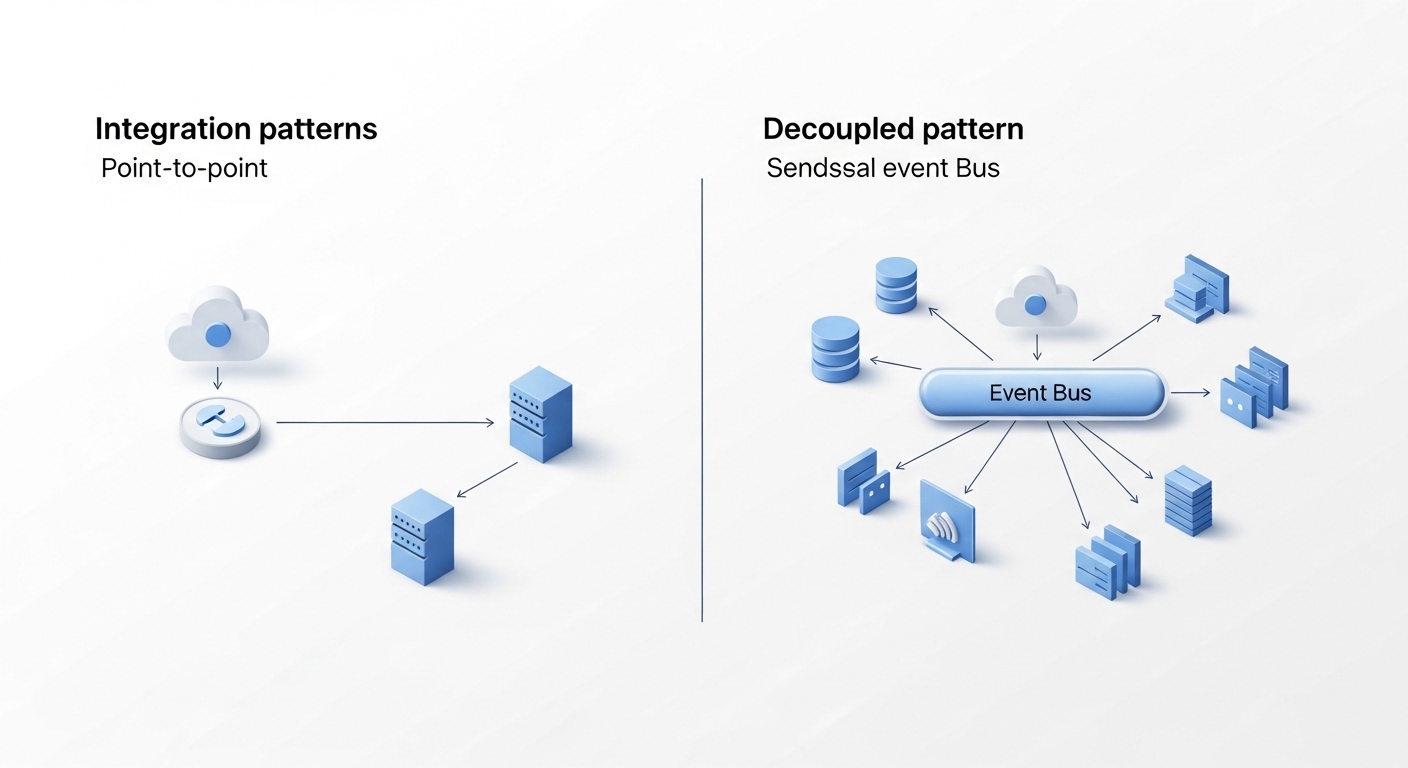
A technical architecture diagram comparing a direct point-to-point outbound message integration with a decoupled, multi-system platform event bus.
Breaking down Salesforce Platform Events vs Outbound Message by use case
Here is where it gets interesting. If you are building for the future, Platform Events are almost always the way to go. They are designed for high-volume scenarios and loose coupling. What does that mean in plain English? It means your Salesforce org doesn't need to know or care who is listening to the event. It just shouts the news into the Event Bus, and whoever needs it picks it up.
One thing that trips people up is the "Publish After Commit" setting. In my experience, you should almost always use this. It ensures your event only fires if the database transaction actually succeeds. There is nothing worse than your external system processing an "Order Paid" event while the Salesforce record rolled back because of a validation error.
If you are working on a microservices architecture or need real-time updates for things like order status or payment processing, Platform Events are your best friend. They fit perfectly into an architect's guide to APIs because they allow for the kind of scale that Outbound Messages just can't touch.
Decision Checklist
- Do you have multiple systems that need the same data? Go with Platform Events.
- Is your target system an old-school server that only takes SOAP? Stick with Outbound Messages.
- Are you worried about hitting limits with high-volume data? Platform Events (specifically High-Volume ones) are the answer.
- Do you need a quick, no-code way to send a notification? Outbound Message is the fastest path.
Architectural best practices
Don't just pick one and hope for the best. I've seen teams get burned because they didn't think about idempotency. Whether you use PE or OM, your receiving system needs to be smart enough to handle the same message twice. Networks glitch, and retries happen. If your system isn't checking for duplicate IDs, you are going to end up with messy data.
Also, keep an eye on your limits. Platform Events have specific hourly and daily limits depending on your edition. I always tell my colleagues to monitor the Event Bus metrics early in the project. It is much better to find out you are hitting a ceiling during testing than on a Monday morning after a big release.
Key Takeaways
- Salesforce Platform Events vs Outbound Message: OM is for legacy, point-to-point SOAP needs; PE is for modern, scalable, pub-sub architectures.
- Retries: OM handles retries automatically for 24 hours; PE allows for replaying events for up to 72 hours.
- Scaling: Use Platform Events if you expect your system to grow or if multiple consumers need the data.
- Security: PE is more aligned with modern OAuth standards, while OM relies on older methods.
Choosing your path
So what is the bottom line? If you are starting a fresh project today, try to use Platform Events first. They are more flexible and follow the direction Salesforce is heading. But don't feel bad if you have to use an Outbound Message for a legacy system. It is a tool in your toolbox, not a sign of being behind the times. Just make sure you are picking the tool that fits the job, not just the one that is newest. Align your choice with where your company's tech is going, and you'll save yourself a lot of headaches down the road.


Leave a Comment