New tool CRON Expression Builder — preview next run times before you schedule Apex. Open the builder →
Interview prep

Data model interview questions and answers

Relationships, skew, large data volumes and schema trade-offs.

12 questions · 4 of them scenarios

Junior round

Junior Data model questions

Data model junior

Lookup or master-detail — what actually changes when you pick one?

Testing Whether the answer stops at roll-up summaries or reaches the sharing model.

junior

Master-detail makes the child dependent on the parent: the parent is required, deleting the parent deletes the children, the child has no owner of its own, and I can put roll-up summary fields on the parent. A lookup is a loose link — optional, the child keeps its own owner and sharing, and no roll-ups without extra work. An object can have two master-detail relationships and up to 40 lookups.

mid

The roll-up is the visible difference and the sharing is the consequential one. A master-detail child has no owner and no sharing of its own — its access is Controlled by Parent — so choosing master-detail is choosing who can see the child, permanently, based on the parent. That is usually what you want for line items and almost never what you want for something a different team owns. Cascade delete is the other commitment: deleting a parent takes the children with it, which is right for detail rows and alarming for anything with history. And conversion is not free either way, because turning a lookup into a master-detail requires every one of the existing children to have the field populated, and at 400,000 rows that is a data project.

Deep dive on this
Data model junior

How do you model a many-to-many relationship?

Testing Which decision you mention beyond "make a junction object". There is one that matters and people skip it.

junior

A junction object with two master-detail relationships, one to each side. Each row represents one pairing, so a Course with 30 Students is 30 junction records. It also gives me somewhere to put the data that belongs to the pairing rather than to either side — the enrolment date, the grade, whether it was completed.

mid

Two master-detail relationships on a junction object, and the decision people skip is which one you create first. The first master-detail is the primary relationship: it determines the junction record's look and feel, and the child's ownership and sharing follow it. So if I get that backwards, the permissions on the pairing follow the wrong side and the only real fix is recreating the relationships. Beyond that, the junction is a real object with real volume — 30 students across 400 courses is 12,000 rows — so I think about roll-ups on it early, because I get one from each parent and that is often the whole reason for choosing master-detail on both sides.

Deep dive on this
Data model junior scenario

A roll-up summary shows the wrong total and nobody can reproduce it. How do you approach it?

Testing Where you look when a value corrects itself the moment somebody touches it.

What they tell you

A roll-up summary on Account sums a currency field on a custom child object. Users report the total being stale on some Accounts. Editing a child record by hand corrects it. The child field is a formula that references a field on the Opportunity the child points at.

junior

A total that corrects itself when a child is edited means the roll-up is only recalculating on child DML, and something is changing the child's value without touching the child. The formula is the suspect: it reads a field on another object, so when that other field changes the formula's result changes without any DML on the child, and the roll-up never hears about it. The fix is to stop the roll-up depending on a cross-object formula.

mid

Editing the child fixing it is the whole diagnosis — the roll-up recalculates on child DML and nothing else, so a source value that can change without a child save will drift. A cross-object formula does exactly that: the Opportunity field moves, the formula's output moves, and no child record was ever written. Two honest options. Store the value on the child as a real field, written by a trigger when Opportunity.Amount changes, so the roll-up has something stable to sum — that costs a trigger or a flow but the total is then correct at all times. Or drop the roll-up and calculate on the parent directly. What I would not do is schedule a repair, because the field is still wrong between runs and everyone using it learns not to trust it.

Ask before you answer
  • Is the child field a formula, and does that formula reference a field on a different object?
  • Does the roll-up have filter criteria, and could a child fall in or out of it without the child itself being edited?
Do not say this

Write a nightly batch job that recalculates the roll-up across all Accounts.

That masks a value that is wrong during the day and adds a job somebody has to maintain forever. It also does not explain the behaviour, so the same design will produce a second stale field later and the batch will be extended rather than questioned.

Deep dive on this
Mid-level round

Mid-level Data model questions

Data model mid

Custom metadata type or custom setting — which do you reach for?

Testing Whether deployability is part of your answer. That is the difference that actually shows up in a release.

mid

Custom metadata types for configuration that belongs to the application — they deploy with their records, so the same rows exist in every org and a release does not need somebody retyping values in production. Hierarchy custom settings for anything that has to vary by profile or user, because metadata types cannot do that. The other practical difference is limits: Type__mdt.getAll() and a custom setting's getInstance() both read from cache and cost no SOQL query, but a SOQL query against a metadata type does count, which surprises people.

senior

I default to custom metadata types and treat a custom setting as the exception, because deployability is the property that matters most over time. A configuration value that lives in data has to be recreated by hand in every sandbox and set by a human in production during a release, which is exactly where a wrong number gets typed at eleven at night. Metadata records go through the same pipeline as the code that reads them, so a sandbox behaves like production and a rollback restores the values too. The cases where I still use a hierarchy custom setting are genuinely per-user or per-profile switches — a feature flag one team gets first, a bypass for an integration user. And the thing worth being precise about is the read path: getInstance() and getAll() are cached and free, so configuration can be read in a loop without thinking, while a SOQL query against __mdt spends a query from the transaction's 100. Code that queries configuration inside a trigger is a limit bug waiting for a data load.

Deep dive on this
Data model mid

Formula field, roll-up summary, or a stored field written by automation — how do you choose?

Testing How you weigh "always correct" against "queryable and fast". They pull in opposite directions.

mid

A formula when the value is derived from the same record or a parent and I want it always current — no storage, no automation, no staleness. A roll-up when I need an aggregate over master-detail children and the platform can maintain it. A stored field when neither works: the value comes from somewhere a formula cannot reach, or I need to filter and sort on it at volume. The cost of the stored field is that correctness is now mine on every path that changes the inputs, including a 200,000 row data load nobody told me about.

senior

I decide on two axes: who guarantees correctness, and whether the field has to be queryable at scale. A formula is always right and costs nothing to maintain, and it is also evaluated at read time, so filtering a report on a cross-object formula over 2,000,000 rows is a query the platform cannot make selective — which is the point at which "always correct" stops being the deciding factor. A roll-up is maintained for me but only over master-detail, only up to the per-object limit, and it cannot summarise a cross-object formula, which is a constraint that catches people after the design is settled. A stored field is fast and indexable and it is the only one that can silently be wrong, so it needs every write path covered and ideally a way to detect drift. What I have learned to ask early is whether anyone will report on the field, because that answer alone often rules out the formula and turns the discussion into how the stored value gets maintained.

Data model mid scenario

A stakeholder wants a roll-up, which means converting a lookup to master-detail. What do you tell them?

Testing Whether you surface the consequences before agreeing, or afterwards.

What they tell you

A custom object with 400,000 records has a lookup to Account. About 12,000 of those records have the lookup blank. The child object has its own owner field used in reports, and a sharing rule grants a support team access to a subset of it.

mid

The conversion has three consequences worth stating before agreeing to it. Every child needs a parent, so the 12,000 blanks have to be resolved and that is a data question, not a technical one. The child loses its own owner and its sharing, becoming Controlled by Parent, so the support team's sharing rule stops doing anything and their access changes. And deleting an Account will now delete its children. If all three are acceptable, the conversion is straightforward; if any is not, a declarative roll-up tool or a small amount of Apex gives them the number without the model change.

senior

I would separate what they want from what they asked for. They want a number on the Account; master-detail is one way to get it and it is the one with the largest blast radius. So I would put the three consequences in front of them plainly — the 12,000 orphans need a home, the child's own owner and sharing rule stop existing, and cascade delete becomes live on 400,000 records — and then offer the alternative, which is maintaining the total with a trigger or a flow on the child. That costs code and it keeps the sharing model intact, and at this volume I would also want it to handle reparenting and deletion, which is the part people forget. Which way I would lean depends on the orphans: if those 12,000 genuinely have no parent in the business sense, master-detail is the wrong model regardless of the roll-up, and that is the strongest argument available. And if we do convert, it goes in a full sandbox first with the real volume, because a conversion at 400,000 records is a long-running operation and the sharing recalculation afterwards is not instant.

Ask before you answer
  • What are the 12,000 records with no parent, and can they legitimately be assigned to one?
  • Does anything depend on the child's own owner or the sharing rule on it?
Do not say this

Populate the 12,000 blanks with a catch-all Account so the conversion can proceed, then convert.

The conversion then succeeds and quietly changes the access model for 400,000 records: the child loses its owner, its sharing rule stops applying, and everything is Controlled by Parent. It also parks 12,000 records under an Account that will end up in somebody's report as a real customer.

Data model mid

When do two record types stop being enough and you need two objects?

Testing What you think a record type is for. Half the orgs I have seen use it as a substitute for an object.

mid

A record type varies the picklist values, the page layout and the business process for records that are still the same thing. Two objects are right when the records are genuinely different things — different fields, different lifecycle, different people using them, different reporting. The signal I watch for is fields that only ever apply to one record type: three is normal, 30 is a second object wearing the first one's badge.

senior

Record types are a presentation and picklist mechanism, and the trouble starts when they are used to carry a different data model. Two symptoms tell me it has happened: a growing set of fields that are required for one record type and meaningless for the other, and validation rules whose first condition is the record type. At that point every report has to filter, every automation has to branch, and any new field has to be explained twice. Against that, splitting into two objects costs real things — you lose the shared list views and reports, every RecordTypeId reference in code has to go, existing integrations reference one API name, and a migration means moving live records and rebuilding automation, so it is not a refactor you do casually. So the honest answer is that the decision is much cheaper before the data exists than after, and if I am asked once the records are live I would rather add discipline around the record types than attempt the split without a strong reason. Reporting is usually the thing that forces it: when the business needs two different reports of the same object and neither makes sense with the other's rows in it, the model has already diverged.

Data model mid

What can and cannot be done with relationship queries in SOQL?

Testing Which limit you have actually hit. The syntax is easy; the ceilings are where designs change.

mid

Going up is easy: Contact.Account.Owner.Name traverses child to parent, up to five levels. Going down needs a subquery — SELECT Id, (SELECT Id FROM Contacts) FROM Account — and only one level, so I cannot fetch grandchildren in the same query. Custom relationships use the __r suffix, and the relationship name is not always what you expect, which is worth checking in the schema rather than guessing.

senior

The ceilings are what shape a design. One level of parent-to-child means a three-deep hierarchy is two queries, and trying to avoid that with a semi-join runs into its own limit — 55 relationships per query and a cap on how many subqueries you can nest. Beyond syntax, the thing I pay attention to is selectivity: a relationship query is still a query, and filtering on a parent's field means the database cannot use the child's index the way you might hope, so a query that looks tidy can be non-selective on a large object and time out. Polymorphic lookups are the other trap worth naming — TYPEOF exists for WhoId and WhatId precisely because those can point at several objects, and code that assumes Contact will break the first time a Lead turns up. My habit is to write the query, then check the query plan on real volumes rather than assume the shape is fine because it returned quickly in a sandbox with 200 rows.

Deep dive on this
Senior round

Senior Data model questions

Data model senior scenario

A report on a 30,000,000 row object times out. How do you make it work?

Testing How you reason about selectivity rather than reaching for an index request.

What they tell you

A custom object with 30,000,000 rows. The report filters on a picklist Status__c where about 70% of rows are Closed, plus a created-date range of the last two years. It used to run in 40 seconds and now times out.

mid

The status filter is not doing any work: 70% of the object is Closed, so filtering on it excludes almost nothing and no index will help. The date range is where the selectivity has to come from, and two years out of a growing 30,000,000 rows is probably no longer narrow either. So I would tighten the range first, check whether the date field is actually indexed — CreatedDate is, a custom date field is not unless someone asked — and see what the row count really is. If they need two years of data, this is not a report, it is an extract.

senior

I would get the numbers before proposing anything, because the fix depends entirely on how many rows the filters really match. Selectivity is the whole story here: an index gets used when the filter is narrow enough, and neither of these filters is — the status matches 70% and the date range grows every day, which also explains why it used to run and now does not. Nothing about the report changed; the data grew past the threshold. From there the options are ordered by cost. Narrow the range and confirm the date field is indexed, which may be enough. Add a genuinely selective filter — an owner, a region, a record type — if the business can accept one. Then structural options: a skinny table from Salesforce support helps a report reading many fields, and archiving the Closed rows older than a couple of years to a Big Object removes most of the object from the query entirely. What I would put to the business is the last one, because a report over 30,000,000 rows including twenty-one million closed records is usually answering a question about the recent ones.

Ask before you answer
  • How many rows does the filter combination actually match, and how has that grown?
  • Is the date range on CreatedDate or on a custom date field, and is that field indexed?
Do not say this

Ask Salesforce support to add a custom index on Status__c.

An index on a field where 70% of rows share one value will not be used — the optimiser will still scan, because matching most of the object is not what an index is for. The request costs a week and changes nothing, and the real problem is that the filter was never selective.

Deep dive on this
Data model senior

What changes about your design once an object holds 50,000,000 rows?

Testing Which levers you know exist, and which ones you would try before asking Salesforce for anything.

mid

Queries stop being free. A filter that matched quickly at 100,000 rows can become non-selective at 50,000,000, and then reports and list views time out rather than run slowly. So the design work moves to indexes: filter on indexed fields, keep date ranges tight, and avoid the things that defeat an index — a leading wildcard, !=, and filtering on NULL in a field with many nulls. Beyond that, archiving off the old rows is usually cheaper than tuning around them.

senior

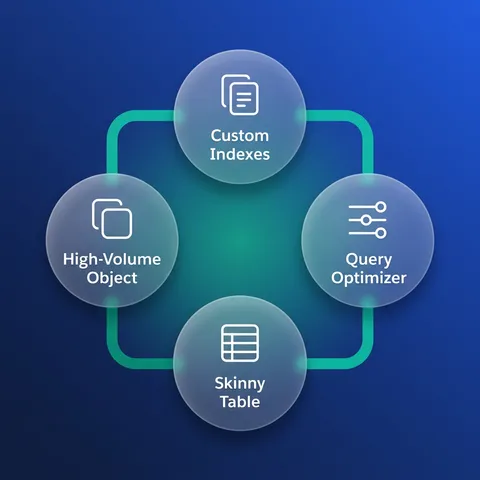
Three things change. Selectivity becomes the design constraint: the database will only use an index if the filter matches a small enough share of the object, so a query filtering on a status where 80% of rows share one value is not going to be helped by indexing it, and the fix is a different filter rather than a different index. Skew becomes a real cost — a parent with hundreds of thousands of children, or one user owning most of the rows, turns every sharing recalculation and many updates into lock contention, and that is a distribution problem you cannot tune away. And the operational envelope shrinks: full copy sandboxes get slow, data loads need to be sorted by parent, and any deployment that recalculates sharing needs a window. What I would try before asking for help is a custom index on the fields people actually filter on, external IDs where integrations look records up, and archiving to a Big Object for rows nobody queries interactively. Skinny tables come from Salesforce support and are worth asking for, and they are not a substitute for a query that was never selective.

Deep dive on this
Data model senior scenario

Someone renamed a field and two integrations stopped working. What happened and what do you change?

Testing That the label and the API name are two different things with two different audiences.

What they tell you

An administrator changed a custom field's label from Region to Territory and also updated its API name to match. Two overnight integrations began failing with INVALID_FIELD. A third integration kept working.

mid

The label is for users and the API name is a contract. Changing the label is safe; changing Region__c to Territory__c breaks anything that names the field, which is why two integrations failed and one did not — the working one is almost certainly reading fields dynamically rather than by name. The immediate fix is either reverting the API name or updating both integrations, and which one depends on whether their code can be deployed tonight. The lasting fix is that nothing made the dependency visible before the change.

senior

The immediate call is a rollback of the API name, because it is the one change I can make in the org in minutes without touching two external codebases, and it restores service tonight. Then the question is how an administrator could make that change without knowing two systems depended on it, because the answer is that nothing showed them — the label change was the goal, and updating the API name looked like tidiness. Where dependencies exist, they need to be discoverable: Salesforce's own dependency view covers metadata inside the org but not an external client's field list, so the only reliable route is a documented contract for the fields integrations read, and a review step for API name changes on those fields specifically. I would also change what the integrations do. Naming fields explicitly is correct and brittle; the fix is not dynamic discovery of everything, which trades a loud failure for a silent one, but agreeing a stable set of fields per integration and treating changes to those as a versioned change. And the label can read Territory today while the API name stays Region__c — that was the actual requirement, and it never needed the API name to move.

Ask before you answer
  • Was it the label that changed, the API name, or both?
  • Do the failing integrations name fields explicitly, and does the working one use a field set or a describe call?
Do not say this

Rename the API name back and tell the administrator not to change field names.

Reverting restores the integrations and leaves the org with a field whose label and API name disagree, which is its own source of confusion. It also frames this as a discipline problem when it is a contract problem: nothing told the administrator that two systems depended on that name.

Data model senior

When is it right to copy a field onto a child record instead of traversing to it?

Testing Where you have paid for the copy. Denormalising is easy to justify and expensive to keep honest.

mid

When the value has to be filtered, sorted or reported on at volume, because a cross-object formula cannot be indexed and a report that filters on one gets slow. Also when the value is a snapshot rather than a reference — a Price_At_Order__c, not today's price. Everything else should traverse, because a copy is a second place the truth lives and it will drift the first time somebody updates the parent through a path nobody covered.

senior

The question I ask is whether the copy is a cache or a fact. A cache of the parent's current value is a maintenance liability: every write path has to update it, including data loads, integrations and anything the platform does on its own, and the drift is silent because nothing compares them. A snapshot is different — the price at the time of the order is genuinely a property of the order, and copying it is the correct model rather than an optimisation. So I try to reclassify the request before implementing it, because if it is really a snapshot then the field needs a name saying so — Price_At_Order__c rather than Price__c — and nobody should be updating it later. When it genuinely has to be a cache, I want two things: a single write path if possible, and a scheduled comparison that reports drift rather than silently repairing it, since a repair job hides how often the write paths are being missed. And I would push back on denormalising for reporting alone if a report type or a summary object would do, because those do not need to be kept in step at all.