


Roll-up summary fields and cross-object formulas
Ever tried to build a roll-up summary formula field that points to a child record, only to realize that child record is pulling its value from a third object? It is a classic Salesforce "gotcha" that I have seen trip up even senior devs. You set everything up, the formula looks perfect, but then you change the grandparent record and... nothing. The roll-up doesn't budge.
It won't work automatically if your child formula uses a cross-object reference. Salesforce is very specific about what triggers a recalculation. If the child record itself doesn't undergo a DML update (a save operation), the parent has no idea that the value sitting in that child formula has changed.
Why your roll-up summary formula field stays stuck
The technical reason is that roll-up summary fields are event-driven. They only wake up and do work when a child record is created, updated, or deleted. Change a field on a "grandparent" or some other lookup record and the formula on the child updates visually in the UI, but the child record never gets saved.
With no save happening on the child, the parent never gets the memo to recalculate. I have seen teams waste hours refreshing pages and clearing caches while the data sits there unsynced, because the DML event never fired. It works in your head and fails in the database.
Reliable ways to use a roll-up summary formula field
If you need the roll-up to reflect changes from another object, you have to force Salesforce to see that change. The most common way I have done it is the "touch" method.
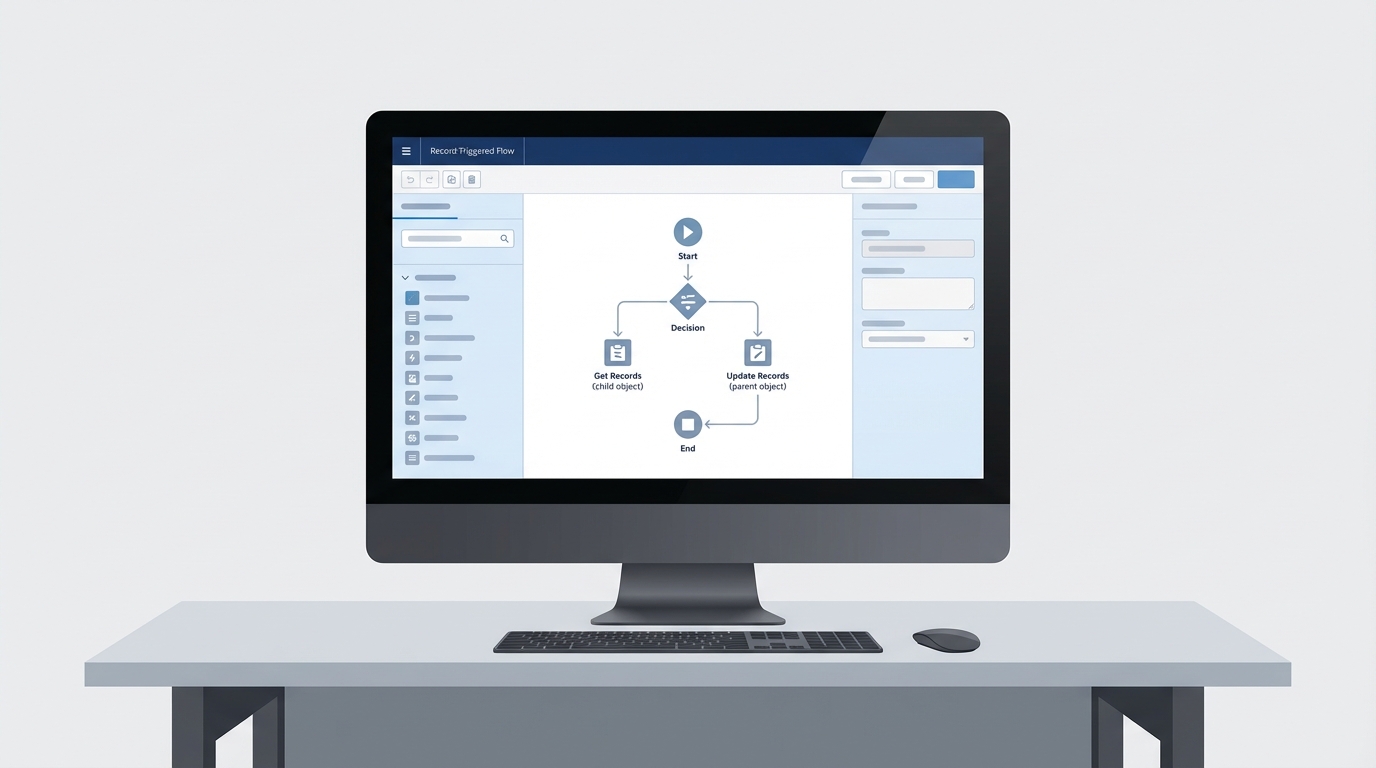
Build a record-triggered Flow on the object that the child formula references. When that record changes, the Flow finds the related child records and performs a "dummy update" on them, which can be as simple as flipping a hidden checkbox. That tiny update is enough to make the parent recalculate its roll-up.
Pro tip: When you are "touching" hundreds of child records via Flow, make sure you understand Salesforce Flow bulkification. If you don't, you'll hit governor limits faster than you can say "System.LimitException".
Choosing between Flow, Apex, or DLRS
Code or declarative? It usually comes down to the complexity of your data model. For a simple relationship, a Flow is fine. With massive data volume or complex logic, Apex vs Flow goes into which one handles the load better.
- DLRS (Declarative Lookup Rollup Summaries) is the community favorite. It handles lookup roll-ups, which native Salesforce doesn't, and runs on a schedule or in real time.
- Scheduled Flows: if you don't need the number accurate to the second, recalculate the totals every night. Much easier on your system resources.
- Apex triggers are the heavy hitter. Absolute control and the highest performance on large batches.
// Simple snippet to 'touch' child records
List<Child_Object__c> childrenToUpdate = [SELECT Id FROM Child_Object__c WHERE Parent_Lookup__c IN :ids];
for(Child_Object__c c : childrenToUpdate) {
    c.Force_Recalc_Check__c = !c.Force_Recalc_Check__c;
}
update childrenToUpdate;
Key takeaways for your roll-up summary formula field
- A roll-up summary formula field only works automatically if the formula stays on the child record itself.
- Cross-object formulas in a roll-up will not trigger updates when the distant record changes.
- Use a "touch" mechanism (Flow or Trigger) to force a child record save if you need real-time updates.
- Consider DLRS if you need to roll up values over a lookup relationship instead of a Master-Detail.
- Always test with bulk data to make sure you aren't hitting limits.
Final thoughts on implementation
Roll-up summary fields do a lot, and the cross-object formula is where they stop. Don't fight the platform logic. If the native roll-up isn't cutting it, move to a Flow or a scheduled job. Being honest about these limitations early in a project has saved me a lot of headache during UAT. Pick the simplest tool that gets the job done without breaking your governor limits.



Leave a Comment