


How to enable Agentforce in Salesforce
To turn on Agentforce in your Salesforce org, you need three things in place: Data Cloud provisioned, Einstein Generative AI enabled, and the user doing the enabling holding four specific permissions. Once those are met, the toggle lives at Setup → Einstein → Agentforce → Get Started. The whole activation takes 10 minutes. The planning that should come before it takes longer.
Most admins who run into trouble are missing one of the prerequisites silently: Data Cloud isn't provisioned in their edition, or Einstein hasn't been turned on for their region. The rest of this guide walks through what to check, the permission set assignment, and what changes day to day after you flip the switch.
If you have spent as much time as I have clicking through the endless menus in Salesforce, the new Agentforce Setup is worth a look. It is an AI assistant living right inside your Setup tree. Most of our day-to-day work isn't complex architecture, it is the repetitive stuff: checking permissions, resetting passwords. That is the part this takes off your plate.
How Agentforce Setup handles the heavy lifting
Agentforce Setup is a conversational tool for the grunt work we usually do by hand. Instead of clicking through five screens to find a user's permission set, you ask the agent. It understands natural language, so you don't need to remember the exact navigation path for every obscure setting. I have watched teams lose hours a week working out why one specific user can't see a button.
Right now it can manage users, freeze accounts, and list permissions. It can also build custom objects and fields without the usual 10-step wizard. If you are still working out Salesforce roles vs profiles, having something that explains and audits those access levels in real time is a big help.
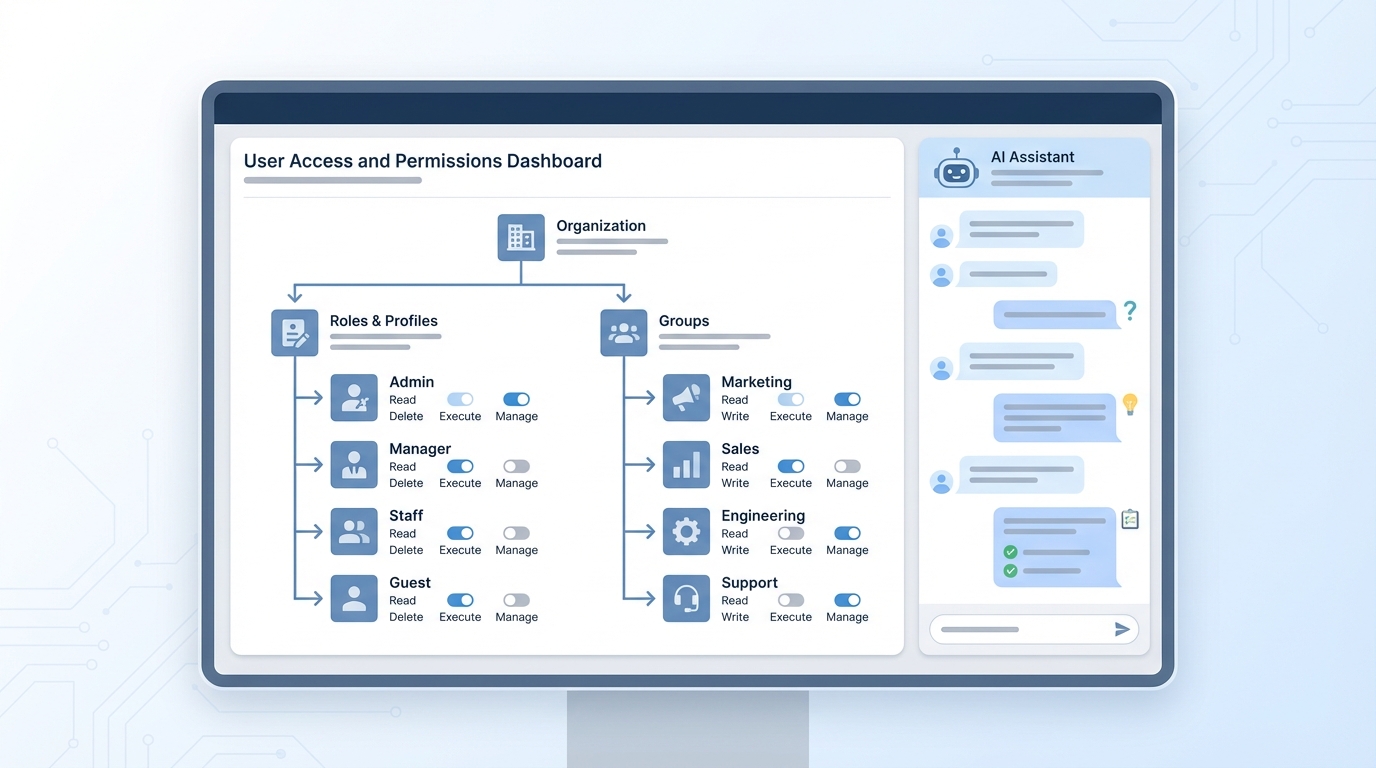
Permission hierarchies on one screen, with the AI assistant panel open beside them.
Key features for the daily grind
- Troubleshoot access issues at the record and field level instantly.
- Create and manage permission set groups using simple chat commands.
- Fix errors in your formulas or Flow logic without searching through forums.
- Generate custom objects and fields on the fly.
- Get direct recommendations for Help and Training content without leaving the page.
The value here is accuracy as much as speed. When you're tired and trying to fix a permission set at 4:00 PM on a Friday, it is easy to miss a checkbox. The agent doesn't get tired.
Security and the Agentforce Setup audit trail
Giving an AI control over your Setup sounds like a security nightmare, and that was my reaction too. It runs on the Einstein Trust Layer, which means the agent respects the permissions you already have. If you don't have the right to delete a field, the agent won't do it for you. It is no shortcut around your security model.
Every single change the agent makes is logged in the Setup Audit Trail. That is huge for compliance. You can see exactly what was changed and who asked the agent to do it, so if something goes sideways you have a clear paper trail to follow. In my experience, this level of visibility is what makes or breaks a new admin tool.
Practical tips for getting started
If you're lucky enough to be in the pilot, don't jump into production. Start in a sandbox. I always tell people to test these AI-driven changes in a safe environment first, and this guide on Salesforce sandbox types will help you pick the right one for it.
Don't blindly click "approve" on what the agent suggests, either. Treat it like a junior admin: great at doing the work, still not the one making the final call. Use it to build the shell of a Flow or a custom object, then review the details yourself to make sure it matches your business logic. That keeps your org clean and stops technical debt piling up.
Key takeaways
- Agentforce Setup reduces the number of clicks needed for routine tasks.
- It helps troubleshoot complex permission issues in seconds.
- All actions are governed by the Einstein Trust Layer and logged in the audit trail.
- Always validate AI-suggested changes in a sandbox before going live.
- A wider beta is expected to open up in December 2025.
So is this going to replace admins? Not a chance. But it will make us a lot faster. Instead of spending your morning resetting passwords and fixing basic formula syntax, you get that time back for the work that actually needs an architect. Keep an eye on the Winter release notes.
FAQ: enabling Agentforce in Salesforce
What are the prerequisites to enable Agentforce in Salesforce?
You need three things provisioned in your org: Data Cloud (any edition with at least one data space), Einstein Generative AI (turned on for your region), and Agentforce itself (an add-on SKU on Enterprise/Unlimited editions, included in some Industries clouds). Without all three, the Setup toggle won't appear or will throw an error when clicked.
Which permissions do I need to enable Agentforce?
The user activating Agentforce needs four permissions: Customize Application, Data Cloud User, Use Setup with Agentforce (or Use Agentforce), and Execute Prompt Template. Bundle them into a permission set group called something like "Agentforce Admin" so you don't have to assign them one-by-one for every admin.
How long does it take to enable Agentforce?
The activation toggle itself runs in under 5 minutes. The full process (verifying prerequisites, assigning permissions, choosing a default data space, and validating that prompt templates execute) takes 30 to 60 minutes for a clean org and 2 to 4 hours for orgs that haven't yet enabled Data Cloud.
Is Agentforce free in Salesforce?
No. Agentforce is a paid add-on with consumption-based pricing per "agent action." Salesforce ships limited free trial actions for orgs that already pay for Sales/Service Cloud Enterprise+ editions, but production usage requires a SKU. Industries clouds (Health, Financial Services, etc.) sometimes include a base allotment.
Can I enable Agentforce in a sandbox first?
Yes, and you should. Enabling in a Developer Pro or Partial Copy sandbox lets you validate prerequisites, test permission set rollout, and run a few prompt templates before flipping the switch in production. Note that some Agentforce features require Data Cloud to be active in the sandbox, which is a separate provisioning step.
What changes for admins after Agentforce is enabled?
Three things show up in the UI: a chat-style assistant on the Setup home page, an Agentforce Builder node under Setup → Einstein, and contextual "Ask Agentforce" buttons on permission sets, formula editors, and the Object Manager. None of your existing automations are altered. Agentforce sits alongside them.

Leave a Comment