
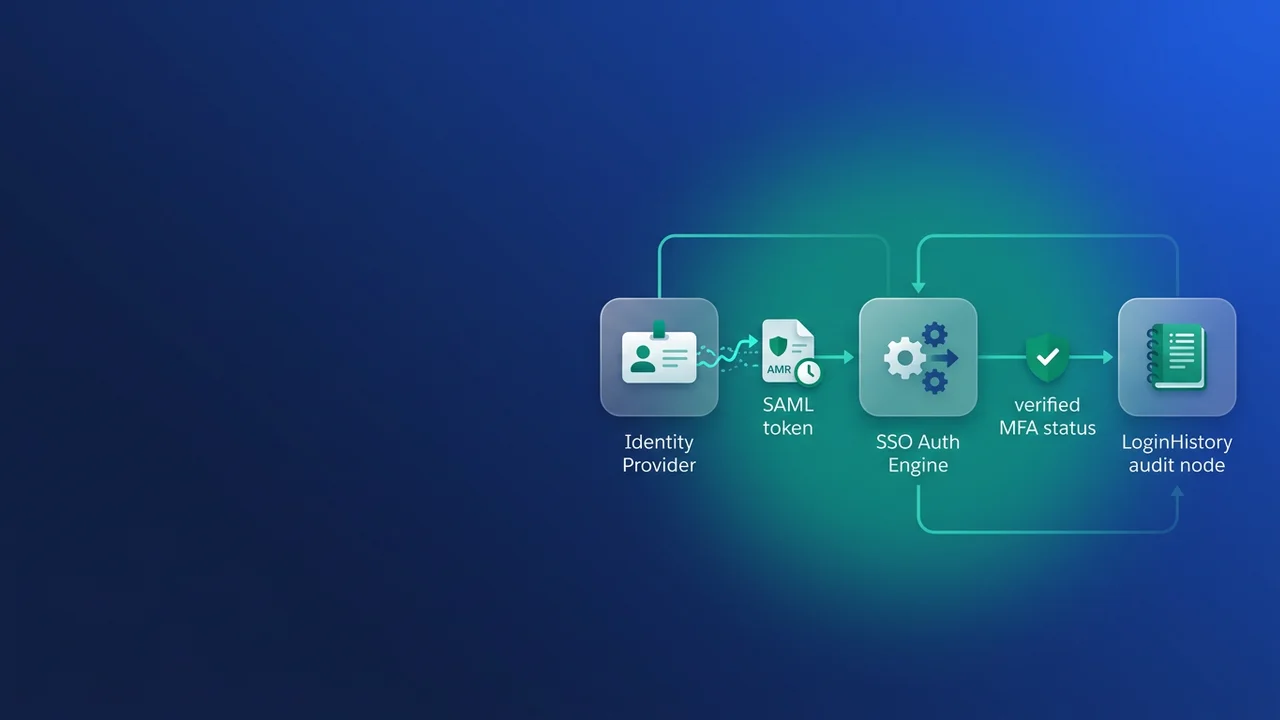

If your org was on a temporary MFA extension, enforcement arrives after the current end date, and Salesforce says it isn't processing requests for more. Many of those orgs log everyone in through Okta or Microsoft Entra ID and assume the IdP's MFA already counts. It counts only when the IdP tells Salesforce about it in a form Salesforce recognises. If it doesn't, every SSO user hits a Salesforce MFA enrollment prompt on the day enforcement lands.
Why your SSO logins currently count as no MFA
Salesforce assumes an SSO login carried no MFA. It only treats the login as MFA when the SAML assertion or OIDC token contains an AMR or ACR value from its recognised lists. If the signal is missing or unrecognised, the user sees a Salesforce screen asking them to register a Salesforce verifier, and the login stays on hold until they do. The Okta push or Entra prompt still happened at the IdP. Salesforce just never received any evidence of it.
Once enforcement is live, the "Require multi-factor authentication (MFA) for all direct UI logins" setting is switched on and greyed out, so on the morning logins break there is nothing to untick. Extension orgs get at least 30 days' notice of their date, and Support can't share dates early. That notice is the only calendar you get, and the dates vary from org to org.
The rule covers internal users with a standard user license, and Chatter Plus counts as internal. Chatter Free, Chatter External and external Experience Cloud users are outside it. For the rest of the rollout work (verifier distribution, exemptions, user comms), use the MFA enforcement checklist for admins. This article only covers the IdP signal.
How Salesforce reads the signal: SAML vs OIDC
The two protocols go through different parsers, and the failures I run into most often come down to an IdP formatting a value one way when Salesforce expects the other.
| SAML | OIDC | |
|---|---|---|
| Where AMR comes from | Any attribute whose name contains amr or authnmethodsreferences |
The amr claim |
| Multiple values | One string, semicolon-separated | JSON array |
| AMR matching | URN and URL values split on : or /, so urn:custom:auth:hwk resolves to hwk |
Exact value comparison, no partial matching |
| Where ACR comes from | AuthnContextClassRef |
acr claim |
| ACR matching | Lowercased string, contains() check | Lowercased string, contains() check |
On the SAML side, the attribute name, the separator and the value shape all matter:
<!-- Read: name contains amr, values separated by a semicolon, URN reduced to hwk -->
<saml:Attribute Name="amr" NameFormat="urn:oasis:names:tc:SAML:2.0:attrname-format:basic">
  <saml:AttributeValue>urn:acme:idp:method:hwk;mfa</saml:AttributeValue>
</saml:Attribute>

<!-- Not evaluated as a list: comma-separated -->
<saml:Attribute Name="amr">
  <saml:AttributeValue>hwk,mfa</saml:AttributeValue>
</saml:Attribute>

<!-- Never read: the name contains neither amr nor authnmethodsreferences -->
<saml:Attribute Name="authMethods">
  <saml:AttributeValue>hwk</saml:AttributeValue>
</saml:Attribute>
The comma case is the one that catches people. IdP expression languages that flatten a multi-valued attribute often default to commas, and in that case Salesforce doesn't read any of the values. If you see a comma in the captured assertion, assume the login counts as nothing.
OIDC is stricter in the opposite direction. Each array element has to equal a listed value exactly:
{
  "iss": "https://login.acme-idp.example",
  "sub": "u-48213",
  "aud": "salesforce-prod-rp",
  "amr": ["hwk", "mfa"],
  "acr": "urn:acme:loa:phr",
  "auth_time": 1794460800
}
If that array held urn:acme:method:hwk, it would fail, because Salesforce doesn't normalise URNs in the OIDC amr claim. The acr value above passes for a different reason: the contains() check finds phr inside the URN. The same rule lets mfa match inside urn:oasis:names:tc:SAML:2.0:ac:classes:mfa. It also explains why the common SAML default PasswordProtectedTransport earns no MFA credit, since none of the recognised tokens appear in that string.
Which values count, and what privileged users need
Salesforce sorts every value into a tier. A phishing-resistant value also passes the standard check.
| Tier | AMR values | ACR values | Satisfies |
|---|---|---|---|
| Phishing-resistant | cert, face, fido, fido2, fpt, hwk, iris, passkey, phr, pki, pop, pwlesspasskey, retina, sc, smartcard, smartcardpki, softwarepki, swk, tlsclient, x509 | fido, fido2, fpt, hwk, passkey, phr, pki, pwlesspasskey, retina, smartcard, smartcardpki, softwarepki, swk, tlsclient, x509 | All users, including privileged |
| Standard | mfa, mobiletwofactorcontract, okta_verify, pin, pgp, publickey, rsa, timesynctoken, user, vbm | mfa, mobiletwofactorcontract, okta_verify, pgp, publickey, rsa, timesynctoken, vbm | Non-privileged users |
| Weak | pwd, sms, tel, email | Nobody; login held until enrollment |
Two values were taken off the lists. wia (Windows integrated auth, Kerberos) was removed on July 16, 2026, because an integrated Windows login doesn't prove on its own that a second factor was used. multipleauthn, the Entra signal meaning several methods were used, was dropped because it doesn't say whether any of those methods were strong. If your Entra tenant's only signal is one of these two, those logins now count as no MFA.
Privileged users have to meet the higher tier. That means anyone on the System Administrator profile, or anyone granted Modify All Data, View All Data, Customize Application or Author Apex through a profile or permission set. Profile permissions show up as profile-owned permission sets, so one query finds them all:
SELECT Assignee.Username, PermissionSet.Name, PermissionSet.IsOwnedByProfile
FROM PermissionSetAssignment
WHERE Assignee.IsActive = true
AND (PermissionSet.PermissionsModifyAllData = true
  OR PermissionSet.PermissionsViewAllData = true
  OR PermissionSet.PermissionsCustomizeApplication = true
  OR PermissionSet.PermissionsAuthorApex = true)
ORDER BY Assignee.Username
The usual Okta trap is that an Okta Verify push sends okta_verify, which is standard tier. Regular users pass with it and admins don't. Mobile TOTP apps, Salesforce Authenticator included, also fall short for privileged users. Platform and hardware authenticators qualify: WebAuthn security keys, Windows Hello for Business, Touch ID or Face ID, Android passkeys, FIDO2 passkeys stored in a password manager, and x.509 certificates with mutual TLS.
I would enroll every privileged user in passkeys or security keys at the IdP, then set an authentication policy that requires them for the Salesforce app and emits hwk, fido or passkey. Letting Salesforce prompt for its own verifier also works as a fallback. The cost is a second MFA prompt for those users and factor management split between two systems, and when someone loses a device, the helpdesk has to work out which system to reset. I have seen a sandbox enforcement date stop a release rehearsal because the only admins who could run the deployment were stuck at a Salesforce enrollment screen, with no security key registered anywhere.
Which OAuth flows fall in scope
The policy covers UI logins by employees. An OAuth flow that sends a person through the browser login is in scope, whether the app is a Connected App or an External Client App. A flow that never shows a login page is out of scope.
| Flow | UI login | Subject to enforcement |
|---|---|---|
| Web Server | Yes | Yes |
| Hybrid Token | Yes | Yes |
| JWT Bearer | No | No |
| Client Credentials | No | No |
The CLI shows the difference well. A developer who authorises an org through the browser goes through your SSO, and that login needs the same AMR signal as any other. A CI pipeline using a certificate does not:
# Web Server flow: browser login through the IdP, in scope
sf org login web --instance-url https://acme.my.salesforce.com --alias uat

# JWT Bearer flow: no UI login, unaffected
sf org login jwt --client-id "$CI_CONSUMER_KEY" --jwt-key-file ci.key \
  --username [email protected] --instance-url https://acme.my.salesforce.com
Data Loader, IDE plugins and desktop tools that open a browser to authorise fall into the first row. Plan their users' signals the same way you plan web logins.
Prove it in LoginHistory before your date
LoginHistory has carried an Authentication Method Reference field (API name AuthenticationMethodReference) since Spring '21. Summer '26 added an Authentication Context Class Reference field. Its API name is not yet confirmed here, so check it in the Object Manager reference or a describe call before you put it in a query. The same data is in Event Monitoring through LoginEvent and LoginEventStream, which is easier to use if you need longer history.
Start with a 30-day distribution of what your SSO logins actually received:
SELECT AuthenticationMethodReference, COUNT(Id) logins
FROM LoginHistory
WHERE LoginTime = LAST_N_DAYS:30
AND AuthenticationServiceId != null
AND Status = 'Success'
GROUP BY AuthenticationMethodReference
A large blank bucket, or one full of pwd, wia or multipleauthn, is the population that will hit enrollment prompts. Next, flag privileged users whose recent SSO logins never carried a phishing-resistant value. This anonymous Apex splits the stored string on any non-alphanumeric character so URN-shaped values still match:
Set<String> strongAmr = new Set<String>{
    'cert', 'face', 'fido', 'fido2', 'fpt', 'hwk', 'iris', 'passkey', 'phr', 'pki',
    'pop', 'pwlesspasskey', 'retina', 'sc', 'smartcard', 'smartcardpki',
    'softwarepki', 'swk', 'tlsclient', 'x509'
};

Set<Id> privilegedIds = new Set<Id>();
for (PermissionSetAssignment psa : [
    SELECT AssigneeId FROM PermissionSetAssignment
    WHERE Assignee.IsActive = true
    AND (PermissionSet.PermissionsModifyAllData = true
      OR PermissionSet.PermissionsViewAllData = true
      OR PermissionSet.PermissionsCustomizeApplication = true
      OR PermissionSet.PermissionsAuthorApex = true)
]) {
    privilegedIds.add(psa.AssigneeId);
}

Map<Id, Boolean> sawStrongLogin = new Map<Id, Boolean>();
for (LoginHistory entry : [
    SELECT UserId, AuthenticationMethodReference
    FROM LoginHistory
    WHERE UserId IN :privilegedIds
    AND LoginTime = LAST_N_DAYS:30
    AND AuthenticationServiceId != null
    AND Status = 'Success'
    LIMIT 20000
]) {
    if (!sawStrongLogin.containsKey(entry.UserId)) {
        sawStrongLogin.put(entry.UserId, false);
    }
    String amr = entry.AuthenticationMethodReference;
    if (String.isBlank(amr)) {
        continue;
    }
    for (String token : amr.toLowerCase().split('[^a-z0-9]+')) {
        if (strongAmr.contains(token)) {
            sawStrongLogin.put(entry.UserId, true);
            break;
        }
    }
}

for (Id userId : sawStrongLogin.keySet()) {
    if (!sawStrongLogin.get(userId)) {
        System.debug(LoggingLevel.WARN, 'No phishing-resistant AMR in 30 days: ' + userId);
    }
}
After changing the IdP mapping, put a fresh assertion through the SAML Assertion Validator in Setup. It labels each AMR and ACR signal as phishing-resistant, standard or weak. Some users will end up relying on Salesforce's own verifiers. For them, the TwoFactorMethodsInfo object guide shows how to report on what each person has registered. Run this audit now. Thirty days is enough to fix an attribute mapping, but it is short for buying and shipping security keys to a distributed admin team.
What to watch for
- The Apex above only reports privileged users who had SSO logins in the window. Break-glass admins who log in directly with a password won't appear, and they need a phishing-resistant Salesforce verifier of their own.
- The ACR list doesn't include
cert,face,iris,poporsc. If your IdP reports one of those only through ACR, send it in AMR as well. - Keep the SAML attribute name literally
amr. A rename during an IdP migration can remove the signal without anyone noticing. - Make sure users who get privileged access through permission set groups show up in your PermissionSetAssignment results, and cross-check against the Setup user list.
- If your org rejects the aggregate query on
AuthenticationMethodReference, pull the raw rows and tally them in a spreadsheet or script. - A single successful login in the Apex output is enough to mark a user as passing. A user whose IdP policy steps down to push on some devices will still fail on those devices.


Leave a Comment