

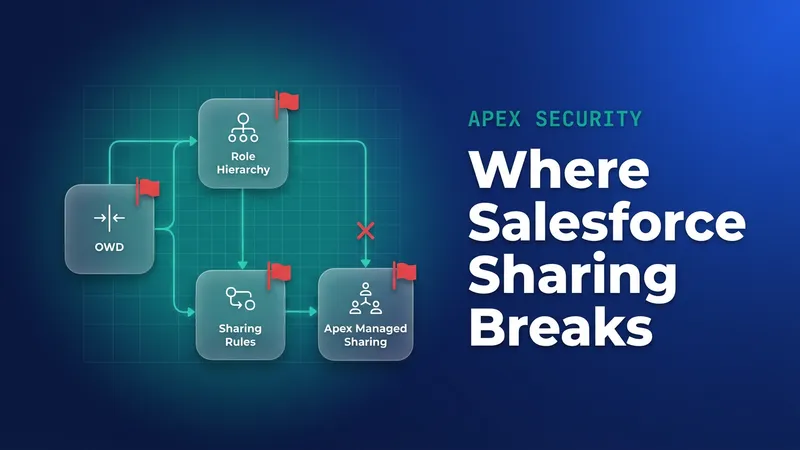
You have a Project__c record and a field that names a delivery region role, and everyone in that role and below it needs edit access. You build a Project__Share row, set UserOrGroupId to the UserRole Id, and the insert fails. The fix is a Group lookup. From Spring '27 there is a second problem to plan for: sharing recalculation after role and group changes made from Apex can run asynchronously, which breaks tests that check access straight after a role change.
Why the role Id fails, and which Group row to use
UserOrGroupId takes a User Id or a Group Id. A role is neither, but the platform keeps Group rows for every role, linked back through Group.RelatedId. The Type on that Group row decides how far down the hierarchy the access goes.
| Group Type | Who gets access | When I use it |
|---|---|---|
Role |
Users in that exact role | Access should stop at one level, such as regional leads only |
RoleAndSubordinates |
The role plus every subordinate role, including portal and external roles once digital experiences are enabled | Almost never in new code |
RoleAndSubordinatesInternal |
The role plus internal subordinate roles only | The default for sharing down a hierarchy |
Salesforce's guidance on the roleAndSubordinates change asks teams to review SOQL, Apex, flows, Lightning components, API integrations, Metadata API deployments and installed packages for RoleAndSubordinates references and move them to RoleAndSubordinatesInternal. Otherwise external site users can end up with access nobody intended once digital experiences are switched on. The secure roles behaviour was enforced in sandboxes in Summer '25 and in production in Winter '26, for orgs created after 8 February 2024 that don't have digital experiences enabled. In those orgs the default group appears as "Roles and Internal Subordinates".
Orgs differ in which Type rows they have, depending on age and whether digital experiences are on. Check yours before you hard-code anything:
SELECT Type, COUNT(Id) total
FROM Group
WHERE Type IN ('Role', 'RoleAndSubordinates', 'RoleAndSubordinatesInternal')
GROUP BY Type
Resolve once per transaction, then insert shares in bulk
A trigger handler that queries Group once per record will run out of SOQL queries on the first data load. Resolve every role name the batch needs in one pass and cache the result in a static map for the rest of the transaction. I use two plain queries (UserRole, then Group) rather than a semi-join on RelatedId, because the two-query version is easier to read and to debug.
public inherited sharing class RoleGroupResolver {
    public static final String DEFAULT_TYPE = 'RoleAndSubordinatesInternal';
    private static Map<String, Id> cache = new Map<String, Id>();

    public class RoleGroupException extends Exception {}

    public static Map<String, Id> resolve(Set<String> roleDevNames, String groupType) {
        Map<String, Id> result = new Map<String, Id>();
        Set<String> uncached = new Set<String>();

        for (String name : roleDevNames) {
            String key = name + '|' + groupType;
            if (cache.containsKey(key)) {
                result.put(name, cache.get(key));
            } else {
                uncached.add(name);
            }
        }

        if (!uncached.isEmpty()) {
            Map<Id, String> devNameByRoleId = new Map<Id, String>();
            for (UserRole r : [SELECT Id, DeveloperName FROM UserRole
                               WHERE DeveloperName IN :uncached]) {
                devNameByRoleId.put(r.Id, r.DeveloperName);
            }
            for (Group g : [SELECT Id, RelatedId FROM Group
                            WHERE Type = :groupType
                            AND RelatedId IN :devNameByRoleId.keySet()]) {
                String name = devNameByRoleId.get(g.RelatedId);
                cache.put(name + '|' + groupType, g.Id);
                result.put(name, g.Id);
            }
        }

        for (String name : roleDevNames) {
            if (!result.containsKey(name)) {
                throw new RoleGroupException(
                    'No ' + groupType + ' group found for role ' + name);
            }
        }
        return result;
    }
}
The resolver throws on purpose when a role or Group Type is missing. A renamed role or a Type your org doesn't have should stop the transaction, because skipping it quietly leaves records unshared. If a single bad picklist value shouldn't block a whole data load, catch the exception in the service and log the failure there.
Run the GROUP BY Type query above before you deploy. If your org has no RoleAndSubordinatesInternal rows, pass the Type your org does have instead of DEFAULT_TYPE, or store the Type in custom metadata.
The sharing service uses a custom Apex sharing reason, Delivery_Team__c, defined on Project__c:
public without sharing class ProjectRoleSharing {
    public static void shareToRegionRole(List<Project__c> projects) {
        Set<String> roleNames = new Set<String>();
        for (Project__c p : projects) {
            if (String.isNotBlank(p.Delivery_Region_Role__c)) {
                roleNames.add(p.Delivery_Region_Role__c);
            }
        }
        if (roleNames.isEmpty()) {
            return;
        }

        Map<String, Id> groupByRole =
            RoleGroupResolver.resolve(roleNames, RoleGroupResolver.DEFAULT_TYPE);

        List<Project__Share> shares = new List<Project__Share>();
        for (Project__c p : projects) {
            Id groupId = groupByRole.get(p.Delivery_Region_Role__c);
            if (groupId == null) {
                continue;
            }
            shares.add(new Project__Share(
                ParentId = p.Id,
                UserOrGroupId = groupId,
                AccessLevel = 'Edit',
                RowCause = Schema.Project__Share.RowCause.Delivery_Team__c
            ));
        }

        Database.SaveResult[] results = Database.insert(shares, false);
        for (Integer i = 0; i < results.size(); i++) {
            if (!results[i].isSuccess()) {
                for (Database.Error err : results[i].getErrors()) {
                    System.debug(LoggingLevel.ERROR, 'Share failed for '
                        + shares[i].ParentId + ': ' + err.getStatusCode()
                        + ' ' + err.getMessage());
                }
            }
        }
    }
}
With Database.insert(shares, false), one bad row doesn't roll back the other 199. The SaveResult array lines up with the input list by index, so shares[i] tells you which project failed. In production, send those failures to your logging framework.
When the region field changes, remove the old reason-specific shares before adding new ones:
delete [
    SELECT Id FROM Project__Share
    WHERE ParentId IN :changedProjectIds
    AND RowCause = :Schema.Project__Share.RowCause.Delivery_Team__c
];
Custom sharing reasons only exist on custom objects, and rows with a custom reason survive an owner change, while Manual rows are dropped. For more on RowCause behaviour, see the Apex managed sharing guide. If you are sharing Account instead, AccountShare also needs AccountAccessLevel, OpportunityAccessLevel and CaseAccessLevel.
When a sharing rule is the better tool
If the target role is fixed and the condition is a field value (for example, Region equals EMEA, shared with EMEA Delivery and internal subordinates), use a criteria-based sharing rule. An admin can maintain it without a deployment, and the platform recalculates it for you. Apex sharing to a role is worth the code when the record's own data picks the role, as Delivery_Region_Role__c does here, or when the logic needs things a rule can't express, such as related records or external data.
| Axis | Criteria or owner-based sharing rule | Apex sharing to a role |
|---|---|---|
| Who maintains it | Admin, in Setup | Developer, through a deployment |
| Choosing the role per record | One rule per role and criteria combination | One code path covers every role |
| Owner change | Rule re-evaluates | Custom reason rows survive, Manual rows do not |
| Role hierarchy changes | Platform recalculates, possibly async (already for UI and API changes, and for Apex- and flow-originated changes from Spring '27) | Your rows point at a Group Id, so membership changes flow through, but you handle role renames and deletions |
| Test effort | Little, unless tests assert rule shares | Unit tests for the resolver and share writes |
| Scale ceiling | Per-object sharing rule limits | SOQL and DML governor limits per transaction |
The trade-off is ownership. Once sharing lives in Apex, every role rename becomes a code concern, because the resolver looks roles up by DeveloperName.
Spring '27: recalculation after role and group changes goes async
The release update "Update Apex Code and Flows for Changed Sharing Recalculation Behavior" has been available since Spring '26 and is enforced in Spring '27. It applies to Professional, Enterprise, Performance, Unlimited and Developer editions. According to the release note, Apex classes, tests, triggers and flows that update group membership or roles and rely on synchronous recalculation can break.
Salesforce started making this recalculation asynchronous in Summer '25 and finished rolling it out to all orgs in April 2026, with one exception: changes that come from Apex and flows stay synchronous until this update is enforced. After a group is deleted, group membership changes or a role is updated, the related owner-based sharing rules and account owner share records can be recalculated in the background when that performs better. The membership or role change is applied right away, and the recalculation that follows it runs later.
The orgs most exposed are those with large data volumes and heavy ownership skew (one user owning hundreds of thousands of records of one object), along with code that changes roles or group membership and then expects the resulting shares to exist. The release note names two failures:
- A SOQL query or assertion that expects
RowCause = 'Rule'share rows immediately after a role change. System.runAs()that doesn't yet reflect the access a user should have from their new role.
As I read the documentation, the Project__Share rows you insert yourself are written immediately, and a Group Id already covers whoever holds that role. The async part is the platform's recalculation of owner-based rules and account owner shares. The risk sits in code that moves users between roles and then depends on what those rules grant.
Fixing tests and automation that expect instant access
On the Sharing Settings page of a sandbox, turn on "Test asynchronous sharing recalculation in Apex tests" and run all local tests. Every failure is code that relies on synchronous recalculation. Fix those tests, then turn the setting off again, because leaving it on produces false failures. Next, enable the release update itself in a sandbox and run a full regression before production enforcement.
For example, a test that moves a user into a peer role, then uses System.runAs to assert edit access to an account the peer owns through an owner-based sharing rule, can fail because that rule's shares may not be recalculated yet. If your deployment validation runs local tests, a failure like this can block an unrelated deployment.
Assert on what your code controls instead. For role sharing, that means the share row and its Group Id:
@IsTest
static void sharesProjectWithRegionGroup() {
    UserRole role;
    System.runAs(new User(Id = UserInfo.getUserId())) {
        role = new UserRole(Name = 'Test Delivery North', DeveloperName = 'Test_Delivery_North');
        insert role;
    }
    Id expectedGroupId = [
        SELECT Id FROM Group
        WHERE RelatedId = :role.Id AND Type = 'RoleAndSubordinatesInternal'
    ].Id;

    Project__c p = new Project__c(Name = 'Atlas', Delivery_Region_Role__c = 'Test_Delivery_North');
    Test.startTest();
    insert p;
    Test.stopTest();

    List<Project__Share> shares = [
        SELECT UserOrGroupId, AccessLevel FROM Project__Share
        WHERE ParentId = :p.Id
        AND RowCause = :Schema.Project__Share.RowCause.Delivery_Team__c
    ];
    Assert.areEqual(1, shares.size());
    Assert.areEqual(expectedGroupId, shares[0].UserOrGroupId);
    Assert.areEqual('Edit', shares[0].AccessLevel);
}
If the target Type doesn't exist in your org, the Group query in the test fails, which tells you the same thing the resolver would.
Production automation that changes a role and then needs the resulting access (for example, reassigning open work once a user has moved region) shouldn't run that step in the same transaction. Hand it to a Queueable that checks access first and re-enqueues with a delay if access isn't there yet:
public class RegionHandoffJob implements Queueable {
    private Id userId;
    private Id accountId;
    private Integer attempt;

    public RegionHandoffJob(Id userId, Id accountId, Integer attempt) {
        this.userId = userId;
        this.accountId = accountId;
        this.attempt = attempt;
    }

    public void execute(QueueableContext ctx) {
        UserRecordAccess ura = [
            SELECT RecordId, HasEditAccess FROM UserRecordAccess
            WHERE UserId = :userId AND RecordId = :accountId
        ];
        if (ura.HasEditAccess) {
            RegionHandoffService.reassignOpenWork(userId, accountId);
        } else if (attempt < 5) {
            System.enqueueJob(new RegionHandoffJob(userId, accountId, attempt + 1), 2);
        } else {
            System.debug(LoggingLevel.ERROR, 'Access not granted after retries for ' + userId);
        }
    }
}
I have not confirmed any supported way to wait for or force-complete the recalculation inside a test. The sources I checked describe none, so design tests around share rows and keep effective-access checks in the retry path.
What to watch for
- Role DeveloperName renames break the resolver. Store DeveloperNames in a restricted picklist or custom metadata, and review sharing whenever a role is renamed.
- Code that still asks for
RoleAndSubordinatesgrants external roles access once digital experiences are on. Search for it in Apex, flows and integrations. - A reorganisation that introduces replacement roles leaves existing shares pointing at the old roles' Group Ids. Rerun the sharing service after the hierarchy changes.
- After a role or group change, check Setup Audit Trail for recent sharing operations and the Background Jobs page for parallel recalculation progress before you report missing access as a bug.
- Salesforce has scheduled enforcement for Spring '27. Check the Release Updates page in Setup for your org's date, and run the test setting and the sandbox release update well before your last pre-release deployment window.


Leave a Comment